Contrarian Donchian Channel Touch Entry Strategy with Post Stop Loss Pause and Trailing Stop Loss
The Contrarian Donchian Channel Touch Entry Strategy is a quantitative trading strategy based on the Donchian Channel indicator. It incorporates stop loss pause and trailing stop loss for risk management. The…
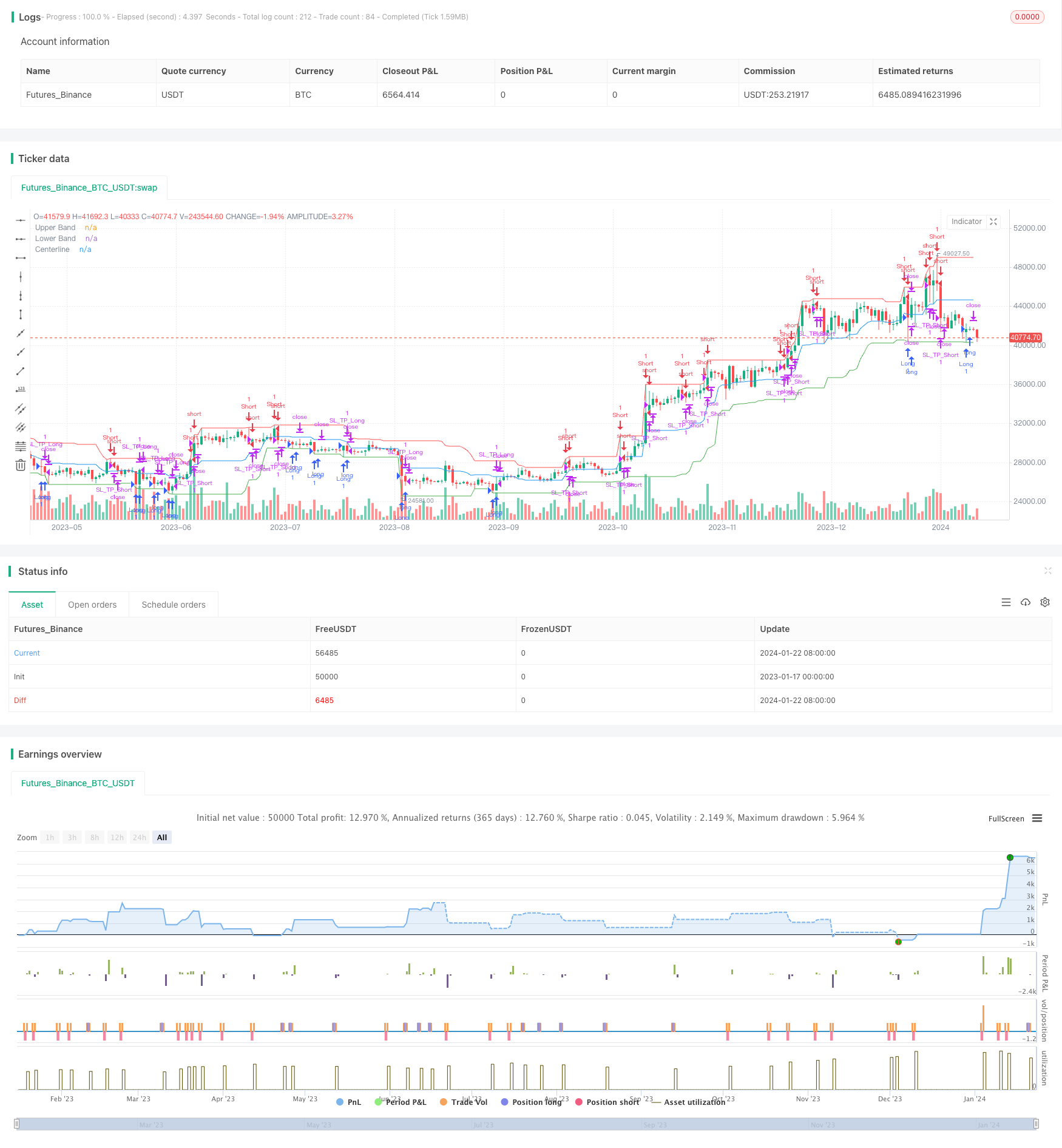
Overview
The Contrarian Donchian Channel Touch Entry Strategy is a quantitative trading strategy based on the Donchian Channel indicator. It incorporates stop loss pause and trailing stop loss for risk management.
The strategy enters long/short positions when price touches the upper/lower band of Donchian Channel. Stop loss and take profit levels are set for each trade. After a stop loss hit, there would be a pause for a number of bars before taking a new trade in the same direction. During a trade, trailing stop loss is used to lock in profits.
Strategy Logic
The strategy uses 20-period Donchian Channel, consisting of Upper Band, Lower Band and Middle Line.
Entry Logic
Go long when price touches the lower band; go short when price touches the upper band.
A pause (e.g. 3 bars) is required after previous stop loss in the same direction to avoid chasing trends.
Stop Loss and Take Profit
For each trade, set a fixed percentage stop loss (e.g. 22%) and a dynamic take profit calculated based on risk-reward ratio (e.g. 2)
Trailing Stop Loss
Use a trailing stop loss during trades:
For long trades, if price crosses above middle line, adjust stop loss to the mid-point of entry price and middle line.
Vice versa for short positions crossing below middle line.
Advantages
Catch trending moves using Donchian Channel breakouts.
Contrarian touch entry aligns with trading against the trend idea.
Effective risk management with stop loss pause and trailing stop.
Clear and easy-to-implement rules.
Risks
Whipsaws on sideways markets for a trend-following system.
Fixed stop loss could be prone to getting stopped out prematurely.
Overly aggressive trailing stop adjustment could knock out profitable trades too early.
Parameter optimization is crucial.
Enhancement Opportunities
Optimize Donchian Channel lookback period for best parameters.
Incorporate position sizing rules e.g. reset pause count periodically.
Add filters using other indicators to avoid false breakouts.
Experiment with dynamic stop loss.
Summary
The Contrarian Donchian Channel Touch Entry Strategy integrates trend identification, risk management and more. With further parameter tuning and combinations with other models, it can achieve better robustness and profitability for experienced traders.
Parameters
| Name | Default | What it controls |
|---|---|---|
| v_input_1 | 20 | Donchian Channel Length |
| v_input_2 | 2 | Risk/Reward Ratio |
| v_input_3 | 0.22 | Stop Loss (%) |
| v_input_4 | 3 | Pause After SL (Candles) |
Source Pine Script
/*backtest
start: 2023-01-17 00:00:00
end: 2024-01-23 00:00:00
period: 1d
basePeriod: 1h
exchanges: [{"eid":"Futures_Binance","currency":"BTC_USDT"}]
*/

//@version=4
strategy("Contrarian Donchian Channel Strategy - Touch Entry with Post-SL Pause and Trailing Stop", overlay=true, default_qty_value=0.01, default_qty_type=strategy.percent_of_equity)

// Inputs
length = input(20, minval=1, title="Donchian Channel Length")
riskRewardRatio = input(2, title="Risk/Reward Ratio")
stopLossPercent = input(0.22, title="Stop Loss (%)") / 100
pauseCandles = input(3, minval=1, title="Pause After SL (Candles)")

// Donchian Channel Calculation
upper = highest(high, length)
lower = lowest(low, length)
centerline = (upper + lower) / 2  // Calculating the Centerline

// Plotting Donchian Channel and Centerline
plot(upper, color=color.red, title="Upper Band")
plot(lower, color=color.green, title="Lower Band")
plot(centerline, color=color.blue, title="Centerline")

// Tracking Stop Loss Hits and Pause
var longSLHitBar = 0
var shortSLHitBar = 0
var int lastTradeDirection = 0 // 1 for long, -1 for short, 0 for none

// Update SL Hit Bars
if (strategy.position_size[1] > 0 and strategy.position_size == 0)
    if (close[1] < strategy.position_avg_price[1])
        longSLHitBar := bar_index
        lastTradeDirection := 1

if (strategy.position_size[1] < 0 and strategy.position_size == 0)
    if (close[1] > strategy.position_avg_price[1])
        shortSLHitBar := bar_index
        lastTradeDirection := -1

// Entry Conditions - Trigger on touch
longCondition = (low <= lower) and (bar_index - longSLHitBar > pauseCandles or lastTradeDirection != 1)
shortCondition = (high >= upper) and (bar_index - shortSLHitBar > pauseCandles or lastTradeDirection != -1)

// Trade Execution
if (longCondition)
    strategy.entry("Long", strategy.long)
if (shortCondition)
    strategy.entry("Short", strategy.short)

// Initial Stop Loss and Take Profit Calculation
stopLoss = strategy.position_avg_price * (1 - stopLossPercent)
takeProfit = strategy.position_avg_price * (1 + stopLossPercent * riskRewardRatio)

// Trailing Stop Loss Logic
var float trailingStopLong = na
var float trailingStopShort = na

// Update Trailing Stop for Long Position
if (strategy.position_size > 0)
    if (close > centerline)
        trailingStopLong := (strategy.position_avg_price + centerline) / 2
    stopLoss := na(trailingStopLong) ? stopLoss : max(trailingStopLong, stopLoss)

// Update Trailing Stop for Short Position
if (strategy.position_size < 0)
    if (close < centerline)
        trailingStopShort := (strategy.position_avg_price + centerline) / 2
    stopLoss := na(trailingStopShort) ? stopLoss : min(trailingStopShort, stopLoss)

// Setting Stop Loss and Take Profit for each trade
strategy.exit("SL_TP_Long", "Long", stop=stopLoss, limit=takeProfit)
strategy.exit("SL_TP_Short", "Short", stop=stopLoss, limit=takeProfit)
Published by ChaoZhang on the FMZ strategy square · last modified 2024-01-24. Collected in the Quant Trading Vault. Unvalidated research: re-test with your own data and costs before trusting it.
Build this with AgenKit
A spec is not a trading system. Paste this into your coding agent and AgenKit runs a specialist team — architecture, test-first build, risk gates, review — with paper trading on by default.
/agenkit build a production-grade trading bot with a backtest engine, risk controls and paper trading by default from strategies/Contrarian-Donchian-Channel-Touch-Entry-Strategy-with-Post-Stop-Loss-Pause-and-Trailing-Stop-Loss.md- npx agenkit install engineering-kit in your project
- Paste the command into your agent and approve each phase
- Get tests, backtest, risk controls and a paper-trading switch
Understand it first
Before you run this, read the lesson behind the idea and how to backtest it honestly. Specs like this one are the survivors of an unknown number of trials; deflate their results accordingly.
Related specs
- Breakout Strategy Based on Turtle TradingPine Script · Breakout · 1d
- Donchian Breakout Trading StrategyPine Script · Breakout · 1d
- Donchian Channel Breakout Strategy 426772Pine Script · Breakout · 2h
- Donchian Channel Breakout Strategy 427308Pine Script · Breakout · 3m
- Donchian Channel Breakout Strategy 440321Pine Script · Breakout · 4h
- Donchian Channel Breakout Strategy 442842Pine Script · Breakout · 4h