Strategy vault / Trend following
Dynamic Trend Tracking Optimized Strategy
This strategy calculates the CMO indicator and rate of change to dynamically plot support lines. Trading signals are generated when price breaks through the support lines. Meanwhile, the strategy also optimizes the…
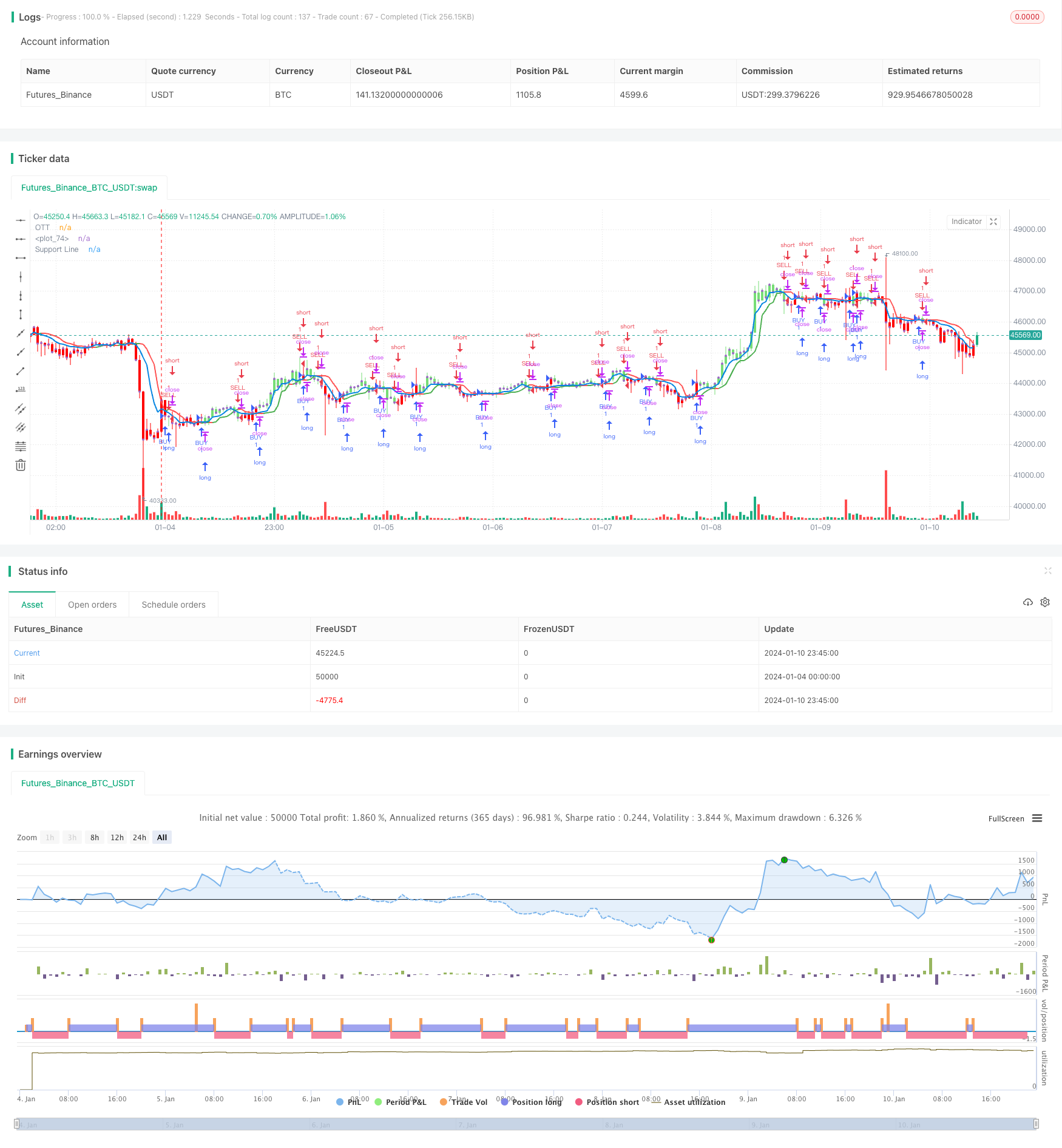
Overview
This strategy calculates the CMO indicator and rate of change to dynamically plot support lines. Trading signals are generated when price breaks through the support lines. Meanwhile, the strategy also optimizes the stop loss range around support lines to lock in more profits.
Strategy Logic
- Calculate the CMO indicator to determine price trend
- Calculate rate of change Var to reflect price change trend
- Plot support line based on rate of change
- Calculate optimized stop loss lines longStop and shortStop
- Generate trading signals when price breaks support line
Advantage Analysis
- Use CMO indicator to determine price trend and avoid false breakouts
- Support line clearly indicates trend direction
- Optimized stop loss locks in more profits
- Clear and simple trading signals, easy to follow
Risk Analysis
- CMO indicator has lagging effect, may miss price turning points
- Breaks of support line may generate false signals
- Improper stop loss optimization may lead to larger losses
Risk Solutions:
- Adjust CMO parameters properly to reduce lagging
- Add more filters with other indicators to avoid false signals
- Test to determine suitable stop loss optimization ratio
Optimization Directions
- Add more indicators to filter out false signals
- AI automated optimization of stop loss range
- Auto adjust trading size
Summary
Overall this strategy works well, using support line to clearly determine trend direction. Combined with CMO indicator and optimized stop loss it achieves good results. But there are some risks of false signals, which can be improved by combining more indicators.
Parameters
| Name | Default | What it controls |
|---|---|---|
| v_input_1_close | 0 | Source: close | high | low | open | hl2 | hlc3 | hlcc4 | ohlc4 |
| v_input_2 | true | OTT Period |
| v_input_3 | 0.1 | OTT Percent |
| v_input_4 | 0 | Condition: Support Line Crossing Signals | Price/OTT Crossing Signals |
| v_input_5 | true | Show Support Line? |
| v_input_6 | true | Show OTT Color Changes? |
| v_input_7 | true | Highlighter On/Off ? |
| v_input_8 | true | Barcolor On/Off ? |
| v_input_9 | false | Show OTT BUY/SELl Labels? |
| v_input_10 | true | From Month |
| v_input_11 | true | From Day |
| v_input_12 | 2020 | From Year |
| v_input_13 | true | To Month |
| v_input_14 | true | To Day |
| v_input_15 | 9999 | To Year |
Source Pine Script
/*backtest
start: 2024-01-04 00:00:00
end: 2024-01-11 00:00:00
period: 45m
basePeriod: 5m
exchanges: [{"eid":"Futures_Binance","currency":"BTC_USDT"}]
*/

// This source code is subject to the terms of the Mozilla Public License 2.0 at https://mozilla.org/MPL/2.0/
// © melihtuna

//@version=4
strategy("Optimized Trend Tracker - Strategy Version", shorttitle="OTT-Strategy", overlay=true, default_qty_type=strategy.percent_of_equity, default_qty_value=100, initial_capital=10000, currency=currency.USD, commission_value=0.1, commission_type=strategy.commission.percent)

src = input(close, title="Source")
pds=input(1, "OTT Period", minval=1)
percent=input(0.1, "OTT Percent", type=input.float, step=0.1, minval=0)
condition = input(title="Condition", defval="Support Line Crossing Signals", options=["Price/OTT Crossing Signals", "Support Line Crossing Signals"])
showsupport = input(title="Show Support Line?", type=input.bool, defval=true)
highlight = input(title="Show OTT Color Changes?", type=input.bool, defval=true)
highlighting = input(title="Highlighter On/Off ?", type=input.bool, defval=true)
barcoloing = input(title="Barcolor On/Off ?", type=input.bool, defval=true)
showlabels = input(title="Show OTT BUY/SELl Labels?", type=input.bool, defval=false)

// === INPUT BACKTEST RANGE ===
FromMonth = input(defval = 1, title = "From Month", minval = 1, maxval = 12)
FromDay   = input(defval = 1, title = "From Day", minval = 1, maxval = 31)
FromYear  = input(defval = 2020, title = "From Year", minval = 2017)
ToMonth   = input(defval = 1, title = "To Month", minval = 1, maxval = 12)
ToDay     = input(defval = 1, title = "To Day", minval = 1, maxval = 31)
ToYear    = input(defval = 9999, title = "To Year", minval = 2017)

// === FUNCTION EXAMPLE ===
start     = timestamp(FromYear, FromMonth, FromDay, 00, 00)  // backtest start window
finish    = timestamp(ToYear, ToMonth, ToDay, 23, 59)        // backtest finish window
window()  => time >= start and time <= finish ? true : false // create function "within window of time"

alpha=2/(pds+1)
ud1=src>src[1] ? src-src[1] : src
dd1=src<src[1] ? src[1]-src : src
UD=sum(ud1,9)
DD=sum(dd1,9)
CMO=(UD-DD)/(UD+DD)
k= abs(CMO)
Var=0.0
Var:=(alpha*k*src)+(1-alpha*k)*nz(Var[1])
fark=Var*percent*0.01
longStop = Var - fark
longStopPrev = nz(longStop[1], longStop)
longStop := Var > longStopPrev ? max(longStop, longStopPrev) : longStop
shortStop =  Var + fark
shortStopPrev = nz(shortStop[1], shortStop)
shortStop := Var < shortStopPrev ? min(shortStop, shortStopPrev) : shortStop
dir = 1
dir := nz(dir[1], dir)
dir := dir == -1 and Var > shortStopPrev ? 1 : dir == 1 and Var < longStopPrev ? -1 : dir
MT = dir==1 ? longStop: shortStop
OTT=Var>MT ? MT*(200+percent)/200 : MT*(200-percent)/200
plot(showsupport ? Var : na, color=#0585E1, linewidth=2, title="Support Line")
OTTC = highlight ? OTT[2] > OTT[3] ? color.green : color.red : #B800D9
pALL=plot(nz(OTT[2]), color=OTTC, linewidth=2, title="OTT", transp=0)

buySignalk = window() and crossover(Var, OTT[2])
sellSignallk = window() and crossunder(Var, OTT[2])
buySignalc = window() and crossover(src, OTT[2])
sellSignallc = window() and crossunder(src, OTT[2])

plotshape(condition == "Support Line Crossing Signals" ? showlabels and buySignalk ? OTT*0.995 : na : showlabels and buySignalc ? OTT*0.995 : na, title="BUY", text="BUY", location=location.belowbar, style=shape.labelup, size=size.tiny, color=#0F18BF, textcolor=color.white, transp=0)
plotshape(condition == "Support Line Crossing Signals" ? showlabels and sellSignallk ? OTT*1.005 : na : showlabels and sellSignallc ? OTT*1.005 : na, title="SELL", text="SELL", location=location.abovebar, style=shape.labeldown, size=size.tiny, color=#0F18BF, textcolor=color.white, transp=0)

ottBuyColor=#77DD77
ottSellColor=#FF0000
vColor = strategy.position_size > 0 ? ottBuyColor : ottSellColor

if condition == "Support Line Crossing Signals"
    strategy.entry("BUY", true, 1, when = buySignalk)
    strategy.entry("SELL", false, 1, when = sellSignallk)
else
    strategy.entry("BUY", true, 1, when = buySignalc)
    strategy.entry("SELL", false, 1, when = sellSignallc)

mPlot = plot(close, title="", style=plot.style_circles, linewidth=0,display=display.none)

longFillColor = highlighting ? (Var>OTT ? color.green : na) : na
shortFillColor = highlighting ? (Var<OTT ? color.red : na) : na
fill(mPlot, pALL, title="UpTrend Highligter", color=longFillColor)
fill(mPlot, pALL, title="DownTrend Highligter", color=shortFillColor)

barcolor(barcoloing ? vColor : na)
Published by ChaoZhang on the FMZ strategy square · last modified 2024-01-12. Collected in the Quant Trading Vault. Unvalidated research: re-test with your own data and costs before trusting it.
Build this with AgenKit
A spec is not a trading system. Paste this into your coding agent and AgenKit runs a specialist team — architecture, test-first build, risk gates, review — with paper trading on by default.
/agenkit build a production-grade trading bot with a backtest engine, risk controls and paper trading by default from strategies/Dynamic-Trend-Tracking-Optimized-Strategy.md- npx agenkit install engineering-kit in your project
- Paste the command into your agent and approve each phase
- Get tests, backtest, risk controls and a paper-trading switch
Understand it first
Before you run this, read the lesson behind the idea and how to backtest it honestly. Specs like this one are the survivors of an unknown number of trials; deflate their results accordingly.
Related specs
- 200 EMA VWAP MFI Trend Following StrategyPine Script · Trend following · 1d
- 4 EMA Trend StrategyPine Script · Trend following · 1d
- ADX MA and EMA Long Only Trend Tracking StrategyPine Script · Trend following · 1d
- ATR Dynamic Profit Target and Stop Loss StrategyPine Script · Trend following · 1d
- ATR Dynamic Trend Following and EMA Crossover Trading StrategyPine Script · Trend following · 1d
- ATR and Moving Average Crossover Hybrid StrategyPine Script · Trend following · 1h