Strategy vault / Trend following
EMA Ribbon Strategy
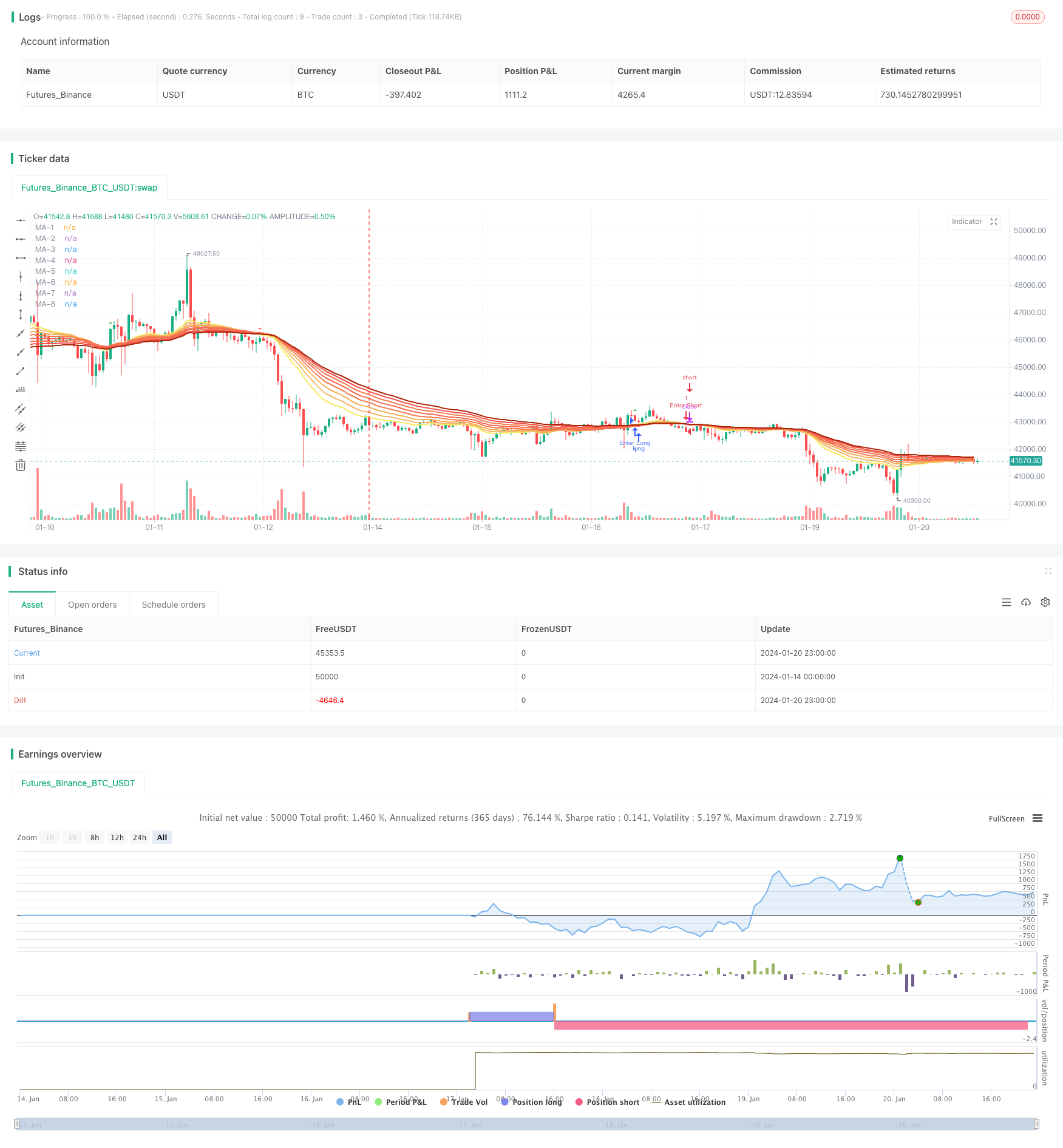
The EMA Ribbon strategy generates trading signals by calculating exponential moving averages (EMAs) of different periods and identifying crossovers between them. This strategy constructs a ribbon of 8 EMAs with…
Overview
The EMA Ribbon strategy generates trading signals by calculating exponential moving averages (EMAs) of different periods and identifying crossovers between them. This strategy constructs a ribbon of 8 EMAs with varying periods, and uses the crossover between the shortest-period EMA and the longest-period EMA to determine market trend and generate trade signals.
Strategy Logic
The core of this strategy consists of 8 EMAs: 20-period, 25-period, 30-period, 35-period, 40-period, 45-period, 50-period and 55-period. These 8 EMAs form a ribbon stacking from bottom to top. When a shorter-period EMA crosses above a longer-period EMA, a buy signal is generated. When a shorter-period EMA crosses below a longer-period EMA, a sell signal is generated.
For example, when the 20-period EMA crosses above the 55-period EMA, a buy signal is triggered; when the 20-period EMA crosses below the 55-period EMA, a sell signal is triggered. EMAs can indicate market trend very well. This strategy identifies the predominant trend using multiple EMA crossovers and generates trading signals accordingly.
Advantage Analysis
The EMA Ribbon strategy has the following advantages:
Using multiple EMAs of different periods can identify changes in market trend more accurately.
Constructing a ribbon with multiple EMAs makes trading signals clearer.
Incorporating both long-period and short-period EMAs considers both long-term trend and short-term corrections.
The strategy allows large parameter optimization space by adjusting EMA periods and other parameters.
The strategy logic is simple and easy to understand and implement.
Risk Analysis
The EMA Ribbon strategy also has some risks:
It may generate false signals when the overall market trend is unclear. Additional indicators can be used for signal confirmation.
High trading frequency increases transaction and slippage costs. EMA periods can be adjusted to reduce trading frequency.
Improper parameter settings may cause signals to be too sensitive or lagging. Parameters need to be repeatedly tested and optimized.
Sudden price gaps from events may invalidate signals. Stop loss strategies should be used to control risks.
Optimization Directions
The EMA Ribbon strategy can be optimized in the following aspects:
Adjust EMA period parameters to find optimal combinations.
Add other technical indicators for signal filtering and confirmation to improve accuracy.
Incorporate volatility indicators to reduce trade frequency in low volatility environments.
Set stop loss strategies to limit per trade loss.
Optimize money management strategies to improve profit factors.
Test parameter robustness across different products and contracts. Find the best markets.
Summary
The EMA Ribbon strategy has clear logic, identifying trend with EMA crossovers and generating trade signals. It has large optimization space for adjusting parameters, adding signal filters etc. Overall it is quite simple and practical, good for quant trading beginners. But controlling trade frequency and risks remains important.
Parameters
| Name | Default | What it controls |
|---|---|---|
| v_input_1 | 20 | MA-1 period |
| v_input_2 | 25 | MA-2 period |
| v_input_3 | 30 | MA-3 period |
| v_input_4 | 35 | MA-4 period |
| v_input_5 | 40 | MA-5 period |
| v_input_6 | 45 | MA-6 period |
| v_input_7 | 50 | MA-7 period |
| v_input_8 | 55 | MA-8 period |
| v_input_9_close | 0 | Source: close | high | low | open | hl2 | hlc3 | hlcc4 | ohlc4 |
Source Pine Script
/*backtest
start: 2024-01-14 00:00:00
end: 2024-01-21 00:00:00
period: 1h
basePeriod: 15m
exchanges: [{"eid":"Futures_Binance","currency":"BTC_USDT"}]
*/

//@version=4
strategy(title="EMA Ribbon [Krypt] with Buy/Sell Signals", shorttitle="EMA Ribbon", overlay=true)

dropn(src, n) =>
    na(src[n]) ? na : src

length1 = input(20, title="MA-1 period", minval=1)
length2 = input(25, title="MA-2 period", minval=1)
length3 = input(30, title="MA-3 period", minval=1)
length4 = input(35, title="MA-4 period", minval=1)
length5 = input(40, title="MA-5 period", minval=1)
length6 = input(45, title="MA-6 period", minval=1)
length7 = input(50, title="MA-7 period", minval=1)
length8 = input(55, title="MA-8 period", minval=1)
source_input = input(close, title="Source")

price = dropn(source_input, 1)

ema1 = ema(price, length1)
ema2 = ema(price, length2)
ema3 = ema(price, length3)
ema4 = ema(price, length4)
ema5 = ema(price, length5)
ema6 = ema(price, length6)
ema7 = ema(price, length7)
ema8 = ema(price, length8)

plot(ema1, title="MA-1", color=#f5eb5d, transp=0, linewidth=2)
plot(ema2, title="MA-2", color=#f5b771, transp=0, linewidth=2)
plot(ema3, title="MA-3", color=#f5b056, transp=0, linewidth=2)
plot(ema4, title="MA-4", color=#f57b4e, transp=0, linewidth=2)
plot(ema5, title="MA-5", color=#f56d58, transp=0, linewidth=2)
plot(ema6, title="MA-6", color=#f57d51, transp=0, linewidth=2)
plot(ema7, title="MA-7", color=#f55151, transp=0, linewidth=2)
plot(ema8, title="MA-8", color=#aa2707, transp=0, linewidth=2)

// Buy and sell signals based on crossover and crossunder
buySignal = crossover(ema1, ema8)
sellSignal = crossunder(ema1, ema8)

plotshape(series=buySignal, title="Buy Signal", color=color.green, style=shape.triangleup, size=size.small)
plotshape(series=sellSignal, title="Sell Signal", color=color.red, style=shape.triangledown, size=size.small)

if buySignal
    strategy.entry("Enter Long", strategy.long)
else if sellSignal
    strategy.entry("Enter Short", strategy.short)
Published by ChaoZhang on the FMZ strategy square · last modified 2024-01-22. Collected in the Quant Trading Vault. Unvalidated research: re-test with your own data and costs before trusting it.
Build this with AgenKit
A spec is not a trading system. Paste this into your coding agent and AgenKit runs a specialist team — architecture, test-first build, risk gates, review — with paper trading on by default.
/agenkit build a production-grade trading bot with a backtest engine, risk controls and paper trading by default from strategies/EMA-Ribbon-Strategy.md- npx agenkit install engineering-kit in your project
- Paste the command into your agent and approve each phase
- Get tests, backtest, risk controls and a paper-trading switch
Understand it first
Before you run this, read the lesson behind the idea and how to backtest it honestly. Specs like this one are the survivors of an unknown number of trials; deflate their results accordingly.
Related specs
- 200 EMA VWAP MFI Trend Following StrategyPine Script · Trend following · 1d
- 4 EMA Trend StrategyPine Script · Trend following · 1d
- ADX MA and EMA Long Only Trend Tracking StrategyPine Script · Trend following · 1d
- ATR Dynamic Trend Following and EMA Crossover Trading StrategyPine Script · Trend following · 1d
- ATR and Moving Average Crossover Hybrid StrategyPine Script · Trend following · 1h
- ATR and T3 Moving Average StrategyPine Script · Trend following · 5m