Strategy vault / Trend following
Gradual BB KC Trend Strategy
This strategy uses a combination of Bollinger Bands and Keltner Channel signals to identify market trends. Bollinger Bands are a technical analysis tool that defines channels based on price volatility ranges. The…
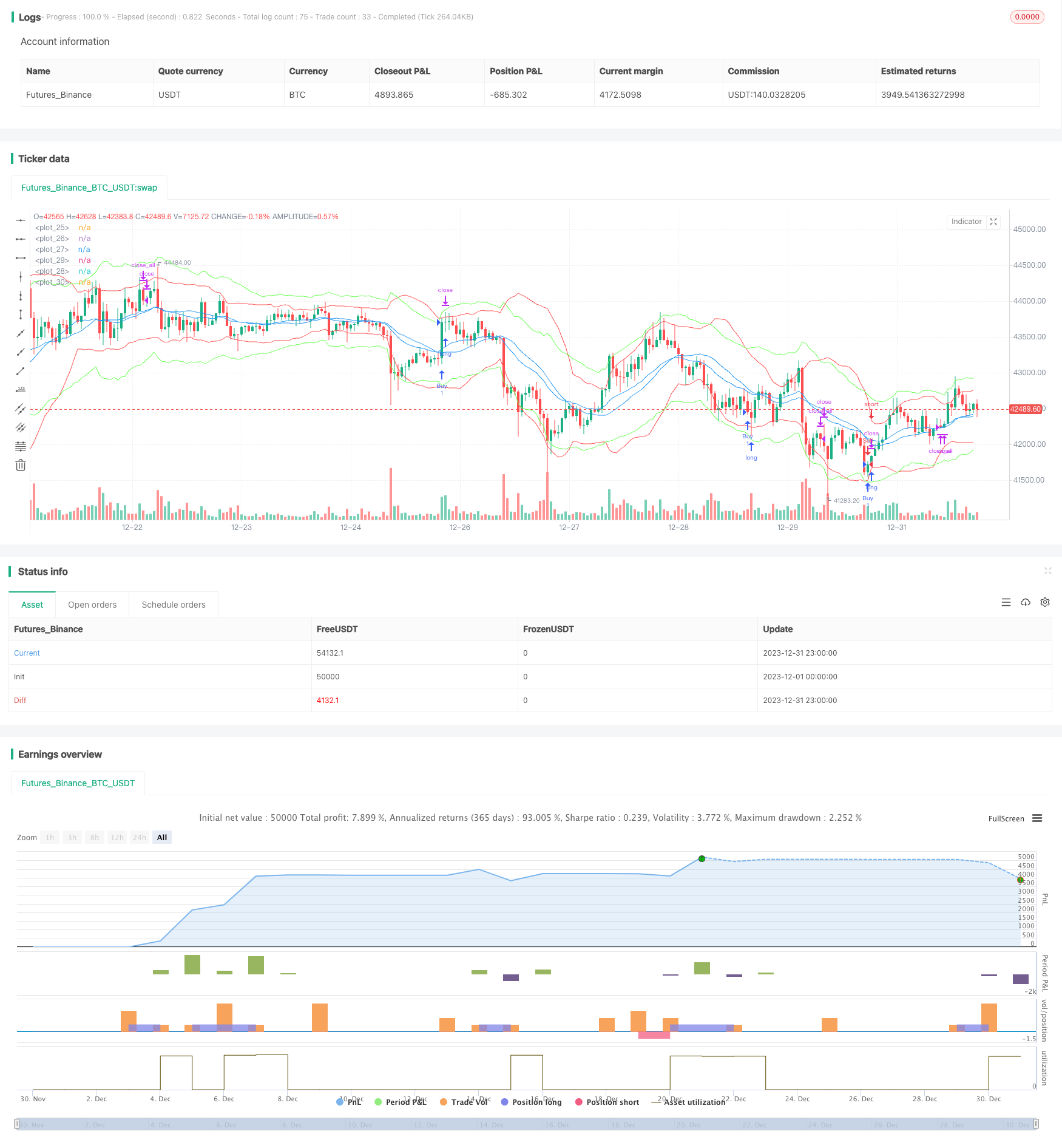
Overview
This strategy uses a combination of Bollinger Bands and Keltner Channel signals to identify market trends. Bollinger Bands are a technical analysis tool that defines channels based on price volatility ranges. The Keltner Channel signal combines price volatility and trending to determine support or resistance levels. This strategy utilizes the advantages of both indicators by judging if a golden cross occurs between the Bollinger Bands and Keltner Channels to find long and short opportunities. It also incorporates trading volume to verify the validity of signals, which can effectively identify the beginning of trends and maximize the filtering of invalid signals.
Strategy Principles
- Calculate the middle, upper, and lower Bollinger Bands over 20 periods. The band width is defined as 2 standard deviations.
- Calculate the middle, upper, and lower Keltner Channels over 20 periods. The channel width is defined as 2.2 times the true range.
- When the Keltner Channel upper line crosses above the Bollinger Band upper line and the volume is greater than its 10 period moving average, go long.
- When the Keltner Channel lower line crosses below the Bollinger Band lower line and the volume is greater than its 10 period moving average, go short.
- Close all positions if no exit signals trigger after 20 bars since entry.
- Set a 1.5% stop loss for long trades and -1.5% stop loss for short trades. Set a 2% trailing stop for long trades and -2% trailing stop for short trades.
This strategy mainly relies on the Bollinger Bands to judge volatility ranges and momentum. The Keltner Channel serves as a verification tool due to its similar characteristics but differing parameters. Using these two indicators together improves signal accuracy. Incorporating trading volume also helps filter out invalid signals.
Strength Analysis
- Utilizes the combined advantages of Bollinger Bands and Keltner Channels to improve signal accuracy.
- Filtering by trading volume reduces invalid signals from frequent line touches.
- Effective risk control from programmed stop loss and trailing stop mechanisms.
- Quick exits and loss limiting from forced profit taking after invalid signals.
Risk Analysis
- Both Bollinger Bands and Keltner Channels are based on moving averages and volatility. They can produce false signals in ranging markets.
- No compounding mechanism means multiple stop outs may lead to oversized losses.
- Reversal signals occur frequently. Parameter tweaks may cause trend opportunities to be missed.
Widening stop loss ranges or adding confirming indicators like MACD can reduce risks from false signals.
Optimization Directions
- Test parameter impacts on strategy return, like lengths, standard deviation multiples etc.
- Add other indicators for signal confirmation, e.g. KDJ, MACD.
- Use machine learning for automated parameter optimization.
Summary
This strategy combines Bollinger Bands and Keltner Channels to identify trends, verified by trading volume. Further enhancements like parameter optimization and adding indicators will strengthen it for more market regimes. It has strong feasibility as an easy to grasp and customizable trading strategy.
Parameters
| Name | Default | What it controls |
|---|---|---|
| v_input_int_1 | 20 | KC Length |
| v_input_float_1 | 2.2 | KC StdDev |
| v_input_int_2 | 20 | BB Length |
| v_input_float_2 | 2 | BB StdDev |
| v_input_int_3 | 10 | Volume MA Length |
| v_input_float_3 | 1.5 | Stop Loss (%) |
| v_input_float_4 | 2 | Trail Stop (%) |
| v_input_int_4 | 20 | Bars in trade before exit |
Source Pine Script
/*backtest
start: 2023-12-01 00:00:00
end: 2023-12-31 23:59:59
period: 1h
basePeriod: 15m
exchanges: [{"eid":"Futures_Binance","currency":"BTC_USDT"}]
*/

// This source code is subject to the terms of the Mozilla Public License 2.0 at https://mozilla.org/MPL/2.0/
// © jensenvilhelm

//@version=5
strategy("BB and KC Strategy", overlay=true)

// Define the input parameters for the strategy, these can be changed by the user to adjust the strategy
kcLength = input.int(20, "KC Length", minval=1) // Length for Keltner Channel calculation
kcStdDev = input.float(2.2, "KC StdDev") // Standard Deviation for Keltner Channel calculation
bbLength = input.int(20, "BB Length", minval=1) // Length for Bollinger Bands calculation
bbStdDev = input.float(2, "BB StdDev") // Standard Deviation for Bollinger Bands calculation
volumeLength = input.int(10, "Volume MA Length", minval=1) // Length for moving average of volume calculation
stopLossPercent = input.float(1.5, "Stop Loss (%)") // Percent of price for Stop loss
trailStopPercent = input.float(2, "Trail Stop (%)") // Percent of price for Trailing Stop
barsInTrade = input.int(20, "Bars in trade before exit", minval = 1) // Minimum number of bars in trade before considering exit

// Calculate Bollinger Bands and Keltner Channel
[bb_middle, bb_upper, bb_lower] = ta.bb(close, bbLength, bbStdDev) // Bollinger Bands calculation
[kc_middle, kc_upper, kc_lower] = ta.kc(close, kcLength, kcStdDev) // Keltner Channel calculation

// Calculate moving average of volume
vol_ma = ta.sma(volume, volumeLength) // Moving average of volume calculation

// Plotting Bollinger Bands and Keltner Channels on the chart
plot(bb_upper, color=color.red) // Bollinger Bands upper line
plot(bb_middle, color=color.blue) // Bollinger Bands middle line
plot(bb_lower, color=color.red) // Bollinger Bands lower line
plot(kc_upper, color=color.rgb(105, 255, 82)) // Keltner Channel upper line
plot(kc_middle, color=color.blue) // Keltner Channel middle line
plot(kc_lower, color=color.rgb(105, 255, 82)) // Keltner Channel lower line

// Define entry conditions: long position if upper KC line crosses above upper BB line and volume is above MA of volume
// and short position if lower KC line crosses below lower BB line and volume is above MA of volume
longCond = ta.crossover(kc_upper, bb_upper) and volume > vol_ma // Entry condition for long position
shortCond = ta.crossunder(kc_lower, bb_lower) and volume > vol_ma // Entry condition for short position

// Define variables to store entry price and bar counter at entry point
var float entry_price = na // variable to store entry price
var int bar_counter = na // variable to store bar counter at entry point

// Check entry conditions and if met, open long or short position
if (longCond)
    strategy.entry("Buy", strategy.long) // Open long position
    entry_price := close // Store entry price
    bar_counter := 1 // Start bar counter
if (shortCond)
    strategy.entry("Sell", strategy.short) // Open short position
    entry_price := close // Store entry price
    bar_counter := 1 // Start bar counter

// If in a position and bar counter is not na, increment bar counter
if (strategy.position_size != 0 and na(bar_counter) == false)
    bar_counter := bar_counter + 1 // Increment bar counter

// Define exit conditions: close position if been in trade for more than specified bars
// or if price drops by more than specified percent for long or rises by more than specified percent for short
if (bar_counter > barsInTrade) // Only consider exit after minimum bars in trade
    if (bar_counter >= barsInTrade)
        strategy.close_all() // Close all positions
    // Stop loss and trailing stop
    if (strategy.position_size > 0)
        strategy.exit("Sell", "Buy", stop=entry_price * (1 - stopLossPercent/100), trail_points=entry_price * trailStopPercent/100) // Set stop loss and trailing stop for long position
    else if (strategy.position_size < 0)
        strategy.exit("Buy", "Sell", stop=entry_price * (1 + stopLossPercent/100), trail_points=entry_price * trailStopPercent/100) // Set stop loss and trailing stop for short position
Published by ChaoZhang on the FMZ strategy square · last modified 2024-01-26. Collected in the Quant Trading Vault. Unvalidated research: re-test with your own data and costs before trusting it.
Build this with AgenKit
A spec is not a trading system. Paste this into your coding agent and AgenKit runs a specialist team — architecture, test-first build, risk gates, review — with paper trading on by default.
/agenkit build a production-grade trading bot with a backtest engine, risk controls and paper trading by default from strategies/Gradual-BB-KC-Trend-Strategy.md- npx agenkit install engineering-kit in your project
- Paste the command into your agent and approve each phase
- Get tests, backtest, risk controls and a paper-trading switch
Understand it first
Before you run this, read the lesson behind the idea and how to backtest it honestly. Specs like this one are the survivors of an unknown number of trials; deflate their results accordingly.
Related specs
- Dual Laser Trend seeking StrategyPine Script · Trend following · 1h
- Multi indicator Trend Following Strategy 433078Pine Script · Trend following
- Dual directional Trailing Stop Moving Average Trend StrategyPine Script · Trend following · 1m
- Solid Trend Following StrategyPine Script · Trend following · 1h
- Speculation Gulf Trend Follow Strategy Based on SARPine Script · Trend following · 1h
- SSL Hybrid Exit Arrow Quant StrategyPine Script · Trend following · 1m