Strategy vault / Trend following
Ichimoku Cloud Trend Following Strategy
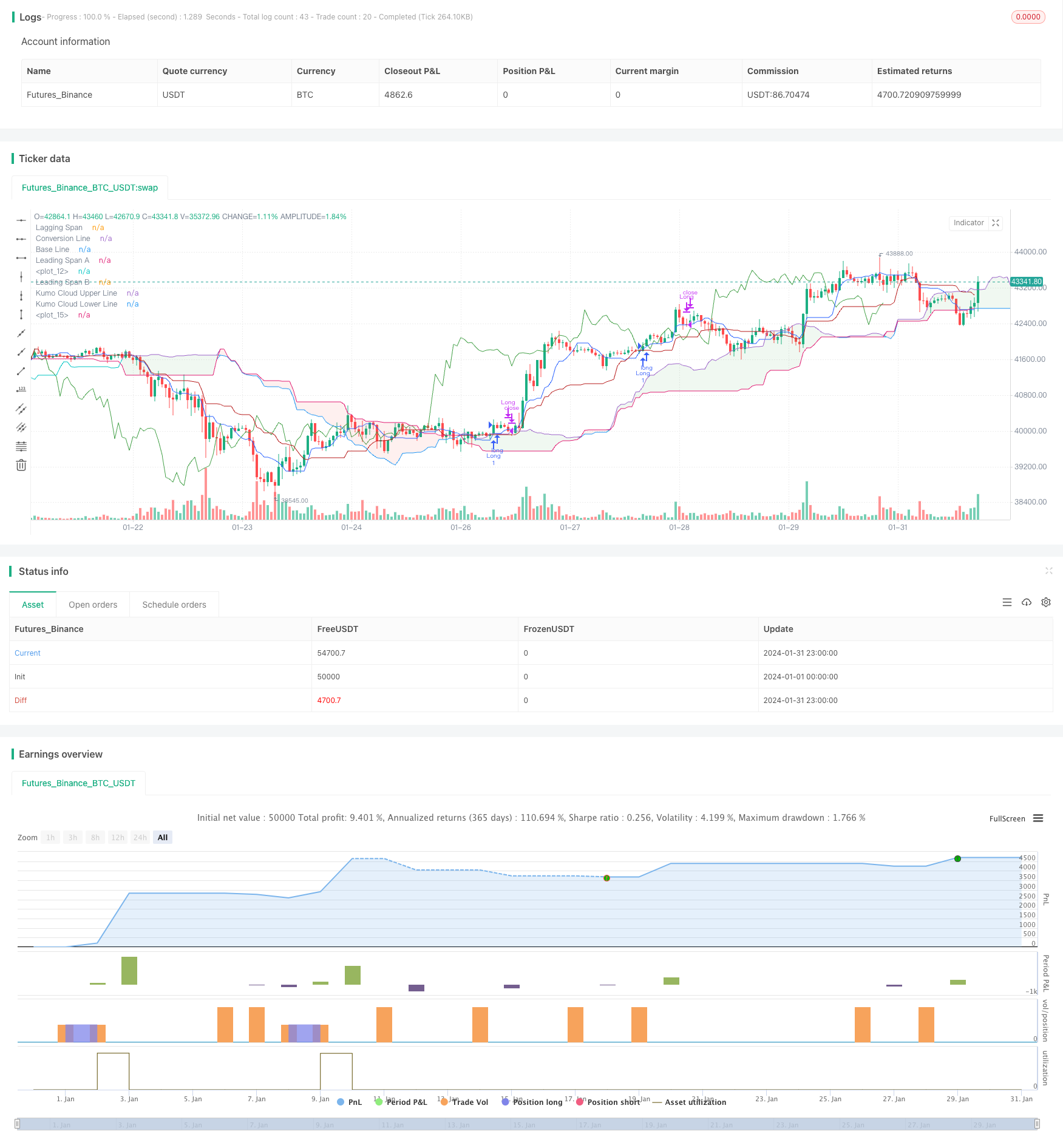
The Ichimoku Cloud trend following strategy is a technical analysis strategy. It uses the five indicator lines of the Ichimoku Cloud to determine market trend direction, support/resistance levels, and entry timing.
Overview
The Ichimoku Cloud trend following strategy is a technical analysis strategy. It uses the five indicator lines of the Ichimoku Cloud to determine market trend direction, support/resistance levels, and entry timing.
Principle
The core indicator lines include:
- Conversion Line: The 9-day average of highest high and lowest low, reflecting short-term trend.
- Base Line: The 26-day average of highest high and lowest low, reflecting medium to long term trend.
- Leading Span A: The average between the conversion and base lines, shifted forward 26 days, judging medium-term support and resistance.
- Leading Span B: The 52-day average of highest high and lowest low, shifted forward 26 days, judging long-term support and resistance.
- Lagging Span: The price shifted backward 26 days, reflecting trend momentum.
Buy signal triggered when conversion line crosses above base line. Sell signal triggered when crossing below base line. Lagging span above price and green cloud color indicates bull trend.
It judges trend direction based on the relationship between conversion and base line. For example, when conversion line breaks out base line upwards, it signals a bull trend. If lagging span is also above price, long entry triggered.
Set stop loss or take profit based on Leading Span A or Base Line. If Base Line is chosen for stop loss, close position when price breaks below Base Line.
Advantage Analysis
The advantages include:
- Utilize multiple indicators for higher accuracy.
- Leading Span anticipates support/resistance levels.
- Lagging Span verifies momentum to avoid false breakouts.
- Base Line as medium/long term indicator reduces noise.
Risks and Improvements
Main risk is false signals. Suggested optimizations:
- Adjust average periods to fine tune sensitivity.
- Add other filters like MACD, Bollinger Bands.
- Lower trading frequency to follow mid/long term trend.
Conclusion
Ichimoku Cloud combines indicators to judge market trend. It considers both short-term momentum and mid/long term trend. Conversion and Base Lines determine trading signals. Base Line sets stop loss to lock in profits and control risks. This strategy suits mid/long term trend following.
Parameters
| Name | Default | What it controls |
|---|---|---|
| v_input_int_1 | 9 | Conversion Line Length |
| v_input_int_2 | 26 | Base Line Length |
| v_input_int_3 | 52 | Leading Span B Length |
| v_input_int_4 | 26 | Lagging Span |
| v_input_string_1 | 0 | Choose Trail Line: ConversionLine | BaseLine |
Source Pine Script
/*backtest
start: 2024-01-01 00:00:00
end: 2024-01-31 23:59:59
period: 1h
basePeriod: 15m
exchanges: [{"eid":"Futures_Binance","currency":"BTC_USDT"}]
*/

//@version=5
strategy(title="Ichimoku Cloud - BitBell", shorttitle="Ichimoku Cloud - BitBell", overlay=true)
conversionPeriods = input.int(9, minval=1, title="Conversion Line Length")
basePeriods = input.int(26, minval=1, title="Base Line Length")
laggingSpan2Periods = input.int(52, minval=1, title="Leading Span B Length")
displacement = input.int(26, minval=1, title="Lagging Span")
donchian(len) => math.avg(ta.lowest(len), ta.highest(len))
conversionLine = donchian(conversionPeriods)
baseLine = donchian(basePeriods)
leadLine1 = math.avg(conversionLine, baseLine)
leadLine1bbbbb = math.avg(conversionLine, baseLine)[displacement - 1]
plot(leadLine1bbbbb)
leadLine2 = donchian(laggingSpan2Periods)
leadLine2bbbbbb = donchian(laggingSpan2Periods)[displacement - 1]
plot(leadLine2bbbbbb)

support = leadLine1bbbbb > leadLine2bbbbbb
Resistance = leadLine1bbbbb < leadLine2bbbbbb


TrailStop = input.string(title='Choose Trail Line', options=["ConversionLine", "BaseLine"], defval="ConversionLine")


var stopLong = 0.0
var stopShort = 0.0
var TagetLong = 0.0
var TargetShort = 0.0


if close > leadLine1bbbbb and close > leadLine2bbbbbb and conversionLine[1] <= baseLine[1] and conversionLine > baseLine and close > conversionLine and support
	strategy.entry("Long",strategy.long)
	stopLong := conversionLine
// if close < stopLong and strategy.position_size > 0
// 	strategy.close("Long")
// 	stopLong := 0.0
if (close < conversionLine and strategy.position_size > 0) and (TrailStop == 'ConversionLine')
	strategy.close("Long")
	stopLong := 0.0
if (close < baseLine and strategy.position_size > 0) and (TrailStop == 'BaseLine')
	strategy.close("Long")
	stopLong := 0.0

if close < leadLine1bbbbb and close < leadLine2bbbbbb and conversionLine[1] >= baseLine[1] and conversionLine < baseLine and close < conversionLine and Resistance
	strategy.entry("Short",strategy.short)
	stopShort := conversionLine
// if close > stopShort and strategy.position_size < 0
// 	strategy.close("Short")
// 	stopShort := 0.0
if (close > conversionLine and strategy.position_size < 0) and (TrailStop == 'ConversionLine')
	strategy.close("Short")
	stopShort := 0.0
if (close > baseLine and strategy.position_size < 0) and (TrailStop == 'BaseLine')
	strategy.close("Short")
	stopShort := 0.0
// if close >= 1.0006 * strategy.position_avg_price and strategy.position_size > 0
// 	strategy.close("Long")
// 	stopLong := 0.0
plot(conversionLine, color=#2962FF, title="Conversion Line")
plot(baseLine, color=#B71C1C, title="Base Line")
plot(close, offset = -displacement + 1, color=#43A047, title="Lagging Span")
p1 = plot(leadLine1, offset = displacement - 1, color=#A5D6A7,
	 title="Leading Span A")
p2 = plot(leadLine2, offset = displacement - 1, color=#EF9A9A,
	 title="Leading Span B")
plot(leadLine1 > leadLine2 ? leadLine1 : leadLine2, offset = displacement - 1, title = "Kumo Cloud Upper Line", display = display.none)
plot(leadLine1 < leadLine2 ? leadLine1 : leadLine2, offset = displacement - 1, title = "Kumo Cloud Lower Line", display = display.none)
fill(p1, p2, color = leadLine1 > leadLine2 ? color.rgb(67, 160, 71, 90) : color.rgb(244, 67, 54, 90))Published by ChaoZhang on the FMZ strategy square · last modified 2024-02-27. Collected in the Quant Trading Vault. Unvalidated research: re-test with your own data and costs before trusting it.
Build this with AgenKit
A spec is not a trading system. Paste this into your coding agent and AgenKit runs a specialist team — architecture, test-first build, risk gates, review — with paper trading on by default.
/agenkit build a production-grade trading bot with a backtest engine, risk controls and paper trading by default from strategies/Ichimoku-Cloud-Trend-Following-Strategy.md- npx agenkit install engineering-kit in your project
- Paste the command into your agent and approve each phase
- Get tests, backtest, risk controls and a paper-trading switch
Understand it first
Before you run this, read the lesson behind the idea and how to backtest it honestly. Specs like this one are the survivors of an unknown number of trials; deflate their results accordingly.
Related specs
- Cloud Based Bollinger Bands Double Moving Average Quantitative Trend StrategyPine Script · Trend following · 1d
- Multiple Timeframe Filtered Trend Following StrategyPine Script · Trend following · 1h
- Trend Following Strategy Based on Moving Average CrossoverPine Script · Trend following · 1d
- Multitimeframe Trend Hunter StrategyPine Script · Trend following · 1h
- Adaptive Bollinger Bands Trend Tracking StrategyPine Script · Trend following · 1h
- Incremental Order Size Fibonacci Retracement Trend Following StrategyPine Script · Trend following · 1d