Strategy vault / Tools & templates
Interaction Template
- Test Code - Interface function - Bind control response function $.BindingFunc(cmdControlName, function(cmd, param){...}) - Interaction detection function Replaces the platform API GetCommand() function…
Test Code
// Test Code
function main() {
    $.BindingFunc("test1", function(cmd, param){                     // Bind control name to test1 button,function(cmd, param){...} For the response function of this button, the first parameter of the response function is the name of the control that triggers the response function.:test1
        var ticker = exchange.GetTicker()                            // The second param Parameters are parameters that are attached when the control is clicked (numeric types, string types, Boolean types, and drop-down boxes all have attached parameters, but button types do not have attached parameters.)
        Log("Control:", cmd, "ticker:", ticker, " Parameters:", param)
    })
    $.BindingFunc("test3", function(cmd, param){                     // Binding test3 ...
        var account = exchange.GetAccount()
        Log("account:", account, "cmd:", cmd, "param:", param)
    })
    $.BindingFunc("test5", function(){                               // Binding test5 ...
        Log(exchange.GetName())
    })
    while(1){
        $.GetCommand()                                               // Detect interactive commands in the main loop.
        Sleep(2000)
    }
}
Interface function
Bind control response function $.BindingFunc(cmdControlName, function(cmd, param){...})
Interaction detection function Replaces the platform API GetCommand() function $.GetCommand()
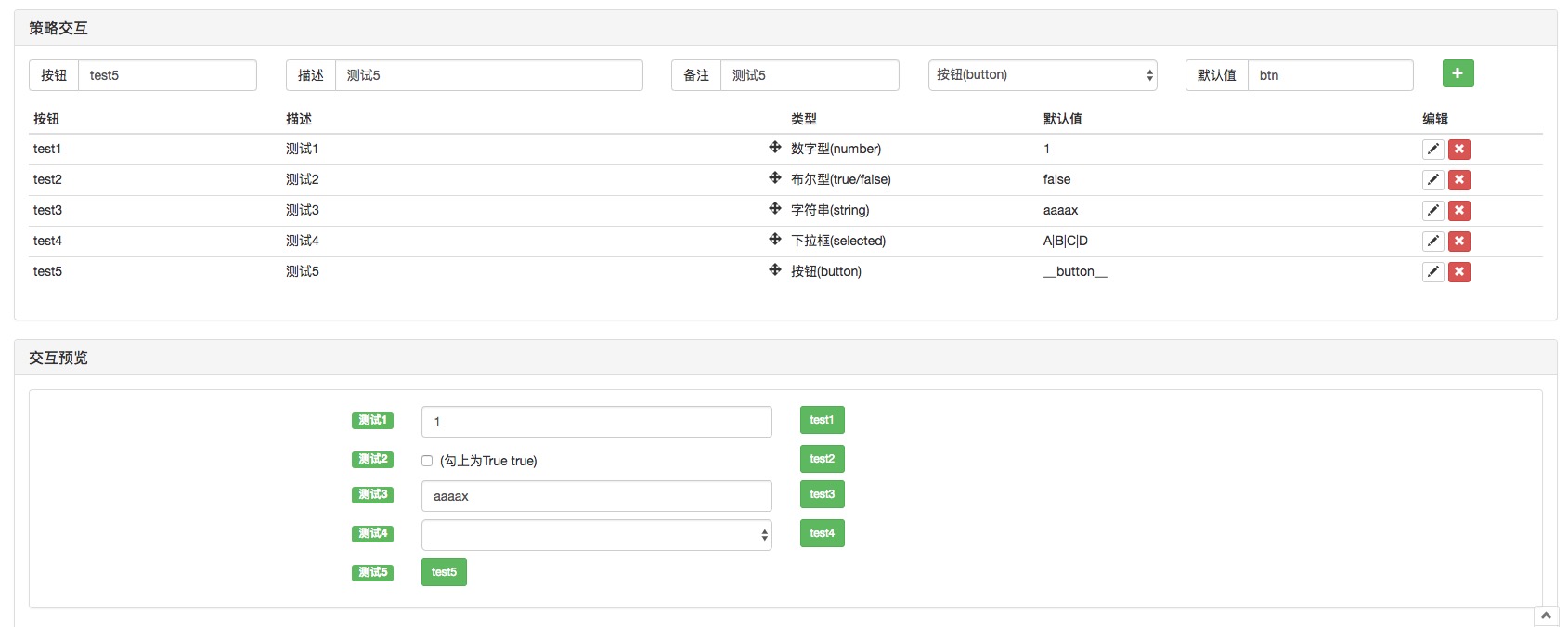
Test code configured control screenshot
If you have any questions, feel free to ask or leave a comment.
Source JavaScript
var _CmdMap = {}

$.BindingFunc = function(cmdName, cmdFunc) {
    _CmdMap[cmdName] = cmdFunc
}

$.GetCommand = function() {
    var cmd = GetCommand()
    if(cmd) {
        strArr = cmd.split(":")
        func = _CmdMap[strArr[0]]
        if(strArr.length == 1) {
            // Call the corresponding command response function
            if(func) {
                func(strArr[0])
            }
        } else if(strArr.length == 2) {
            // Call the corresponding command response function
            if(func) {
                func(strArr[0], strArr[1])
            }
        } else {
            var param = strArr[1]
            for(var i = 2; i < strArr.length; i++) {
                param += (":" + strArr[i])
            }

            // Call the corresponding command response function
            if(func) {
                func(strArr[0], param)
            }
        }
        if(!func) {
            Log(strArr[0], "This command has no registered response function.", "#FF0000")
        }
    }
}

// Test Code
function main() {
    $.BindingFunc("test1", function(cmd, param){                     // Bind control name to test1 button,function(cmd, param){...} For the response function of this button, the first parameter of the response function is the name of the control that triggers the response function.:test1
        var ticker = exchange.GetTicker()                            // The second param Parameters are parameters that are attached when the control is clicked (numeric types, string types, Boolean types, and drop-down boxes all have attached parameters, but button types do not have attached parameters.)
        Log("Control:", cmd, "ticker:", ticker, " Parameters:", param)
    })
    $.BindingFunc("test3", function(cmd, param){                     // Binding test3 ...
        var account = exchange.GetAccount()
        Log("account:", account, "cmd:", cmd, "param:", param)
    })
    $.BindingFunc("test5", function(){                               // Binding test5 ...
        Log(exchange.GetName())
    })
    while(1){
        $.GetCommand()                                               // Detect interactive commands in the main loop.
        Sleep(2000)
    }
}
Published by 发明者量化-小小梦 on the FMZ strategy square · last modified 2019-02-15. Collected in the Quant Trading Vault. Unvalidated research: re-test with your own data and costs before trusting it.
Build this with AgenKit
A spec is not a trading system. Paste this into your coding agent and AgenKit runs a specialist team — architecture, test-first build, risk gates, review — with paper trading on by default.
/agenkit build a tested, production-ready module from strategies/Interaction-Template.md- npx agenkit install engineering-kit in your project
- Paste the command into your agent and approve each phase
- Get tests, backtest, risk controls and a paper-trading switch
Understand it first
Before you run this, read the lesson behind the idea and how to backtest it honestly. Specs like this one are the survivors of an unknown number of trials; deflate their results accordingly.
Related specs
- Binance Account Cross Transfer Small ToolJavaScript · Tools & templates
- Get cryptocurrency current and max supplyJavaScript · Tools & templates
- KuCoin Fund Transfer PluginJavaScript · Tools & templates
- Moving Average Bot 30 linesJavaScript · Tools & templates · 1d
- OKEx V5 Candlestick Data Paginated Query ExampleJavaScript · Tools & templates
- Single Currency Dynamic Equilibrium V10 District LeaderJavaScript · Tools & templates · 1d