Inventor Quantitative Database Practice
Data is the source of quantitative trading. How to efficiently manage large amounts of data is a very critical link. Databases are one of the best solutions. Nowadays, the application of databases has become the…
I. Summary
Data is the source of quantitative trading. How to efficiently manage large amounts of data is a very critical link. Databases are one of the best solutions. Nowadays, the application of databases has become the quantitative standard configuration for various types of intraday trading, high-frequency trading and other strategies. In this article, we will study the built-in database of Inventor Quantification (FMZ.COM), including: how to create data tables, store data, modify data, delete data, quote data, and how to apply it to actual combat.
2. How to choose a database
Those familiar with the Inventor Quantification Platform should know that before this, if you wanted to save data locally for reuse, you could only use the _G() function. Each time the strategy stops, the _G() function automatically saves the necessary information. However, if you want to save more complex formatted data, the _G() function is obviously not very suitable, so many people thought of creating their own database to solve this problem.
When it comes to self-built databases, everyone can think of Oracle, MySQL, KDB, OneTick, NoSQL... These are all excellent enterprise-level applications, both in terms of functionality and performance. But it also faces several problems: it is difficult to get started, the configuration is cumbersome and maintenance is troublesome. For retail investors in quantitative trading, it feels like using a cannon to kill flies. Even if you get started, only a few functions are used.
3. Inventor Quant built-in database
Next, let us get to know the lightweight database built into Inventor Quantitative. DBExec is a relational data management system interface built into Inventor Quantitative. It is developed based on SQLite. It is written in C. It is not only small in size, low in resources, but also fast in processing speed. It is very suitable for financial quantitative analysis enthusiasts to implement local data management, because different "objects" (such as exchanges, data sources, prices) can be divided into different tables, and relationships are defined between tables. In addition, users do not need to install and configure separately. They can use it directly by calling the DBExec() function.!
In addition, the learning cost of SQLite language is very low, and most of the work performed on the database is completed by SQLite statements. Being familiar with basic syntax can meet most needs. The following is the basic syntax of SQLite.
4. Basic Grammar
SQLiteThe syntax is not case-sensitive, but some commands are case-sensitive, such as GLOB and glob, which have different meanings. SQLite statements can start with any keyword, such as SELECT, INSERT, UPDATE, DELETE, ALTER, DROP, etc., which respectively represent: extract data, insert data, update data, delete data, modify database, delete data table. All statements end with an English semicolon. The following is a simple database creation, addition, deletion, modification, search and other operations:
function main() {
    // Create: If"users"Create one if the table does not exist,"id"is an integer and increases automatically,"name"Is in text format and not empty
    Log(DBExec('CREATE TABLE IF NOT EXISTS "users" (id INTEGER PRIMARY KEY AUTOINCREMENT, name text not NULL);'));

    // Increase:
    Log(DBExec("INSERT INTO users(name) values('Zhang San')"));
    Log(DBExec("INSERT INTO users(name) values('Li Si')"));

    // Delete:
    Log(DBExec("DELETE FROM users WHERE id=1;"));

    // Modify
    Log(DBExec("UPDATE users SET name='Wang Wu' WHERE id=2"));

    // Query
    Log(DBExec('select 2, ?, ?, ?, ?', 'ok', true,9.8,null));
    Log(DBExec('select * from kvdb'));
    Log(DBExec('select * from cfg'));
    Log(DBExec('select * from log'));
    Log(DBExec('select * from profit'));
    Log(DBExec('select * from chart'));
    Log(DBExec("selEct * from users"));
}
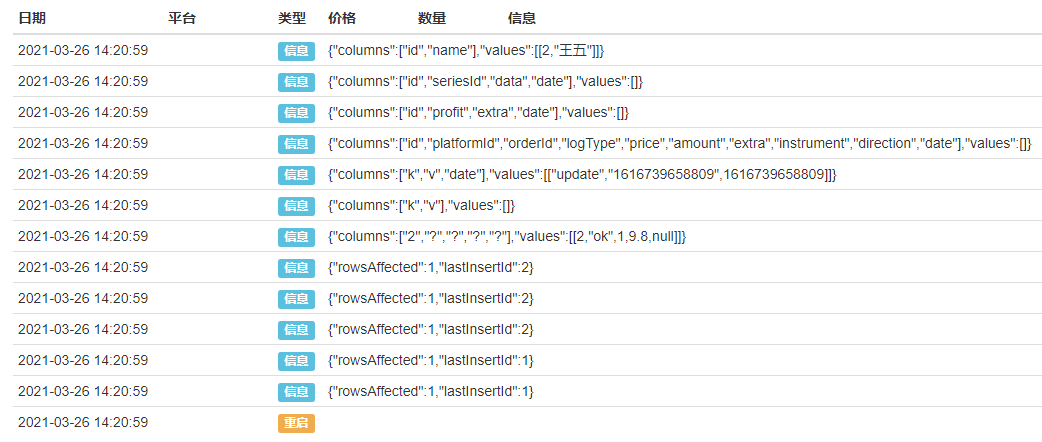
A database usually contains one or more tables, each table is identified by a name. It should be noted that the system reserved tables are: kvdb, cfg, log, profit, chart. In other words, when creating a table, you should avoid names reserved by the system. Let's run the above code and it will output the following:
5. Strategy examples
After understanding the basic syntax of SQLite, we strike while the iron is hot and use the inventor's built-in database to create an example of collecting and using Tick data.
Step 1: Update custodian First make sure you are using the latest version of the host. If you have downloaded and used the host before, you need to delete it first and re-download and deploy it on the https://www.fmz.cn/m/add-node page.
Step 2: Create a strategy
function main() {
    // Subscription Contract
    _C(exchange.SetContractType, 'swap');

    // Create data table
    DBExec('CREATE TABLE IF NOT EXISTS "tick" (id INTEGER PRIMARY KEY AUTOINCREMENT,'.concat(
        'High FLOAT not NULL,',
        'Low FLOAT not NULL,',
        'Sell FLOAT not NULL,',
        'Buy FLOAT not NULL,',
        'Last FLOAT not NULL,',
        'Volume INTEGER not NULL,',
        'Time INTEGER not NULL);'
    ));

    // Obtain10Individual/UnittickData
    while (true) {
        let tick = exchange.GetTicker();
        // At/IntickAdd data to the table
        DBExec(`INSERT INTO tick(High, Low, Sell, Buy, Last, Volume, Time) values(${tick.High}, ${tick.Low}, ${tick.Sell}, ${tick.Buy}, ${tick.Last}, ${tick.Volume}, ${tick.Time})`);
        // Query all data
        let allDate = DBExec('select * from tick');
        if (allDate.values.length > 10) {
            break;
        }
        Sleep(1000);
    }

    // Query all data
    Log(DBExec('select * from tick'));

    // Query the first data
    Log(DBExec('select * from tick limit 1'));

    // Query the first two data
    Log(DBExec('select * from tick limit 0,2'));

    // Delete the first data
    Log(DBExec('DELETE FROM tick WHERE id=1;'));

    // Modify the second data
    Log(DBExec('UPDATE tick SET High=10000 WHERE id=2'));

    // Query all data
    let allDate = DBExec('select * from tick')
    Log(allDate);
}
Step 3: Run the strategy
Taking Windows as an example, after running the policy, a folder named after the robot number will be generated in the "\logs\storage" directory of the host directory. When you open the folder, there is a file with ".db3" as the suffix. This file is the file used by the inventor to quantify the built-in database. As shown in the figure below:
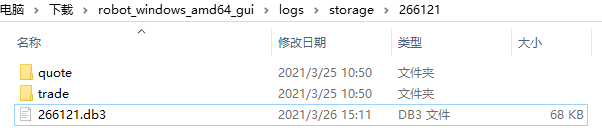 The above code first creates a data table named "tick", then adds the tick data field to the table, then obtains the tick data from the exchange in the loop, and inserts the data into the "tick" data table. At the same time, it judges that the amount of data in the data table exceeds 10 and breaks out of the loop. Finally, five SQLite commands are used to query, delete, and modify the data in the data table. And print it out in the log, as shown in the figure below:
 Step 4: Create status bar
Finally, we add some code to create a status bar for the strategy by obtaining data from the inventor's quantitative database to display the data more intuitively. The new code is as follows:
Step 4: Create status bar
Finally, we add some code to create a status bar for the strategy by obtaining data from the inventor's quantitative database to display the data more intuitively. The new code is as follows:
    // Create status bar
    let table = {
        type: 'table',
        title: 'Binance Tick Data',
        cols: allDate.columns,
        rows: allDate.values
    }
    LogStatus('`' + JSON.stringify(table) + '`');
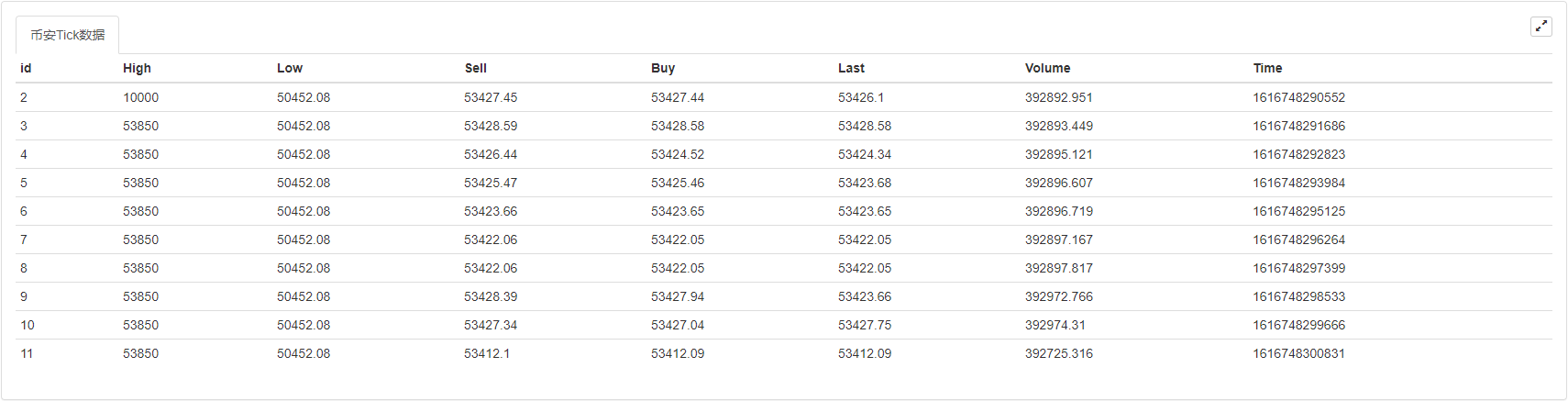
The above code creates a "Binance Tick Data" table from the data in the database. The "columns" field in the database represents the "rows" in the status bar, and the "values" field represents the "columns" in the status bar. As shown below:
6. Complete strategy code
/*backtest
start: 2020-07-19 00:00:00
end: 2020-08-17 23:59:00
period: 15m
basePeriod: 15m
exchanges: [{"eid":"Binance","currency":"LTC_USDT"}]
*/

function main() {
    Log(DBExec('DROP TABLE tick;'));
    // Subscription Contract
    _C(exchange.SetContractType, 'swap');

    // Create data table
    DBExec('CREATE TABLE IF NOT EXISTS "tick" (id INTEGER PRIMARY KEY AUTOINCREMENT,'.concat(
        'High FLOAT not NULL,',
        'Low FLOAT not NULL,',
        'Sell FLOAT not NULL,',
        'Buy FLOAT not NULL,',
        'Last FLOAT not NULL,',
        'Volume INTEGER not NULL,',
        'Time INTEGER not NULL);'
    ));

    // Obtain10Individual/UnittickData
    while (true) {
        let tick = exchange.GetTicker();
        // At/IntickAdd data to the table
        DBExec(`INSERT INTO tick(High, Low, Sell, Buy, Last, Volume, Time) values(${tick.High}, ${tick.Low}, ${tick.Sell}, ${tick.Buy}, ${tick.Last}, ${tick.Volume}, ${tick.Time})`);
        // Query all data
        let allDate = DBExec('select * from tick');
        if (allDate.values.length > 10) {
            break;
        }
        Sleep(1000);
    }

    // Query all data
    Log(DBExec('select * from tick'));

    // Query the first data
    Log(DBExec('select * from tick limit 1'));

    // Query the first two data
    Log(DBExec('select * from tick limit 0,2'));

    // Delete the first data
    Log(DBExec('DELETE FROM tick WHERE id=1;'));

    // Modify the second data
    Log(DBExec('UPDATE tick SET High=10000 WHERE id=2'));

    // Query all data
    let allDate = DBExec('select * from tick')
    Log(allDate);

    // Create status bar
    let table = {
        type: 'table',
        title: 'Binance Tick Data',
        cols: allDate.columns,
        rows: allDate.values
    }
    LogStatus('`' + JSON.stringify(table) + '`');
}
Click this link https://www.fmz.com/strategy/388963 to copy the complete strategy code.
7. Summary
The database can not only carry massive amounts of data, but also carry the quant dreams of many quantitative trading enthusiasts. The use of databases is by no means limited to the examples in this article. For more usage methods, please refer to the SQLite tutorial and the subsequent series of articles published by the inventor Quantification.
Source JavaScript
/*backtest
start: 2020-07-19 00:00:00
end: 2020-08-17 23:59:00
period: 15m
basePeriod: 15m
exchanges: [{"eid":"Binance","currency":"LTC_USDT"}]
*/

function main() {
    // Subscription Contract
    _C(exchange.SetContractType, 'swap');

    // Create data table
    DBExec('CREATE TABLE IF NOT EXISTS "tick" (id INTEGER PRIMARY KEY AUTOINCREMENT,'.concat(
        'High FLOAT not NULL,',
        'Low FLOAT not NULL,',
        'Sell FLOAT not NULL,',
        'Buy FLOAT not NULL,',
        'Last FLOAT not NULL,',
        'Volume INTEGER not NULL,',
        'Time INTEGER not NULL);'
    ));

    // Obtain10Individual/UnittickData
    while (true) {
        let tick = exchange.GetTicker();
        // At/IntickAdd data to the table
        DBExec(`INSERT INTO tick(High, Low, Sell, Buy, Last, Volume, Time) values(${tick.High}, ${tick.Low}, ${tick.Sell}, ${tick.Buy}, ${tick.Last}, ${tick.Volume}, ${tick.Time})`);
        // Query all data
        let allDate = DBExec('select * from tick');
        if (allDate.values.length > 10) {
            break;
        }
        Sleep(1000);
    }

    // Query all data
    Log(DBExec('select * from tick'));

    // Query the first data
    Log(DBExec('select * from tick limit 1'));

    // Query the first two data
    Log(DBExec('select * from tick limit 0,2'));

    // Delete the first data
    Log(DBExec('DELETE FROM tick WHERE id=1;'));

    // Modify the second data
    Log(DBExec('UPDATE tick SET High=10000 WHERE id=2'));

    // Query all data
    let allDate = DBExec('select * from tick')
    Log(allDate);

    // Create status bar
    let table = {
        type: 'table',
        title: 'Binance Tick Data',
        cols: allDate.columns,
        rows: allDate.values
    }
    LogStatus('`' + JSON.stringify(table) + '`');
}Published by 发明者量化-小小梦 on the FMZ strategy square · last modified 2022-11-04. Collected in the Quant Trading Vault. Unvalidated research: re-test with your own data and costs before trusting it.
Build this with AgenKit
A spec is not a trading system. Paste this into your coding agent and AgenKit runs a specialist team — architecture, test-first build, risk gates, review — with paper trading on by default.
/agenkit build a production-grade trading bot with a backtest engine, risk controls and paper trading by default from strategies/Inventor-Quantitative-Database-Practice.md- npx agenkit install engineering-kit in your project
- Paste the command into your agent and approve each phase
- Get tests, backtest, risk controls and a paper-trading switch
Understand it first
Before you run this, read the lesson behind the idea and how to backtest it honestly. Specs like this one are the survivors of an unknown number of trials; deflate their results accordingly.