Matrix Series
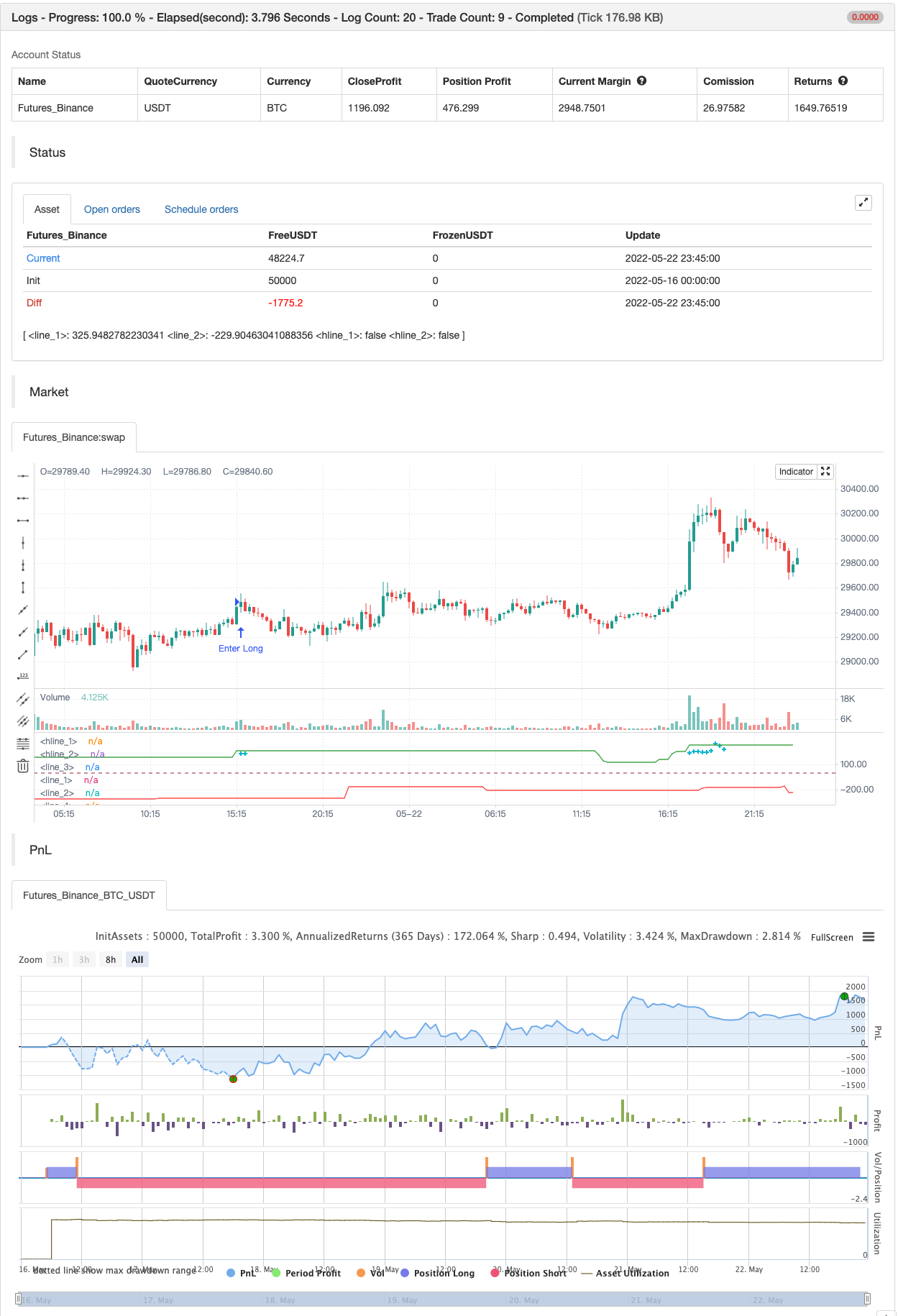
For those who are using charts with white backround they should change from the indicator options- style the black color to white. OB/OS zones are at 200 and -200 and marked with aqua color above below the candles…
For those who are using charts with white backround they should change from the indicator options->style the black color to white. OB/OS zones are at 200 and -200 and marked with aqua color above below the candles.
backtest
Parameters
| Name | Default | What it controls |
|---|---|---|
| v_input_1 | 5 | Smoother |
| v_input_2 | 50 | SupResPeriod |
| v_input_3 | 100 | SupResPercentage |
| v_input_4 | 16 | PricePeriod |
| v_input_5 | 200 | Overbought |
| v_input_6 | -200 | Oversold |
| v_input_7 | false | Show OB/OS |
| v_input_8 | true | Dynamic zones |
Source Pine Script
/*backtest
start: 2022-05-16 00:00:00
end: 2022-05-22 23:59:00
period: 15m
basePeriod: 5m
exchanges: [{"eid":"Futures_Binance","currency":"BTC_USDT"}]
*/

study("Matrix Series",shorttitle="MS",precision=1)
Smoother=input(5)
nn = Smoother
//--Sup/Res Detail
SupResPeriod = input(50)
SupResPercentage =input(100)
PricePeriod = input(16)
ob = input(200,title="Overbought")
os = input(-200,title="Oversold")
OBOS= input(type=bool,defval=false,title="Show OB/OS")
dynamic=input(true,title="Dynamic zones")
ys1 = ( high + low + close * 2 ) / 4
rk3 = ta.ema( ys1, nn )
rk4 = ta.stdev(ys1, nn)
rk5 = (ys1 - rk3 ) * 200 / rk4
rk6 = ta.ema( rk5, nn )
up = ta.ema(rk6, nn )
down = ta.ema( up, nn )
Oo = iff( up < down, up, down )
Hh = Oo
Ll = iff( up < down, down, up )
Cc = Ll
vcolor= Oo > Cc ? red : up > down? color.green:color.red

//plotcandle(Oo,Hh,Ll,Cc,color=vcolor)


//-------S/R Zones------
Lookback = SupResPeriod
PerCent = SupResPercentage
Pds = PricePeriod

C3 = ta.cci(close,Pds )

Osc = C3
Value1 = Osc
Value2 = ta.highest( Value1, Lookback )
Value3 = ta.lowest( Value1, Lookback )
Value4 = Value2 - Value3
Value5 = Value4 * ( PerCent / 100 )
ResistanceLine = Value3 + Value5
SupportLine = Value2 - Value5
plot(dynamic?ResistanceLine:na,color=color.green,transp=0)
plot(dynamic?SupportLine:na,color=color.red,transp=0)

//--Overbought/Oversold/Warning Detail
UPshape = up > ob and up>down ? ta.highest(up,1) + 20:up > ob and up<down? ta.highest(down,1) + 20:na
DOWNshape = down < os and up>down ? ta.lowest(down,1) - 20:down < os and up<down? ta.lowest(up,1) - 20 :na
plot(UPshape,style=plot.style_cross,color=color.aqua,linewidth=2,transp=0)
plot(DOWNshape,style=plot.style_cross,color=color.aqua,linewidth=2,transp=0)
x1=OBOS?ob:false
x2=OBOS?os:false
hline(x1)
hline(x2)
//http://www.wisestocktrader.com/indicators/2739-flower-indicator


if UPshape
    strategy.entry("Enter Long", strategy.long)
else if DOWNshape
strategy.entry("Enter Short", strategy.short)Published by ChaoZhang on the FMZ strategy square · last modified 2022-05-24. Collected in the Quant Trading Vault. Unvalidated research: re-test with your own data and costs before trusting it.
Build this with AgenKit
A spec is not a trading system. Paste this into your coding agent and AgenKit runs a specialist team — architecture, test-first build, risk gates, review — with paper trading on by default.
/agenkit build a production-grade trading bot with a backtest engine, risk controls and paper trading by default from strategies/Matrix-Series.md- npx agenkit install engineering-kit in your project
- Paste the command into your agent and approve each phase
- Get tests, backtest, risk controls and a paper-trading switch
Understand it first
Before you run this, read the lesson behind the idea and how to backtest it honestly. Specs like this one are the survivors of an unknown number of trials; deflate their results accordingly.