SuperJump Turn Back Bollinger Band
This is a simple indicator using bolinger band return. After the candle's bolinger band broke out, Turn back inside BB is the entry point. Usually there are more than two triangles, so you can wait after ordering a…
This is a simple indicator using bolinger band return.
After the candle's bolinger band broke out, Turn back inside BB is the entry point.
Usually there are more than two triangles, so you can wait after ordering a better price.
backtest
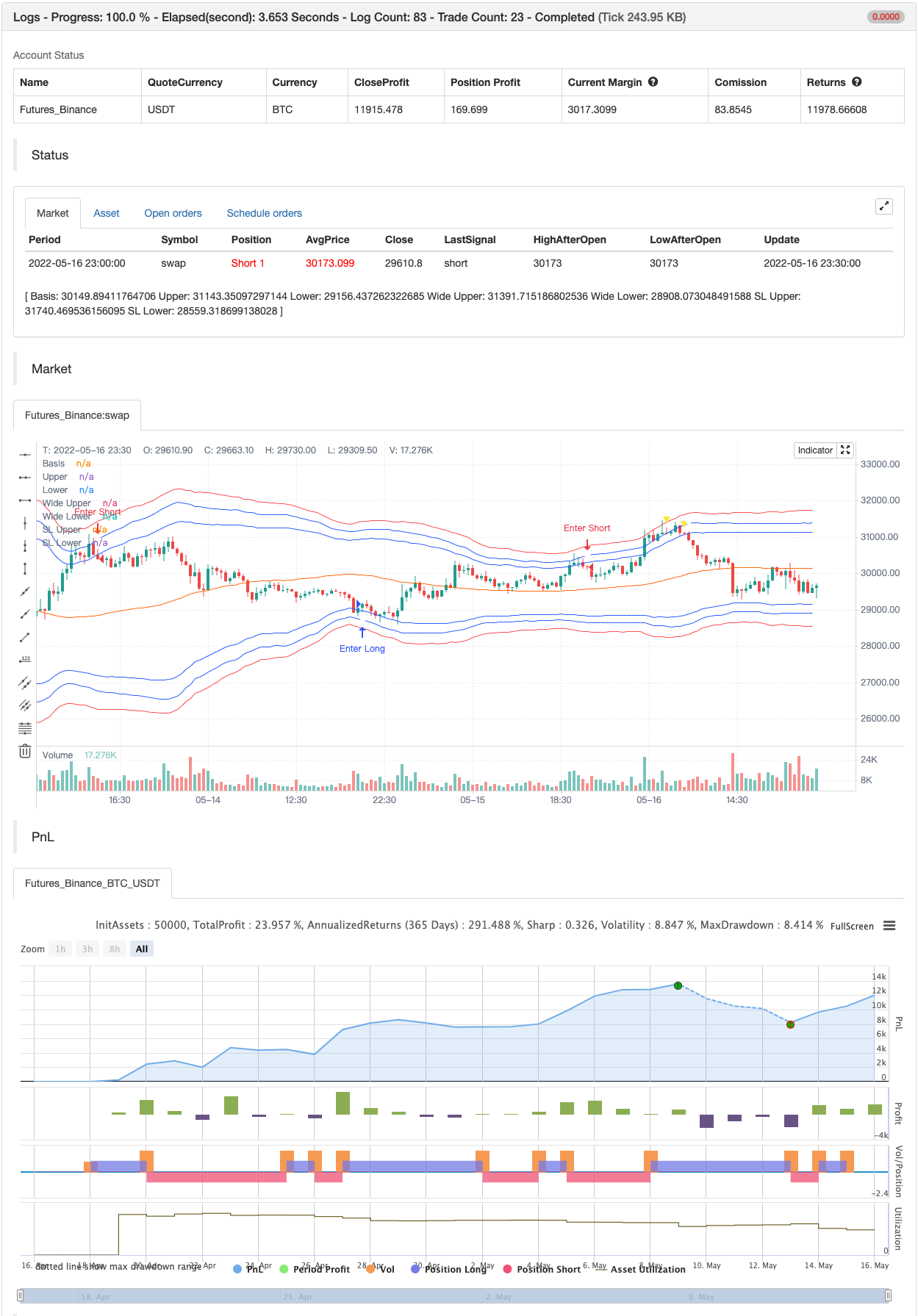
Parameters
| Name | Default | What it controls |
|---|---|---|
| v_input_int_1 | 68 | (?Bollinger)length |
| v_input_1_open | 0 | Source: open | high | low | close | hl2 | hlc3 | hlcc4 | ohlc4 |
| v_input_float_1 | 2 | StdDev |
| v_input_float_2 | 2.5 | Wide StdDev |
| v_input_int_2 | 14 | (?ATR)ATR Length |
| v_input_string_1 | 0 | Smoothing: RMA | SMA | EMA | WMA |
| v_input_float_3 | true | Stop Loss ATR Ratio |
Source Pine Script
/*backtest
start: 2022-04-17 00:00:00
end: 2022-05-16 23:59:00
period: 30m
basePeriod: 15m
exchanges: [{"eid":"Futures_Binance","currency":"BTC_USDT"}]
*/

// This source code is subject to the terms of the Mozilla Public License 2.0 at https://mozilla.org/MPL/2.0/
//@SuperJump
//@version=5
indicator(shorttitle="SuperJump TBBB", title="SuperJump Turn Back Bollinger Band", overlay=true, timeframe="", timeframe_gaps=true)
length = input.int(68, minval=1, group="Bollinger", inline='1')
src = input(open, title="Source", group="Bollinger", inline='1')
mult = input.float(2.0, minval=0.001, maxval=50, title="StdDev", group="Bollinger", inline='1')
b_mult = input.float(2.5, minval=0.001, maxval=50, title="Wide StdDev", group="Bollinger", inline='1')


basis = ta.sma(src, length)

dev = mult * ta.stdev(src, length)
upper = basis + dev
lower = basis - dev

b_dev = b_mult * ta.stdev(src, length)
b_upper = basis + b_dev
b_lower = basis - b_dev


atrlength = input.int(title="ATR Length", defval=14, minval=1,group="ATR" ,inline='2')
smoothing = input.string(title="Smoothing", defval="RMA", options=["RMA", "SMA", "EMA", "WMA"],group="ATR", inline='2')
SLAtr = input.float(title="Stop Loss ATR Ratio", defval=1.0, minval=1,group="ATR" ,inline='2')
ma_function(source, length) =>
	switch smoothing
		"RMA" => ta.rma(source, length)
		"SMA" => ta.sma(source, length)
		"EMA" => ta.ema(source, length)
		=> ta.wma(source, length)

atr = ma_function(ta.tr(true), atrlength)


LongSig = ta.crossunder(lower,src) and close > open
ShortSig = ta.crossover(upper,src) and close < open
WLongSig = ta.crossunder(b_lower,src) and close > open
WShortSig = ta.crossover(b_upper,src) and close < open


//Plots

plot(basis, "Basis", color=#FF6D00)
plot(upper, "Upper", color=#2962FF)
plot(lower, "Lower", color=#2962FF)
plot(b_upper, "Wide Upper", color=#2962FF)
plot(b_lower, "Wide Lower", color=#2962FF)

plot(b_upper + atr*SLAtr, "SL Upper", color=color.red)
plot(b_lower - atr*SLAtr, "SL Lower", color=color.red)


plotchar(ShortSig and WShortSig == false ? src : na, location = location.abovebar, char= "▼", size = size.tiny, color = color.white )
plotchar(LongSig and WLongSig == false ? src : na, location = location.belowbar, char= "▲", size = size.tiny, color = color.white)

plotchar(WShortSig ? src : na, location = location.abovebar, char= "▼", size = size.tiny, color = color.yellow )
plotchar(WLongSig ? src : na, location = location.belowbar, char= "▲", size = size.tiny, color = color.yellow)


alertcondition(LongSig and WLongSig == false, title='Bollinger Band Long', message='Bollinger Band Long Price is {{close}}, SL :{{plot_4}}')
alertcondition(ShortSig and WShortSig == false, title='Bollinger Band Short', message='Bollinger Band Short Price is {{close}},SL :{{plot_3}} ')
alertcondition(WLongSig, title='Wide Bollinger Band Long', message='Wide Bollinger Band Long Price is {{close}}, SL :{{plot_4}}')
alertcondition(WShortSig, title='Wide Bollinger Band Short', message='Wide Bollinger Band Short Price is {{close}},SL :{{plot_3}} ')


if LongSig
    strategy.entry("Enter Long", strategy.long)
else if ShortSig
strategy.entry("Enter Short", strategy.short)Published by ChaoZhang on the FMZ strategy square · last modified 2022-05-18. Collected in the Quant Trading Vault. Unvalidated research: re-test with your own data and costs before trusting it.
Build this with AgenKit
A spec is not a trading system. Paste this into your coding agent and AgenKit runs a specialist team — architecture, test-first build, risk gates, review — with paper trading on by default.
/agenkit build a production-grade trading bot with a backtest engine, risk controls and paper trading by default from strategies/SuperJump-Turn-Back-Bollinger-Band.md- npx agenkit install engineering-kit in your project
- Paste the command into your agent and approve each phase
- Get tests, backtest, risk controls and a paper-trading switch
Understand it first
Before you run this, read the lesson behind the idea and how to backtest it honestly. Specs like this one are the survivors of an unknown number of trials; deflate their results accordingly.