Bollinger Breakout Stop loss Strategy
This strategy generates trading signals based on the Bollinger Bands indicator and manages positions using stop-loss/take-profit. It monitors the breakout of the Bollinger Bands upper and lower bands, goes long when…
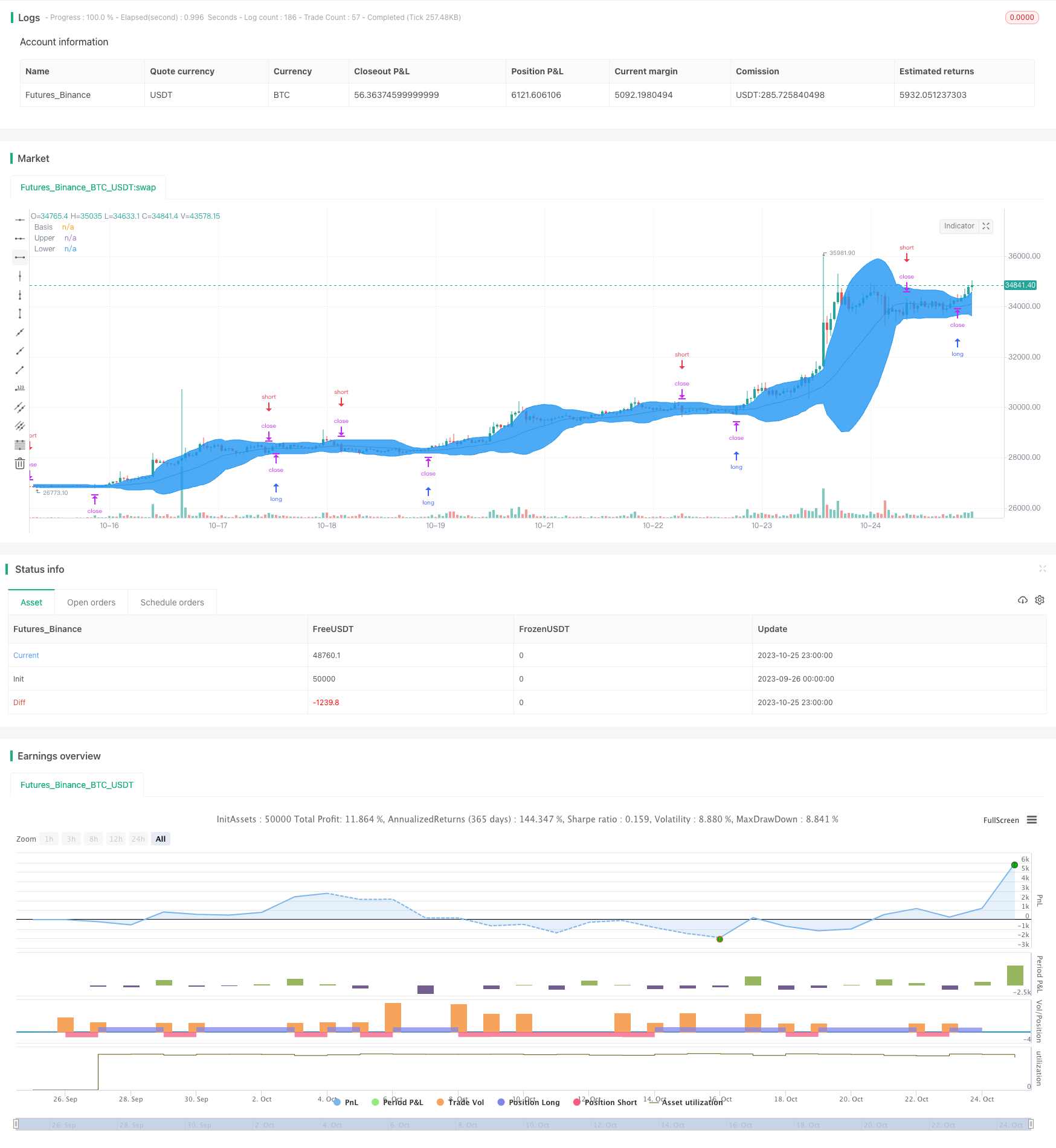
Overview
This strategy generates trading signals based on the Bollinger Bands indicator and manages positions using stop-loss/take-profit. It monitors the breakout of the Bollinger Bands upper and lower bands, goes long when price breaks above the upper band, goes short when price breaks the lower band, and exits when price breaks the bands in reverse using stop-loss orders.
Strategy Logic
The strategy utilizes the middle, upper and lower bands from the Bollinger Bands indicator. The middle band is the moving average, the upper band is middle band plus 2 standard deviations, and the lower band is the middle band minus 2 standard deviations.
First it calculates the Bollinger Bands middle, upper and lower bands. Then it checks if price breaks above the upper band or below the lower band. If price breaks above upper band, it goes long. If price breaks below lower band, it goes short. Also if price breaks the bands in reverse, it exits positions using stop-loss orders.
Specifically, the strategy logic is:
- Calculate Bollinger Bands middle, upper and lower bands
- If price breaks above upper band, go long
- If price breaks below lower band, go short
- If already long, close long when price breaks below lower band
- If already short, close short when price breaks above upper band
This allows catching trends when price makes big moves, while limiting losses using stop-loss.
Advantages
- Using Bollinger Bands for entry signals catches trends after breakouts
- Clear long/short signals, simple rules
- Stop-loss strategy limits max loss per trade
- Parameter tunability to optimize strategy
Risks
- Frequent small stop-loss trades may hurt overall P/L
- Poor parameter tuning may cause too many signals or missed trades
- Only considers price, no other indicators for confirmation
- No adjustment of stop-loss near breakout may increase loss
Can optimize via combining indicators, adjusting stop-loss units etc.
Enhancement Opportunities
- Combine other indicators like volume, moving averages to confirm signals
- Optimize Bollinger parameters for different markets
- Adjust stop-loss distance near breakout to avoid oversensitivity
- Trade only after trends develop, like Turtle Trading rules
- Auto-optimize parameters via machine learning algorithms
Conclusion
This is a relatively simple trend following strategy based on Bollinger Bands. It can quickly take positions when price breaks out and uses stop-loss to control risk. But relying solely on price may cause misjudgements, while sensitive stop-loss may increase trade frequency. We can further improve it via parameter tuning, combining indicators, adjusting stops etc. Overall it provides a simple and reliable quant trading framework.
Parameters
| Name | Default | What it controls |
|---|---|---|
| v_input_1 | true | long |
| v_input_2 | true | short |
| v_input_int_1 | 20 | length |
| v_input_float_1 | 2 | mult |
| v_input_3_close | 0 | source: close | high | low | open | hl2 | hlc3 | hlcc4 | ohlc4 |
| v_input_4 | true | Show Bollinger Bands |
| v_input_5 | true | Show Offset |
| v_input_6 | timestamp(01 Jan 2000 00:00 +0000) | Start Time |
| v_input_7 | timestamp(31 Dec 2099 23:59 +0000) | Final Time |
Source Pine Script
/*backtest
start: 2023-09-26 00:00:00
end: 2023-10-26 00:00:00
period: 1h
basePeriod: 15m
exchanges: [{"eid":"Futures_Binance","currency":"BTC_USDT"}]
*/

// This source code is subject to the terms of the Mozilla Public License 2.0 at https://mozilla.org/MPL/2.0/
// © ROBO_Trading

//@version=5
strategy(title = "Bollinger Stop Strategy", shorttitle = "BBStop", overlay = true, default_qty_type = strategy.percent_of_equity, initial_capital = 10000, default_qty_value = 100, commission_value = 0.1)

//Settings
long = input(true)
short = input(true)
length = input.int(20, minval=1)
mult = input.float(2.0, minval=0.001, maxval=50)
source = input(close)
showbb = input(true, title = "Show Bollinger Bands")
showof = input(true, title = "Show Offset")
startTime = input(defval = timestamp("01 Jan 2000 00:00 +0000"), title = "Start Time", inline = "time1")
finalTime = input(defval = timestamp("31 Dec 2099 23:59 +0000"), title = "Final Time", inline = "time1")

//Bollinger Bands
basis = ta.sma(source, length)
dev = mult * ta.stdev(source, length)
upper = basis + dev
lower = basis - dev

//Show indicator
offset = showof ? 1 : 0
colorBasis = showbb ? color.gray : na
colorUpper = showbb ? color.blue : na
colorLower = showbb ? color.blue : na
colorBands = showbb ? color.blue : na
p0 = plot(basis, "Basis", color = colorBasis, offset = offset)
p1 = plot(upper, "Upper", color = colorUpper, offset = offset)
p2 = plot(lower, "Lower", color = colorLower, offset = offset)
fill(p1, p2, title = "Background", color = colorBands, transp = 90)

//Trading
truetime = true
if basis > 0 and truetime
    if long
        strategy.entry("Long", strategy.long, stop = upper, when = truetime)
    if short
        strategy.entry("Short", strategy.short, stop = lower, when = truetime)
    if long == false
        strategy.exit("Exit", "Short", stop = upper)
    if short == false
        strategy.exit("Exit", "Long", stop = lower)
if time > finalTime
    strategy.close_all()
Published by ChaoZhang on the FMZ strategy square · last modified 2023-10-27. Collected in the Quant Trading Vault. Unvalidated research: re-test with your own data and costs before trusting it.
Build this with AgenKit
A spec is not a trading system. Paste this into your coding agent and AgenKit runs a specialist team — architecture, test-first build, risk gates, review — with paper trading on by default.
/agenkit build a production-grade trading bot with a backtest engine, risk controls and paper trading by default from strategies/Bollinger-Breakout-Stop-loss-Strategy.md- npx agenkit install engineering-kit in your project
- Paste the command into your agent and approve each phase
- Get tests, backtest, risk controls and a paper-trading switch
Understand it first
Before you run this, read the lesson behind the idea and how to backtest it honestly. Specs like this one are the survivors of an unknown number of trials; deflate their results accordingly.
Related specs
- Adaptive Bollinger Breakout with Moving Average Quantitative Strategy SystemPine Script · Breakout · 1h
- BB Breakout StrategyPine Script · Breakout · 1d
- Bollinger Band Breakout Trend Following StrategyPine Script · Breakout · 1d
- Bollinger Band Channel Breakout Trading StrategyPine Script · Breakout · 1d
- Bollinger Band T3 Moving Average StrategyPine Script · Breakout · 10m
- Bollinger Bands Breakout Trading StrategyPine Script · Breakout · 1h