Dynamic Range Breakout Strategy
This strategy is designed based on the Bollinger Bands indicator to create a dynamic breakout trading strategy. It combines the conditions of candle body filter and color filter to look for breakout entry…
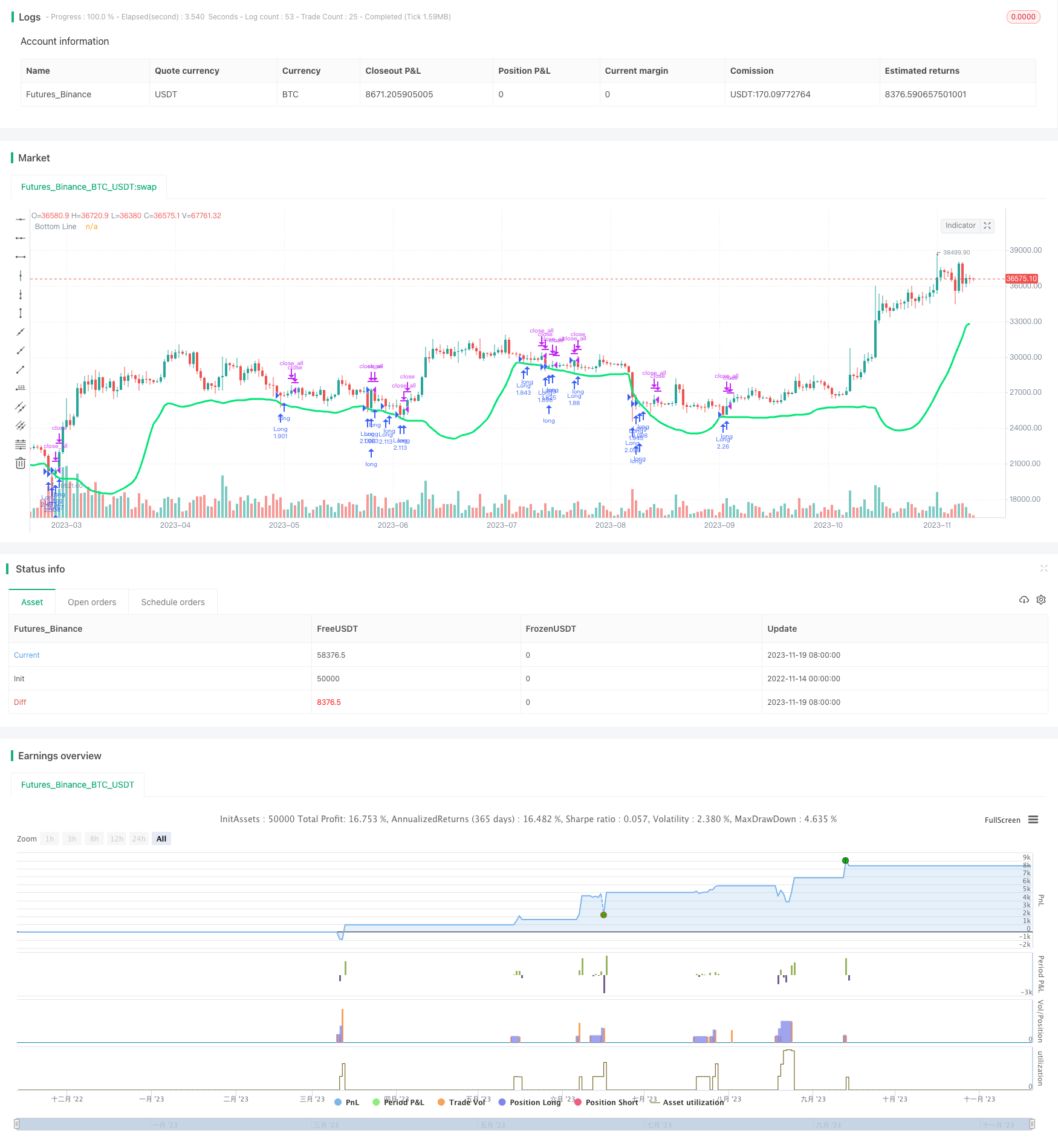
Overview
This strategy is designed based on the Bollinger Bands indicator to create a dynamic breakout trading strategy. It combines the conditions of candle body filter and color filter to look for breakout entry opportunities around the Bollinger lower band. Exits are based on body filter. The strategy automatically manages position sizing and risk.
Strategy Logic
Indicator Calculation
First, calculate the base line and lower band of Bollinger Bands based on low price:
src = low
basis = sma(src, length)
dev = mult * stdev(src, length)
lower = basis - dev
Where src is the low price, length is the calculation period, basis is the moving average, dev is the standard deviation, and lower is the lower band.
mult is usually set to 2, meaning the lower band is one standard deviation away.
Filter Conditions
The strategy incorporates two filter conditions:
Candle Body Filter Use the body size nbody and its mean abody to determine, only generate trading signal when nbody is greater than half of abody.
Color Filter
Do not long when candle closes positive (close > open). This avoids false breakout at the head of hbox.
Trading Signals
Generate long signal when below conditions meet:
low < lower // price breaks lower band
close < open or usecol == false // color filter
nbody > abody / 2 or usebod == false // body filter
When body size exceeds half of the mean again, close position:
close > open and nbody > abody / 2
Position Sizing
Strategy calculates trade size automatically for exponential growth of position:
lot = strategy.position_size == 0 ? strategy.equity / close * capital / 100 : lot[1]
Risk Control
Add constraints on year, month and date to limit trading only in specific date range:
when=(time > timestamp(fromyear, frommonth, fromday, 00, 00) and time < timestamp(toyear, tomonth, today, 23, 59))
Advantages
Dynamic Trading Range
Bollinger lower band provides a dynamic support area to capture retracements after trends.
Dual Filter
Combination of candle body and color filters avoids false breakouts effectively.
Automatic Position Sizing
Position sizes up exponentially to 100% managing risk automatically.
Date Range
Setting a date range lowers risk associated with market volatility in specific periods.
Risks
Prolonged Drawdown
When strong uptrend, BB middle and upper bands may shift up quickly, causing prolonged drawdown.
Solutions
Combine with trend indicators, stop strategy when judged as bull market to avoid prolonged drawdown.
Failed Breakout
Breakout may fail with pullback and retest of lower band.
Solutions
Add stop loss below support level. Or add logic to detect failed retest for quick stop loss.
Enhancements
Add Stop Loss
Optimize stop loss below support based on backtest results.
Optimize Parameters
Fine tune body filter abody period, COLOR filter etc to find optimum.
Add Trend Filter
Stop strategy when judged as bull market. Reduce drawdown time.
Conclusion
This strategy combines BB support, body filter, color filter and breakout logic to capture high probability retracements. In practice, parameters can be optimized based on backtest, with stop loss and trend filter added to control risks for improved performance.
Parameters
| Name | Default | What it controls |
|---|---|---|
| v_input_1 | 100 | Capital, % |
| v_input_2 | 25 | BB Period |
| v_input_3 | false | Use Body-Filter |
| v_input_4 | false | Use Color-Filter |
| v_input_5 | false | Show Arrows |
| v_input_6 | 1900 | From Year |
| v_input_7 | 2100 | To Year |
| v_input_8 | true | From Month |
| v_input_9 | 12 | To Month |
| v_input_10 | true | From day |
| v_input_11 | 31 | To day |
Source Pine Script
/*backtest
start: 2022-11-14 00:00:00
end: 2023-11-20 00:00:00
period: 1d
basePeriod: 1h
exchanges: [{"eid":"Futures_Binance","currency":"BTC_USDT"}]
*/

//Noro
//2018

//@version=2
strategy(title = "Noro's Wizard Strategy v1.0", shorttitle = "Wizard str 1.0", overlay = true, default_qty_type = strategy.percent_of_equity, default_qty_value = 100, pyramiding = 10)

//Settings
capital = input(100, defval = 100, minval = 1, maxval = 10000, title = "Capital, %")
length = input(25, defval = 25, minval = 1, maxval = 200, title = "BB Period")
usebod = input(false, defval = false, title = "Use Body-Filter")
usecol = input(false, defval = false, title = "Use Color-Filter")
showar = input(false, defval = false, title = "Show Arrows")
fromyear = input(1900, defval = 1900, minval = 1900, maxval = 2100, title = "From Year")
toyear = input(2100, defval = 2100, minval = 1900, maxval = 2100, title = "To Year")
frommonth = input(01, defval = 01, minval = 01, maxval = 12, title = "From Month")
tomonth = input(12, defval = 12, minval = 01, maxval = 12, title = "To Month")
fromday = input(01, defval = 01, minval = 01, maxval = 31, title = "From day")
today = input(31, defval = 31, minval = 01, maxval = 31, title = "To day")

//Bollinger
src = low
mult = 2
basis = sma(src, length)
dev = mult * stdev(src, length)
lower = basis - dev
plot(lower, color = lime, linewidth = 3, title="Bottom Line")

//Body Filter
nbody = abs(close - open)
abody = sma(nbody, 10)
body = nbody > abody / 2 or usebod == false

//Signals
up1 = low < lower and (close < open or usecol == false) and body
exit = close > open and nbody > abody / 2

//Arrows
needar = up1 and showar
plotarrow(needar ? 1 : na)

//Trading
lot = strategy.position_size == 0 ? strategy.equity / close * capital / 100 : lot[1]

if up1
    if strategy.position_size < 0
        strategy.close_all()

    strategy.entry("Long", strategy.long, lot, when=(time > timestamp(fromyear, frommonth, fromday, 00, 00) and time < timestamp(toyear, tomonth, today, 23, 59)))

if time > timestamp(toyear, tomonth, today, 23, 59) or exit
    strategy.close_all()
Published by ChaoZhang on the FMZ strategy square · last modified 2023-12-01. Collected in the Quant Trading Vault. Unvalidated research: re-test with your own data and costs before trusting it.
Build this with AgenKit
A spec is not a trading system. Paste this into your coding agent and AgenKit runs a specialist team — architecture, test-first build, risk gates, review — with paper trading on by default.
/agenkit build a production-grade trading bot with a backtest engine, risk controls and paper trading by default from strategies/Dynamic-Range-Breakout-Strategy.md- npx agenkit install engineering-kit in your project
- Paste the command into your agent and approve each phase
- Get tests, backtest, risk controls and a paper-trading switch
Understand it first
Before you run this, read the lesson behind the idea and how to backtest it honestly. Specs like this one are the survivors of an unknown number of trials; deflate their results accordingly.
Related specs
- Adaptive Bollinger Breakout with Moving Average Quantitative Strategy SystemPine Script · Breakout · 1h
- BB Breakout StrategyPine Script · Breakout · 1d
- Bollinger Band Breakout Trend Following StrategyPine Script · Breakout · 1d
- Bollinger Band Channel Breakout Trading StrategyPine Script · Breakout · 1d
- Bollinger Band T3 Moving Average StrategyPine Script · Breakout · 10m
- Bollinger Bands Breakout Trading StrategyPine Script · Breakout · 1h