Strategy vault / Trend following
Flying Dragon Trend Strategy
The Flying Dragon Trend strategy generates trading signals by drawing trend bands in different colors based on the configuration of moving averages in terms of types, lengths and offsets. It can find the optimal…
Overview
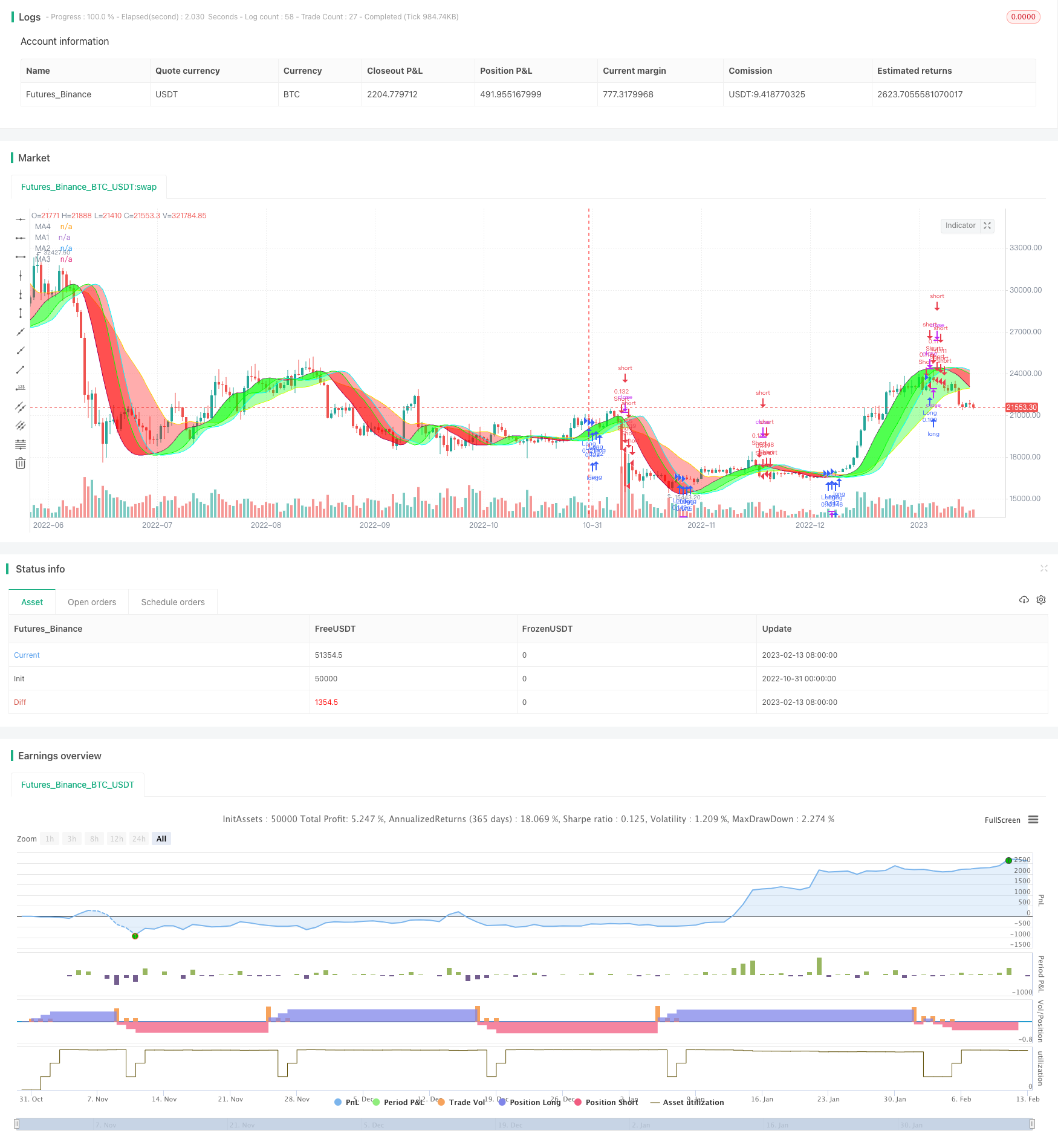
The Flying Dragon Trend strategy generates trading signals by drawing trend bands in different colors based on the configuration of moving averages in terms of types, lengths and offsets. It can find the optimal parameter sets across different timeframes to balance trend accuracy and trading risk.
Strategy Logic
The strategy uses two moving averages to plot the trend bands, denoted as MA1 and MA4. MA1 is the faster moving average and MA4 is the slower one. Meanwhile, MA1 has 3 offset settings (Offset1, Offset2, Offset3) that form MA2 and MA3. Crossing different moving averages will generate trading signals with different risk levels.
There are 5 risk levels to choose from. A trading signal is only triggered when price crosses different moving averages under different risk levels, from high to low: MA1 Offset1, MA2, MA3, MA4, all trend bands in same color. The color of trend bands indicates the current trend direction, with green for uptrend and red for downtrend.
The strategy also allows stop loss and options for long only, short only or both directions.
Advantage Analysis
- Finds optimal parameter sets across different timeframes, adaptable to more market conditions
- Various MA types available for optimization for different products
- The offset, the core of this strategy, makes trend judgement more accurate
- Risk levels strike a balance between risk and reward
- Highly customizable with various parameter combinations
- Intuitive trend bands form clear visual trading signals
- Stop loss controls risk
Risk Analysis
- High risk levels may generate false signals, should lower risk level or adjust parameters
- Risk of consecutive stop loss exits when trend reverses
- Different products need separate parameter testing and optimization
- For high frequency trading, fast MA should lead slow MA
- Inadequate parameter optimization may cause oversensitivity or sluggishness
Risks can be managed by gradually lowering risk levels, testing more parameter combinations, and optimizing parameters separately for different products.
Optimization Directions
- Test different combinations of moving average types
- Try more length values to find optimal lengths
- Carefully adjust offsets, the key to optimization
- Optimize parameters separately for different products
- Optimize stop loss points, consider taking profits
- Test different entry rule combinations
- Evaluate whether filters are needed for optimization
- Consider adding trend strength indicators for assistance
Summary
The Flying Dragon Trend strategy cleverly combines moving averages into a visualizable trend trading system. Its high parameter tunability enables fine-grained optimization for different products and market regimes to strike an optimum balance between stability and sensitivity. The abundant parameter combinations provide sufficient optimization space. In summary, this strategy has a novel logic and high practical utility. When optimized properly, it can become a very powerful trend following system.
Parameters
| Name | Default | What it controls |
|---|---|---|
| v_input_string_1 | 0 | (?Strategy)Strategy Direction: Both | Long | Short |
| v_input_string_2 | 0 | Risk Level: Medium | High | Highest | Low | Lowest |
| v_input_1 | false | Use Stop Loss |
| v_input_int_1 | 10 | % |
| v_input_string_3 | 0 | (?Leading Moving Average)ma1Type: HMA | EMA | RMA | SMA | SWMA | VWMA | WMA |
| v_input_int_2 | 35 | ma1Length |
| v_input_2_close | 0 | ma1Source: close | high | low | open | hl2 | hlc3 | hlcc4 | ohlc4 |
| v_input_3 | purple | ma1Color |
| v_input_int_3 | false | Offset1 Steps |
| v_input_4 | lime | ma2Color |
| v_input_int_4 | 4 | Offset2 Steps |
| v_input_5 | aqua | ma3Color |
| v_input_int_5 | 6 | Offset3 Steps |
| v_input_string_4 | 0 | (?Lagging Moving Average)ma4Type: SMA | HMA | RMA | EMA | SWMA | VWMA | WMA |
| v_input_int_6 | 22 | ma4Length |
| v_input_6_close | 0 | ma4Source: close | high | low | open | hl2 | hlc3 | hlcc4 | ohlc4 |
| v_input_7 | yellow | ma4Color |
| v_input_int_7 | 2 | Offset Steps |
| v_input_int_8 | 60 | (?Banding)Band Transparency |
| v_input_8 | true | Band 1 |
| v_input_9 | true | Band 2 |
| v_input_10 | true | Band 3 |
Source Pine Script
/*backtest
start: 2022-10-31 00:00:00
end: 2023-02-14 00:00:00
period: 1d
basePeriod: 1h
exchanges: [{"eid":"Futures_Binance","currency":"BTC_USDT"}]
*/

// This source code is subject to the terms of the Mozilla Public License 2.0 at https://mozilla.org/MPL/2.0/
// © MarkoP010 2023

//@version=5
//The basic idea of the strategy is to select the best set of MAs, types, lenghts and offsets, which draws red trend bands for downtrend (and green for uptrend).
//Strategy executes by selected risk level either when there is MA crossover with price (MA1 Offset1 on Highest risk level, MA2 on Low risk level) or three bands with the same color on at the same time (on Lowest risk level).
//Strategy plots user selectable Moving Average lines and a colored trend band between the MA lines. The trend bands can be turned off individually if required.
//The Offset option shifts the selected MA with the set number of steps to the right. That is where the Magic happens and the Dragon roars!

//Strategy version 1.0
strategy("Flying Dragon Trend Strategy", shorttitle="FD Trend Strategy", overlay=true, pyramiding=3, initial_capital=100000, default_qty_type=strategy.percent_of_equity, default_qty_value=5, commission_type=strategy.commission.cash_per_order, commission_value=10, calc_on_order_fills=false, process_orders_on_close=true)

strDirection = input.string(defval="Both", title="Strategy Direction", options=["Both", "Long", "Short"], group="Strategy") //Strategy direction selector by DashTrader
strSelection = strDirection == "Long" ? strategy.direction.long : strDirection == "Short" ? strategy.direction.short : strategy.direction.all //Strategy direction selector by DashTrader
strategy.risk.allow_entry_in(strSelection)

riskLevel = input.string(defval="Medium", title="Risk Level", options=["Highest", "High", "Medium", "Low", "Lowest"], tooltip="Strategy execution criteria. When Highest then MA1 Offset1 crossover with price, when Low then MA2 Offset crossover, when Lowest then all the Bands are the same color.", group="Strategy")

useStop = input(defval=false, title="Use Stop Loss", inline="SL", group="Strategy")
stopPrct = input.int(defval=10, title=" %", minval=0, maxval=100, step=1, inline="SL", group="Strategy") / 100

//Moving Averages function
MA(source, length, type) =>
    type == "EMA" ? ta.ema(source, length) :
     type == "HMA" ? ta.hma(source, length) :
     type == "RMA" ? ta.rma(source, length) :
     type == "SMA" ? ta.sma(source, length) :
     type == "SWMA" ? ta.swma(source) :
     type == "VWMA" ? ta.vwma(source, length) :
     type == "WMA" ? ta.wma(source, length) :
     na

//Inputs
ma1Type = input.string(defval="HMA", title="", inline="MA1", options=["EMA", "HMA", "RMA", "SMA","SWMA", "VWMA", "WMA"], group="Leading Moving Average")
ma1Length = input.int(defval=35, title="",minval=1, inline="MA1", group="Leading Moving Average")
ma1Source = input(defval=close, title="", tooltip="For short timeframes, minutes to hours, instead of Default values try Lowest risk level and HMA75 with Offsets 0,1,4 and SMA12 with Offset 6.", inline="MA1", group="Leading Moving Average")
ma1Color  = input(defval=color.purple, title="", inline="MA-1", group="Leading Moving Average")
//useMa1Offset = input(defval=false, title="Use offset to MA-1", inline="MA1", group="Leading Moving Average")
ma1Offset = input.int(defval=0, title="Offset1 Steps", minval=0, maxval=10, step=1, tooltip="The Magic happens here! The offset to move the line to the right.", inline="MA-1", group="Leading Moving Average")
ma1 = MA(ma1Source, ma1Length, ma1Type)[ma1Offset]

ma2Color  = input(defval=color.lime, title="", inline="MA-2", group="Leading Moving Average")
//useMa2Offset = input(defval=true, title="Use offset to MA2", inline="MA-2", group="Leading Moving Average")
ma2Offset = input.int(defval=4, title="Offset2 Steps", minval=0, maxval=10, step=1, tooltip="The Magic happens here! The offset to move the line to the right.", inline="MA-2", group="Leading Moving Average")
ma2 = ma1[ma2Offset]

ma3Color  = input(defval=color.aqua, title="", inline="MA-3", group="Leading Moving Average")
//useMa3Offset = input(defval=false, title="Use offset to MA3", inline="MA-3", group="Leading Moving Average")
ma3Offset = input.int(defval=6, title="Offset3 Steps", minval=0, maxval=10, step=1, tooltip="The Magic happens here! The offset to move the line to the right.", inline="MA-3", group="Leading Moving Average")
ma3 = ma1[ma3Offset]

ma4Type = input.string(defval="SMA", title="", inline="MA4", options=["EMA", "HMA", "RMA", "SMA","SWMA", "VWMA", "WMA"], group="Lagging Moving Average")
ma4Length = input.int(defval=22, title="",minval=1, inline="MA4", group="Lagging Moving Average")
ma4Source = input(defval=close, title="", inline="MA4", group="Lagging Moving Average")
ma4Color  = input(defval=color.yellow, title="", inline="MA-4", group="Lagging Moving Average")
//useMa4Offset = input(defval=true, title="Use offset to MA4", inline="MA-4", group="Lagging Moving Average")
ma4Offset = input.int(defval=2, title="Offset Steps", minval=0, maxval=10, step=1, tooltip="The Magic happens here! The offset to move the line to the right.", inline="MA-4", group="Lagging Moving Average")
ma4 = MA(ma4Source, ma4Length, ma4Type)[ma4Offset]

bandTransp = input.int(defval=60, title="Band Transparency", minval=20, maxval=80, step=10, group="Banding")
useBand1 = input(defval=true, title="Band 1", inline="Band", group="Banding")
band1Transp = useBand1 ? bandTransp : 100
band1clr = ma1 > ma2 ? color.new(#00ff00, transp=band1Transp) : color.new(#ff0000, transp=band1Transp)
useBand2 = input(defval=true, title="Band 2", inline="Band", group="Banding")
band2Transp = useBand2 ? bandTransp : 100
band2clr = ma1 > ma3 ? color.new(#00ff00, transp=band2Transp) : color.new(#ff0000, transp=band2Transp)
useBand3 = input(defval=true, title="Band 3", tooltip="Up trend green, down trend red. Colors get reversed if MA1 lenght is greater than MA2 lenght, or they are different type and MA2 quicker. In that case, just reverse your selections for MA1 and MA2, or let it be as is.", inline="Band", group="Banding")
band3Transp = useBand3 ? bandTransp : 100
band3clr = ma1 > ma4 ? color.new(#00ff00, transp=band3Transp) : color.new(#ff0000, transp=band3Transp)

//Graphs
piirto1 = plot(ma1, color = ma1Color, title="MA1")
piirto2 = plot(ma2, color = ma2Color, title="MA2")
piirto3 = plot(ma3, color = ma3Color, title="MA3")
piirto4 = plot(ma4, color = ma4Color, title="MA4")

fill(piirto1, piirto2, color=band1clr)
fill(piirto1, piirto3, color=band2clr)
fill(piirto1, piirto4, color=band3clr)

//Strategy entry and stop conditions

longCondition = riskLevel == "Highest" ? ma1Source > ma1 : riskLevel == "High" ? ma1Source > ma2 : riskLevel == "Medium" ? ma1Source > ma3 : riskLevel == "Low" ? ma1Source > ma4 : riskLevel == "Lowest" ? ma1 > ma2 and ma1 > ma3 and ma1 > ma4 : na
shortCondition = riskLevel == "Highest" ? ma1Source < ma1 : riskLevel == "High" ? ma1Source < ma2 : riskLevel == "Medium" ? ma1Source < ma3 : riskLevel == "Low" ? ma1Source < ma4 : riskLevel == "Lowest" ? ma1 < ma2 and ma1 < ma3 and ma1 < ma4 : na

stopLprice = useStop == true ? strategy.position_avg_price * (1-stopPrct) : na
stopSprice = useStop == true ? strategy.position_avg_price * (1+stopPrct) : na

if (longCondition)
    strategy.entry("Long",strategy.long)
    strategy.exit("Long Stop", "Long", stop=stopLprice)
if (shortCondition)
    strategy.entry("Short",strategy.short)
    strategy.exit("Short Stop", "Short", stop=stopSprice)

//End
Published by ChaoZhang on the FMZ strategy square · last modified 2023-11-07. Collected in the Quant Trading Vault. Unvalidated research: re-test with your own data and costs before trusting it.
Build this with AgenKit
A spec is not a trading system. Paste this into your coding agent and AgenKit runs a specialist team — architecture, test-first build, risk gates, review — with paper trading on by default.
/agenkit build a production-grade trading bot with a backtest engine, risk controls and paper trading by default from strategies/Flying-Dragon-Trend-Strategy.md- npx agenkit install engineering-kit in your project
- Paste the command into your agent and approve each phase
- Get tests, backtest, risk controls and a paper-trading switch
Understand it first
Before you run this, read the lesson behind the idea and how to backtest it honestly. Specs like this one are the survivors of an unknown number of trials; deflate their results accordingly.
Related specs
- ADX MA and EMA Long Only Trend Tracking StrategyPine Script · Trend following · 1d
- ATR and Moving Average Crossover Hybrid StrategyPine Script · Trend following · 1h
- Bollinger Band Moving Average Crossover StrategyPine Script · Trend following · 1h
- Bollinger Bands and EMA Trend Following StrategyPine Script · Trend following · 1h
- Bollinger Bands and RSI Trend Following StrategyPine Script · Trend following · 1h
- Candlestick Pattern Trend Filter StrategyPine Script · Trend following · 1d