Strategy vault / Trend following
Moving Average Cross Alert Multi Timeframe MTF
See when two moving averages cross. With the option to choose between four moving average calculations: SMA = simple moving average EMA = exponential moving average (default) WMA = weighted moving average Linear =…
See when two moving averages cross. With the option to choose between four moving average calculations:
SMA = simple moving average EMA = exponential moving average (default) WMA = weighted moving average Linear = linear regression
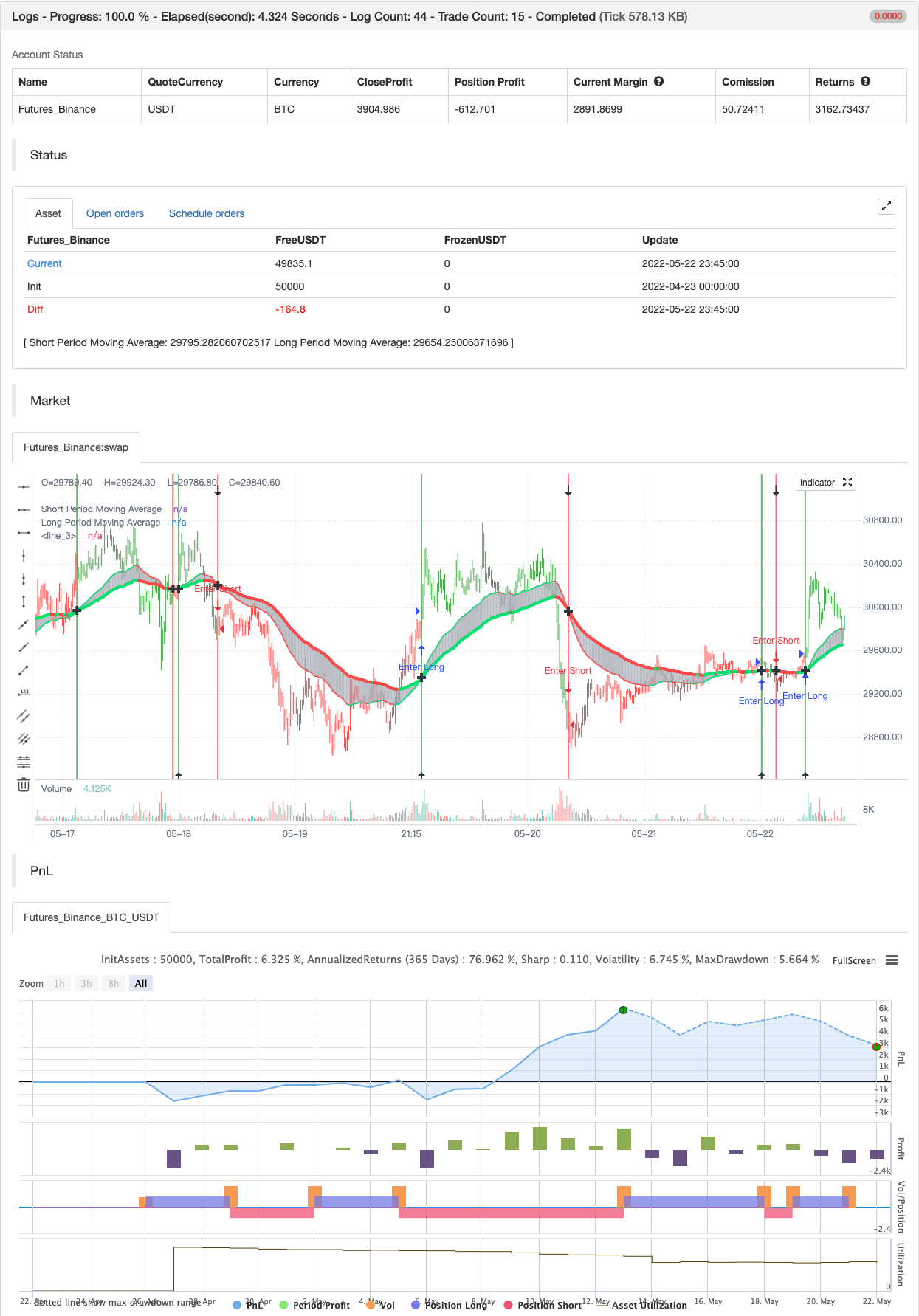
The moving averages can be plotted from different time-frames, like e.g. the weekly or 4 hour time-frame using HL2 , HLC3 or OHLC4 as price source for the calculation. In addition there is a background color alert and arrows when the moving averages cross each other when the price also rises or falls. And the moving averages are colored depending on their trend direction (if they are trending up or down).
backtest
Parameters
| Name | Default | What it controls |
|---|---|---|
| v_input_1_close | 0 | Price Source For The Moving Averages: close | high | low | open | hl2 | hlc3 | hlcc4 | ohlc4 |
| v_input_2 | true | Use Current Timeframe As Resolution? |
| v_input_3 | W | Use Different Timeframe? Then Uncheck The Box Above |
| v_input_4 | 50 | Short Period Moving Average |
| v_input_5 | 100 | Long Period Moving Average |
| v_input_6 | 2 | Moving Average Calculation: (1 = SMA), (2 = EMA), (3 = WMA), (4 = Linear) |
Source Pine Script
/*backtest
start: 2022-04-23 00:00:00
end: 2022-05-22 23:59:00
period: 15m
basePeriod: 5m
exchanges: [{"eid":"Futures_Binance","currency":"BTC_USDT"}]
*/

study("Moving Average Cross Alert, Multi-Timeframe Option (MTF) (by ChartArt)", shorttitle="CA_-_MA_cross", overlay=true)

// ChartArt's Moving Average Cross Indicator
//
// Version 1.0
// Idea by ChartArt on September 15, 2015.
//
// This indicator shows when two moving averages cross.
// With the option to choose between four moving
// average calculations:
// (SMA = simple moving average)
// (EMA = exponential moving average)
// (WMA = weighted moving average)
// (Linear = Linear regression)
//
// The moving averages can be plotted from different
// timeframes, like the weekly or 4 hour timeframe.
// With the possibility to use HL2, HLC3 or OHLC4 prices.
//
// In addition there is a background color alert
// and arrows when the moving averages cross each other.
// And the moving averages are colored depending if
// they are trending up or down.
//
// List of my work:
// https://www.tradingview.com/u/ChartArt/

//@version=4
// Multi-timeframe and price input
pricetype = input(close, title="Price Source For The Moving Averages")
useCurrentRes = input(true, title="Use Current Timeframe As Resolution?")
resCustom = input(title="Use Different Timeframe? Then Uncheck The Box Above", defval="W")
res = useCurrentRes ? timeframe.period : resCustom
price = security(syminfo.tickerid, res, pricetype)

// MA period input
shortperiod = input(50, title="Short Period Moving Average")
longperiod = input(100, title="Long Period Moving Average")

// MA calculation
smoothinput = input(2, minval=1, maxval=4, title='Moving Average Calculation: (1 = SMA), (2 = EMA), (3 = WMA), (4 = Linear)')
short = smoothinput == 1 ? sma(price, shortperiod) :
   smoothinput == 2 ? ema(price, shortperiod) :
   smoothinput == 3 ? wma(price, shortperiod) :
   smoothinput == 4 ? linreg(price, shortperiod,0) :
   na
long = smoothinput == 1 ? sma(price, longperiod) :
   smoothinput == 2 ? ema(price, longperiod) :
   smoothinput == 3 ? wma(price, longperiod) :
   smoothinput == 4 ? linreg(price, longperiod,0) :
   na

// MA trend direction color
shortcolor = short > short[1] ? lime : short < short[1] ? red : blue
longcolor = long > long[1] ? lime : long < long[1] ? red : blue

// MA output
MA1 = plot(short, title="Short Period Moving Average", style=linebr, linewidth=2, color=shortcolor)
MA2 = plot(long, title="Long Period Moving Average", style=linebr, linewidth=4, color=longcolor)
fill(MA1, MA2, color=silver, transp=50)

// MA trend bar color
TrendingUp() => short > long
TrendingDown() => short < long
barcolor(TrendingUp() ? green : TrendingDown() ? red : blue)

// MA cross alert
MAcrossing = cross(short, long) ? short : na
plot(MAcrossing, style = cross, linewidth = 4,color=black)

// MA cross background color alert
Uptrend() => TrendingUp() and TrendingDown()[1]
Downtrend() => TrendingDown() and TrendingUp()[1]
bgcolor(Uptrend() ? green : Downtrend() ? red : na,transp=50)

// Buy and sell alert
Buy = Uptrend() and close > close[1]
Sell = Downtrend() and close < close[1]
plotshape(Buy, color=black, style=shape.arrowup, text="Buy", location=location.bottom)
plotshape(Sell, color=black, style=shape.arrowdown, text="Sell", location=location.top)


if Buy
    strategy.entry("Enter Long", strategy.long)
else if Sell
strategy.entry("Enter Short", strategy.short)Published by ChaoZhang on the FMZ strategy square · last modified 2022-05-24. Collected in the Quant Trading Vault. Unvalidated research: re-test with your own data and costs before trusting it.
Build this with AgenKit
A spec is not a trading system. Paste this into your coding agent and AgenKit runs a specialist team — architecture, test-first build, risk gates, review — with paper trading on by default.
/agenkit build a production-grade trading bot with a backtest engine, risk controls and paper trading by default from strategies/Moving-Average-Cross-Alert-Multi-Timeframe-MTF.md- npx agenkit install engineering-kit in your project
- Paste the command into your agent and approve each phase
- Get tests, backtest, risk controls and a paper-trading switch
Understand it first
Before you run this, read the lesson behind the idea and how to backtest it honestly. Specs like this one are the survivors of an unknown number of trials; deflate their results accordingly.
Related specs
- ADX MA and EMA Long Only Trend Tracking StrategyPine Script · Trend following · 1d
- ATR and Moving Average Crossover Hybrid StrategyPine Script · Trend following · 1h
- Bollinger Band Moving Average Crossover StrategyPine Script · Trend following · 1h
- Bollinger Bands and EMA Trend Following StrategyPine Script · Trend following · 1h
- Bollinger Bands and RSI Trend Following StrategyPine Script · Trend following · 1h
- Candlestick Pattern Trend Filter StrategyPine Script · Trend following · 1d