Strategy vault / Trend following
Trend Following Stop Loss Strategy Based on Trend Alert Indicator
The Trend Following Stop Loss strategy is a trend tracking stop loss trading strategy based on the TrendAlert indicator. It determines the trend direction through the TrendAlert indicator to implement trend tracking…
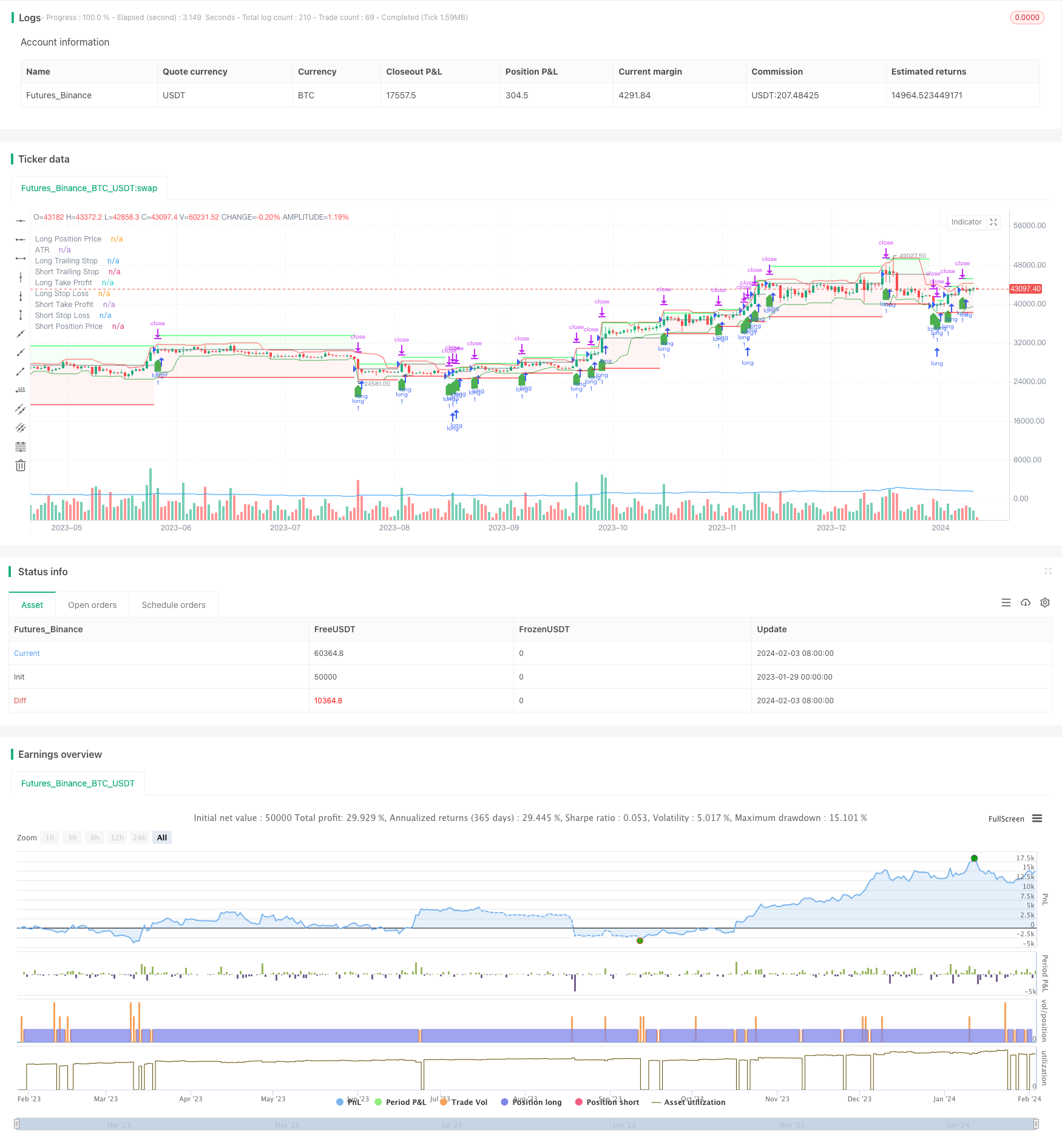
Overview
The Trend Following Stop Loss strategy is a trend tracking stop loss trading strategy based on the TrendAlert indicator. It determines the trend direction through the TrendAlert indicator to implement trend tracking entry. At the same time, it uses the ATR indicator to set the stop loss to control risks.
Strategy Logic
The strategy consists of the following main parts:
The TrendAlert indicator judges the trend direction. When TrendAlert is greater than 0, it is a bullish signal. When less than 0, it is a bearish signal.
The ATR indicator calculates the price fluctuation range recently. ATR multiplied by the ATR stop loss multiplier atrStopMultiplier is used as the fixed stop loss.
The lowest low lowestLow and highest high highestHigh together with ATR stop loss construct the tracking stop loss. The structure parameter controls whether it is enabled.
Enter long or short positions according to the trend signal direction. After entering, set Take Profit and Stop Loss.
Close positions when price triggers stop loss or take profit.
The strategy filters false signals through trend judgment, controls risks through tracking stop loss, ensures profitability through take profit, and improves the stability of the trading system.
Advantage Analysis
The main advantages of this strategy are:
The dual guarantee of trend filtering and tracking stop loss avoids chasing market noise and ensures controllable trading risks.
ATR adaptive stop loss setting prevents over optimization and is suitable for various market environments.
Take profit ensures profitability and prevents eating up profits.
The strategy logic is clear and concise, easy to understand and modify, suitable for quantitative traders' secondary development.
Written in Pine Script language, can be used directly on the TradingView platform without programming skills.
Risk Analysis
There are also some risks in this strategy:
Incorrect trend judgment may cause unnecessary entry and stop loss trigger. You can appropriately relax the stop loss or filter entry signals.
When the market fluctuates violently, ATR may underestimate the true amplitude. At this time, the ATR stop loss multiplier atrStopMultiplier can be increased.
The target take profit may limit the profit space of the strategy. Adjust the limitMultiplier parameter according market.
The exist logic based only on price should be combined with time management.
Optimization Directions
The strategy can be optimized in the following aspects:
Optimize parameters ATR length atrLength and stop loss multiplier atrStopMultiplier to adjust the sensitivity of the stop loss algorithm.
Try different trend indicators to find better entry opportunities.
Select or adjust the target take profit parameter according to the characteristics of specific trading varieties.
Increase time stop loss mechanism to avoid overnight risks.
Filter false breakouts by combining trading volume indicators to improve strategy stability.
Conclusion
In general, this is a very practical trend tracking stop loss strategy. It uses indicators to determine the trend direction to achieve trend tracking, while setting adaptive stops to ensure risk control. The strategy logic is clear and easy to use, making it ideal for beginners to learn. At the same time, it also provides a good trading strategy framework for advanced strategy development, which is worth quantitative traders' in-depth research and optimization.
Parameters
| Name | Default | What it controls |
|---|---|---|
| v_input_source_1_close | 0 | TrendAlert: close | high | low | open | hl2 | hlc3 | hlcc4 | ohlc4 |
| v_input_int_1 | 15 | ATR Length |
| v_input_bool_1 | true | Use Structure? |
| v_input_int_2 | 8 | How Far To Look Back For High/Lows |
| v_input_float_1 | 0.2 | ATR Multiplier |
| v_input_float_2 | 0.5 | Limit Multiplier |
| v_input_int_3 | false | Pine Connector ID |
| v_input_string_1 | ETHUSD | personilized currency |
| v_input_int_4 | 10 | risk in % to send |
Source Pine Script
/*backtest
start: 2023-01-29 00:00:00
end: 2024-02-04 00:00:00
period: 1d
basePeriod: 1h
exchanges: [{"eid":"Futures_Binance","currency":"BTC_USDT"}]
*/

// This Pine Script™ code is subject to the terms of the Mozilla Public License 2.0 at https://mozilla.org/MPL/2.0/
// © jaque_verdatre

//@version=5
strategy("TrendAlert Based", overlay = true)

// Get inputs
TrendAlert = input.source(close, "TrendAlert")
atrLength = input.int(title="ATR Length", defval=15, minval=1)
useStructure = input.bool(title="Use Structure?", defval=true)
lookback = input.int(title="How Far To Look Back For High/Lows", defval=8, minval=1)
atrStopMultiplier = input.float(title="ATR Multiplier", defval=0.2, minval=0.1)
LimitMultiplier = input.float(title = "Limit Multiplier", defval = 0.5, minval = 0.1)
PineConnectorID = input.int(title = "Pine Connector ID",defval = 0)
CurrencyToSend = input.string(title = "personilized currency", defval = "ETHUSD")
Risk = input.int(title = "risk in % to send", defval = 10, minval = 1)

// Calculate data
atr = ta.atr(atrLength)
lowestLow = ta.lowest(low, lookback)
highestHigh = ta.highest(high, lookback)
longStop = (useStructure ? lowestLow : close) - atr * atrStopMultiplier
shortStop = (useStructure ? highestHigh : close) + atr * atrStopMultiplier

// Draw data to chart
plot(atr, color=color.rgb(33, 149, 243), title="ATR", display = display.none)
plot(longStop, color=color.green, title="Long Trailing Stop")
plot(shortStop, color=color.red, title="Short Trailing Stop")

var float LimitL = na
var float LimitS = na
var float LPosPrice = na
var float SPosPrice = na
var float LPosLongStop = na
var float SPosShortStop = na

KnowLimit (PosPrice, PosStop) =>
    (PosPrice-PosStop)*LimitMultiplier+PosPrice


NotInTrade = strategy.position_size == 0
InLongTrade = strategy.position_size > 0
InShortTrade = strategy.position_size < 0

longCondition = TrendAlert > 0 and NotInTrade
if (longCondition)
    LPosPrice := close
    LPosLongStop := longStop
    LimitL := KnowLimit(LPosPrice, LPosLongStop)
    strategy.entry("long", strategy.long)
    LTPPip = LimitL-LPosPrice
    LSLPip = LPosPrice-longStop
    alert(str.tostring(PineConnectorID)+',buy,'+str.tostring(CurrencyToSend)+',risk='+str.tostring(Risk)+',sl='+str.tostring(LSLPip)+'tp='+str.tostring(LTPPip), alert.freq_once_per_bar_close)
    strategy.exit("exit", "long", stop = longStop, limit = LimitL)

shortCondition = TrendAlert < 0 and NotInTrade
if (shortCondition)
    SPosPrice := close
    SPosShortStop := shortStop
    LimitS := KnowLimit(SPosPrice, SPosShortStop)
    strategy.entry("short", strategy.short)
    STPPip = SPosPrice-LimitS
    SSLPip = shortStop - SPosPrice
    alert(str.tostring(PineConnectorID)+',sell,ETHUSD,risk=10,sl='+str.tostring(SSLPip)+'tp='+str.tostring(STPPip), alert.freq_once_per_bar_close)
    strategy.exit("exit", "short", stop = shortStop, limit = LimitS)

plotshape(longCondition, color = color.green, style = shape.labelup, location = location.belowbar, size = size.normal, title = "Long Condition")
plotshape(shortCondition, color = color.red, style = shape.labeldown, location = location.abovebar, size = size.normal, title = "Short Condition")

if (InShortTrade)
    LimitL := close
    LPosLongStop := close
    LPosPrice := close

PlotLongTakeProfit = plot(LimitL, color = InLongTrade ? color.rgb(0, 255, 64) : color.rgb(120, 123, 134, 100), title = "Long Take Profit")
PlotLongStopLoss = plot(LPosLongStop, color = InLongTrade ? color.rgb(255, 0, 0) : color.rgb(120, 123, 134, 100), title = "Long Stop Loss")
PlotLongPosPrice = plot(LPosPrice, color = InLongTrade ? color.gray : color.rgb(120, 123, 134, 100), title = "Long Position Price")

if (InLongTrade)
    LimitS := close
    SPosShortStop := close
    SPosPrice := close

PlotShortTakeProfit = plot(LimitS, color = InShortTrade ? color.rgb(0, 255, 64) : color.rgb(120, 123, 134, 100), title = "Short Take Profit")
PlotShortStopLoss = plot(SPosShortStop, color = InShortTrade ? color.rgb(255, 0, 0) : color.rgb(120, 123, 134, 100), title = "Short Stop Loss")
PlotShortPosPrice = plot(SPosPrice, color = InShortTrade ? color.gray : color.rgb(120, 123, 134, 100), title = "Short Position Price")

fill(PlotLongPosPrice, PlotLongTakeProfit, color = InLongTrade ? color.rgb(0, 255, 0, 95) : color.rgb(0, 255, 0, 100))
fill(PlotShortPosPrice, PlotShortTakeProfit, color = InShortTrade ? color.rgb(0, 255, 0, 95) : color.rgb(0, 255, 0, 100))

fill(PlotLongPosPrice, PlotLongStopLoss, color = InLongTrade ? color.rgb(255, 0, 0, 95) : color.rgb(255, 0, 0, 100))
fill(PlotShortPosPrice, PlotShortStopLoss, color = InShortTrade ? color.rgb(255, 0, 0, 95) : color.rgb(255, 0, 0, 100))Published by ChaoZhang on the FMZ strategy square · last modified 2024-02-05. Collected in the Quant Trading Vault. Unvalidated research: re-test with your own data and costs before trusting it.
Build this with AgenKit
A spec is not a trading system. Paste this into your coding agent and AgenKit runs a specialist team — architecture, test-first build, risk gates, review — with paper trading on by default.
/agenkit build a production-grade trading bot with a backtest engine, risk controls and paper trading by default from strategies/Trend-Following-Stop-Loss-Strategy-Based-on-Trend-Alert-Indicator.md- npx agenkit install engineering-kit in your project
- Paste the command into your agent and approve each phase
- Get tests, backtest, risk controls and a paper-trading switch
Understand it first
Before you run this, read the lesson behind the idea and how to backtest it honestly. Specs like this one are the survivors of an unknown number of trials; deflate their results accordingly.
Related specs
- ATR Dynamic Profit Target and Stop Loss StrategyPine Script · Trend following · 1d
- ATR Dynamic Trend Following and EMA Crossover Trading StrategyPine Script · Trend following · 1d
- ATR and Moving Average Crossover Hybrid StrategyPine Script · Trend following · 1h
- ATR and T3 Moving Average StrategyPine Script · Trend following · 5m
- Adaptive ATR and RSI Trend Following Strategy with Trailing Stop LossPine Script · Trend following · 1h
- Adaptive Risk Management Strategy Based on Dynamic ATR and Moving Average CrossoverPine Script · Trend following · 2h