Strategy vault / Trend following
Dual MACD Quantitative Trading Strategy 440449
The Dual MACD quantitative trading strategy is a quantitative trading strategy implemented using dual timeframe MACD indicators. It goes long when the weekly MACD indicator forms a golden cross and closes the…
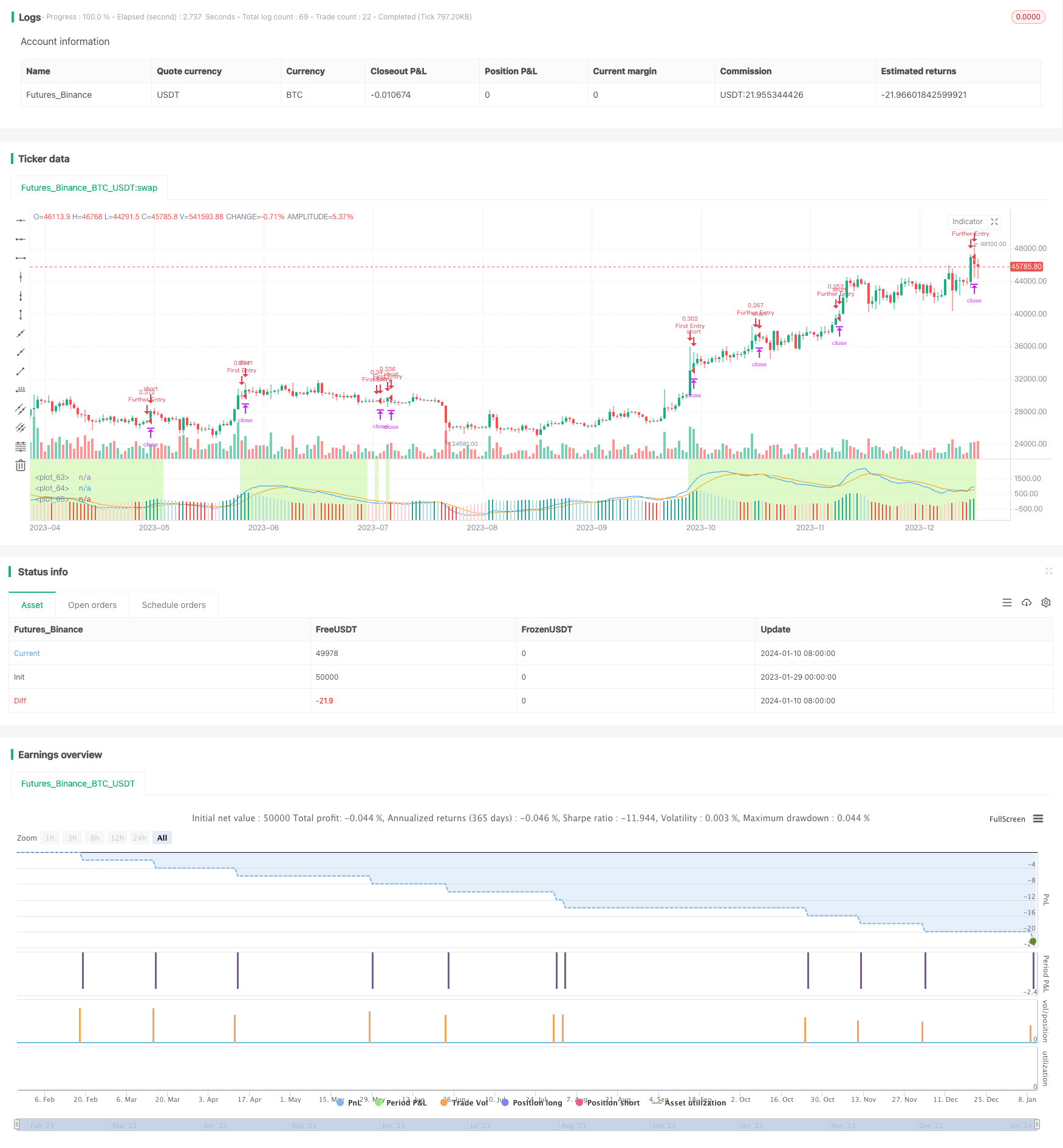
Overview
The Dual MACD quantitative trading strategy is a quantitative trading strategy implemented using dual timeframe MACD indicators. It goes long when the weekly MACD indicator forms a golden cross and closes the position when the daily MACD indicator forms a death cross. When the position is empty, if the daily MACD indicator forms another golden cross, a new long position can be opened.
Strategy Logic
The Dual MACD quantitative trading strategy uses a combination of weekly MACD and daily MACD indicators to determine entry and exit signals.
Firstly, when the MACD line of the weekly MACD indicator crosses above the signal line, a buy signal is generated and a long position is opened. Then when the MACD line of the daily MACD indicator crosses below the signal line, a sell signal is generated and the position is closed.
When the position is empty, if the MACD line of the daily MACD indicator crosses above the signal line again, a new long position is reopened. That is to say, the golden cross of the daily MACD acts as the re-entry condition.
Note that only the death cross of the daily MACD will close the position, but reopening is only allowed when the MACD line of the weekly MACD is above the signal line, within the "Trading Window".
Advantages
The Dual MACD quantitative trading strategy combines dual timeframe analysis, which can effectively filter false signals and improve signal quality. Specifically, there are several main advantages:
The weekly timeframe judges the main trend direction, which helps avoid contrarian trading.
The daily timeframe determines entry and exit timing, which can timely capture short-term trading opportunities.
The "Trading Window" mechanism can avoid excessively frequent opening and closing due to short-term adjustments.
The MACD indicator parameters are adjustable and can be optimized according to different varieties and market conditions.
Integrates take profit, stop loss, trailing stop loss functions to effectively control risks.
Risks
The Dual MACD quantitative trading strategy also has some risks, mainly including:
MACD indicator tends to generate false signals and frequent crossovers, needs confirmation from other indicators.
The main trend identified in weekly/monthly timeframe may reverse, trailing stop loss is necessary.
Parameters need continuous optimization and adjustment according to varieties and market conditions.
Cannot overly rely on backtest results, live performance may differ from backtest.
Corresponding solutions:
Combine with other indicators to build strategy systems with logic optimization.
Set reasonable stop loss to avoid exceeding maximum tolerable loss.
Continuously optimize parameters to find optimal combinations.
Start live trading from minimum capital to validate stability.
Optimization
The Dual MACD quantitative trading strategy has room for further optimization:
Introduce Bollinger Bands, KDJ and other indicators to build multi-indicator combined strategies and improve signal quality.
Incorporate trading volume indicators to avoid false breakouts with insufficient volume.
Utilize machine learning methods to automatically optimize parameters and achieve dynamic adjustment.
Further risk adjustment of the strategy, such as adding advanced stop loss methods like profit & loss ratio.
Strategy fitness test & optimization to avoid overfitting problems.
Conclusion
The Dual MACD quantitative trading strategy integrates dual timeframe analysis to determine main and subordinate trends and gives full play to the advantages of each indicator. There is still great potential for strategy optimization, and it is expected to further improve strategy performance by introducing other indicators, automatic parameter optimization through machine learning, etc. Live trading verification is an indispensable step and important basis for further perfecting the strategy.
Parameters
| Name | Default | What it controls |
|---|---|---|
| v_input_1 | timestamp(01 May 2018 13:30 +0000) | Start Time |
| v_input_2 | timestamp(9 Sep 2021 13:30 +0000) | Finish Time |
| v_input_3 | false | ------ Profit & Loss ------ |
| v_input_4 | true | Enable Just a Profit Level? |
| v_input_5 | false | Enable Just a S.Loss Level? |
| v_input_6 | true | Enable Only Trailing Stop |
| v_input_7 | 30 | Take Profit % |
| v_input_8 | true | Stop Loss % |
| v_input_9 | 5 | Trailing Stop % |
| v_input_10_low | 0 | Trailing Stop Source: low | high | close | open | hl2 | hlc3 | hlcc4 | ohlc4 |
| v_input_11 | false | ------ Macd Properties ------ |
| v_input_12 | D | Short Term TimeFrame |
| v_input_13 | W | Long Term TimeFrame |
| v_input_14_close | 0 | Source: close | high | low | open | hl2 | hlc3 | hlcc4 | ohlc4 |
| v_input_15 | 12 | Fast Length |
| v_input_16 | 26 | Slow Length |
| v_input_17 | 9 | Sign Length |
| v_input_18 | true | Daily or Weekly? |
Source Pine Script
/*backtest
start: 2023-01-29 00:00:00
end: 2024-01-11 05:20:00
period: 1d
basePeriod: 1h
exchanges: [{"eid":"Futures_Binance","currency":"BTC_USDT"}]
*/

// This source code is subject to the terms of the Mozilla Public License 2.0 at https://mozilla.org/MPL/2.0/
// © maxits

// Long Position: Weekly Macd line crosses above Signal line
// [Trading Window Macd Line > Signal Line] (Weekly)
// Close Position: Daily Macd Line crosses above Daily Signal line.
// Re Entry Condition: Macd line crosses above Signal line only if [Trading Window MacdLine > Sgnal Line] (Weekly)

//@version=4
strategy("Dual MACD Strategy",
         shorttitle="Dual Macd Tester",
         overlay=false,
         initial_capital=1000,
         default_qty_value=20,
         default_qty_type=strategy.percent_of_equity,
         commission_value=0.1,
         pyramiding=0)


// Define user inputs
i_time     = input(defval = timestamp("01 May 2018 13:30 +0000"), title = "Start Time", type = input.time) // Starting  time for Backtesting
f_time     = input(defval = timestamp("9 Sep 2021 13:30 +0000"), title = "Finish Time", type = input.time) // Finishing time for Backtesting

sep1          = input(false, title="------ Profit & Loss ------")

enable_TP     = input(true, title="Enable Just a Profit Level?")
enable_SL     = input(false, title="Enable Just a S.Loss Level?")
enable_TS     = input(true, title=" Enable Only Trailing Stop")
long_TP_Input = input(30.0,   title='Take Profit %',      type=input.float, minval=0)/100
long_SL_Input = input(1.0,   title='Stop Loss %',        type=input.float, minval=0)/100
long_TS_Input = input(5.0,   title='Trailing Stop %',    type=input.float, minval=0)/100
cl_low_Input  = input(low,   title="Trailing Stop Source")
long_TP       = strategy.position_avg_price * (1 + long_TP_Input)
long_SL       = strategy.position_avg_price * (1 - long_SL_Input)
long_TS       = cl_low_Input * (1 - long_TS_Input)

sep2       = input(false, title="------ Macd Properties ------")

d_res      = input(title="Short Term TimeFrame", type=input.resolution, defval="D") // Daily Time Frame
w_res      = input(title="Long Term TimeFrame", type=input.resolution, defval="W")  // Weekly Time Frame
src        = input(close, title="Source")                                           // Indicator Price Source
fast_len   = input(title="Fast Length", type=input.integer, defval=12)              // Fast MA Length
slow_len   = input(title="Slow Length", type=input.integer, defval=26)              // Slow MA Length
sign_len   = input(title="Sign Length", type=input.integer, defval=9)               // Sign MA Length
d_w        = input(title="Daily or Weekly?", type=input.bool, defval=true)          // Plot Daily or Weekly MACD

// Color Plot for Macd

col_grow_above = #26A69A
col_grow_below = #FFCDD2
col_fall_above = #B2DFDB
col_fall_below = #EF5350

// BG Color

bg_color = color.rgb(127, 232, 34, 75)

// Daily Macd

[d_macdLine, d_singleLine, d_histLine] = security(syminfo.tickerid, d_res, macd(src, fast_len, slow_len, sign_len)) // Funcion Security para poder usar correcta resolución

plot(d_w ? d_macdLine   : na, color=color.blue)
plot(d_w ? d_singleLine : na, color=color.orange)
plot(d_w ? d_histLine   : na, style=plot.style_columns,
     color=(d_histLine>=0 ? (d_histLine[1] < d_histLine ? col_grow_above : col_fall_above) :
     (d_histLine[1] < d_histLine ? col_grow_below : col_fall_below)))

// Weekly Macd

[w_macdLine, w_singleLine, w_histLine] = security(syminfo.tickerid, w_res, macd(src, fast_len, slow_len, sign_len)) // Funcion Security para poder usar correcta resolución

plot(d_w ? na : w_macdLine,   color=color.blue)
plot(d_w ? na : w_singleLine, color=color.orange)
plot(d_w ? na : w_histLine,   style=plot.style_columns,
     color=(w_histLine>=0 ? (w_histLine[1] < w_histLine ? col_grow_above : col_fall_above) :
     (w_histLine[1] < w_histLine ? col_grow_below : col_fall_below)))

///////////////////////////////// Entry Conditions
inTrade    = strategy.position_size != 0       // Posición abierta
notInTrade = strategy.position_size == 0       // Posición Cerrada
start_time = true

trading_window = w_macdLine > w_singleLine   // Weekly Macd Signal enables a trading window
bgcolor(trading_window ? bg_color : na)
buy_cond       = crossover (w_macdLine, w_singleLine)
sell_cond      = crossunder(d_macdLine, d_singleLine)
re_entry_cond  = crossover (d_macdLine, d_singleLine) and trading_window

// Entry Exit Conditions

trailing_stop  = 0.0        // Code for calculating Long Positions Trailing Stop Loss
trailing_stop := if (strategy.position_size != 0)
    stopValue = long_TS
    max(trailing_stop[1], stopValue)
else
    0

if (buy_cond and notInTrade and start_time)
    strategy.entry(id="First Entry", long=strategy.long, comment="First Long")

if (sell_cond and inTrade)
    strategy.close(id="First Entry", comment="Close First Long")

if (re_entry_cond and notInTrade and start_time)
    strategy.entry(id="Further Entry", long=strategy.long, comment="Further Entry")

if (sell_cond and inTrade)
    strategy.close(id="Further Entry", comment="Close First Long")

if enable_TP
    if (enable_TS and not enable_SL)
        strategy.exit("Long TP & TS FiEn", "First Entry",   limit = long_TP, stop = trailing_stop)
        strategy.exit("Long TP & TS FuEn", "Further Entry", limit = long_TP, stop = trailing_stop)
    else
        if (enable_SL and not enable_TS)
            strategy.exit("Long TP & TS FiEn", "First Entry",   limit = long_TP, stop = long_SL)
            strategy.exit("Long TP & TS FuEn", "Further Entry", limit = long_TP, stop = long_SL)
        else
            strategy.exit("Long TP & TS FiEn", "First Entry",   limit = long_TP)
            strategy.exit("Long TP & TS FuEn", "Further Entry", limit = long_TP)
else
    if not enable_TP
        if (enable_TS and not enable_SL)
            strategy.exit("Long TP & TS FiEn", "First Entry",   stop = trailing_stop)
            strategy.exit("Long TP & TS FuEn", "Further Entry", stop = trailing_stop)
        else
            if (enable_SL and not enable_TS)
                strategy.exit("Long TP & TS FiEn", "First Entry",   stop = long_SL)
                strategy.exit("Long TP & TS FuEn", "Further Entry", stop = long_SL)

plot(enable_TP ? long_TP : na, title="TP Level", color=color.green, style=plot.style_linebr, linewidth=2)
plot(enable_SL ? long_SL : na, title="SL Level", color=color.red,   style=plot.style_linebr, linewidth=2)
plot(enable_TS and trailing_stop ? trailing_stop : na, title="TS Level", color=color.red, style=plot.style_linebr, linewidth=2)
Published by ChaoZhang on the FMZ strategy square · last modified 2024-01-30. Collected in the Quant Trading Vault. Unvalidated research: re-test with your own data and costs before trusting it.
Build this with AgenKit
A spec is not a trading system. Paste this into your coding agent and AgenKit runs a specialist team — architecture, test-first build, risk gates, review — with paper trading on by default.
/agenkit build a production-grade trading bot with a backtest engine, risk controls and paper trading by default from strategies/Dual-MACD-Quantitative-Trading-Strategy-440449.md- npx agenkit install engineering-kit in your project
- Paste the command into your agent and approve each phase
- Get tests, backtest, risk controls and a paper-trading switch
Understand it first
Before you run this, read the lesson behind the idea and how to backtest it honestly. Specs like this one are the survivors of an unknown number of trials; deflate their results accordingly.
Related specs
- Adaptive ATR and RSI Trend Following Strategy with Trailing Stop LossPine Script · Trend following · 1h
- Adaptive Bollinger Bands Trend Tracking StrategyPine Script · Trend following · 1h
- Adaptive Price Crossing Moving Average Trading StrategyPine Script · Trend following · 1d
- Advanced Multi Indicator Multi Dimensional Trend Cross Quantitative StrategyPine Script · Trend following · 3h
- Advanced Supertrend Indicator Trading Mechanism Optimization StrategyPine Script · Trend following · 1d
- Bollinger Bands and RSI Trend Following StrategyPine Script · Trend following · 1h