Strategy vault / Trend following
Ichimoku Cloud Smooth Oscillator
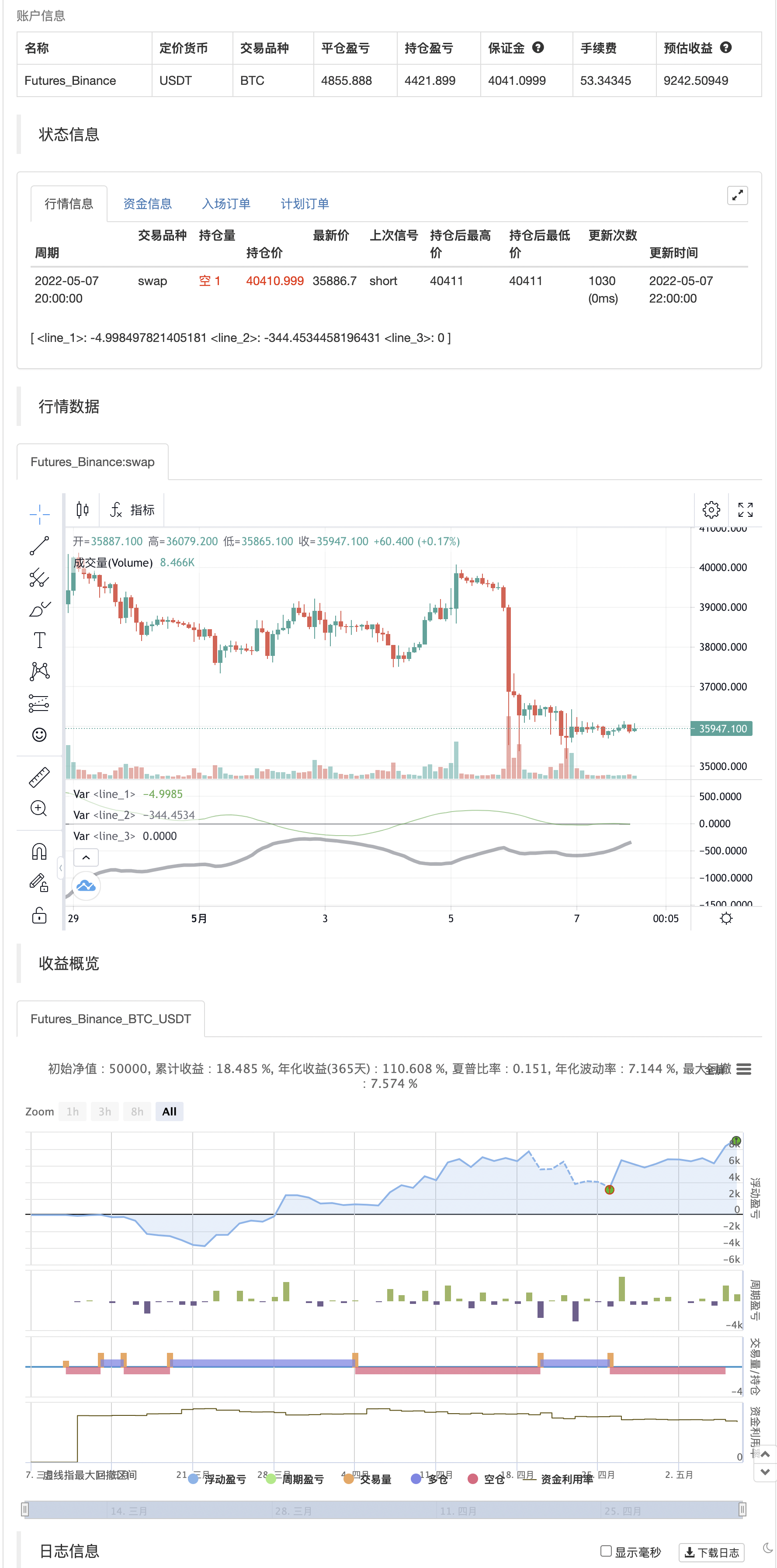
The Ichimoku Cloud is a powerful indicator to track trends. By smoothing it and placing it in a separate chart, the signals can be easily identified without cluttering the display. The bold line is the signal: green…
The Ichimoku Cloud is a powerful indicator to track trends. By smoothing it and placing it in a separate chart, the signals can be easily identified without cluttering the display. The bold line is the signal: green indicates a buy signal while red indicates a sell signal. Gray represents a possible change in direction and the lack of a trend. The thinner line is the width of the cloud which can be used to further determine the direction.
backtest
Parameters
| Name | Default | What it controls |
|---|---|---|
| v_input_1 | 9 | Conversion Line Periods |
| v_input_2 | 26 | Base Line Periods |
| v_input_3 | 52 | Lagging Span 2 Periods |
| v_input_4 | 52 | Pivot Periods |
| v_input_5 | 26 | Displacement |
Source Pine Script
/*backtest
start: 2022-03-08 00:00:00
end: 2022-05-07 23:59:00
period: 2h
basePeriod: 15m
exchanges: [{"eid":"Futures_Binance","currency":"BTC_USDT"}]
*/

//@version=4

study(title="Ichimoku Cloud Smooth Oscillator")
conversionPeriods = input(9, minval=1, title="Conversion Line Periods"),
basePeriods = input(26, minval=1, title="Base Line Periods")
laggingSpan2Periods = input(52, minval=1, title="Lagging Span 2 Periods"),
pivotPeriods = input(52, minval=1, title="Pivot Periods"),
displacement = input(26, minval=1, title="Displacement")

//T3 constants
b = 0.7
c1 = -b*b*b
c2 = 3*b*b+3*b*b*b
c3 = -6*b*b-3*b-3*b*b*b
c4 = 1+3*b+b*b*b+3*b*b
//T3 constants end

t3n(source,len) => c1 * ema(ema(ema(ema(ema(ema(source, len), len), len), len), len), len) + c2 * ema(ema(ema(ema(ema(source, len), len), len), len), len) + c3 * ema(ema(ema(ema(source, len), len), len), len) + c4 * ema(ema(ema(source, len), len), len)

conversionLine = t3n(close,conversionPeriods)
baseLine = t3n(close,basePeriods)
leadLine1 = avg(conversionLine, baseLine)[displacement]
leadLine2 = t3n(close,laggingSpan2Periods)[displacement]
middleLine = avg(leadLine1, leadLine2)
cloudHeight = leadLine1-leadLine2
conversionDistance = conversionLine-middleLine

var conversionCloudDistance = 0.0

if conversionDistance > 1/2*abs(cloudHeight) or conversionDistance < -1/2*abs(cloudHeight)
    conversionCloudDistance := conversionDistance - abs(cloudHeight) / 2
else
    conversionCloudDistance := 0

var conversionColor = color.green
if conversionCloudDistance > 0
    conversionColor := color.green
else if conversionCloudDistance < 0
    conversionColor := color.red
else
    conversionColor := color.gray

cloudColor = cloudHeight > 0 ? color.green : color.red
p1 = plot(cloudHeight, color=cloudColor)
p2 = plot(conversionCloudDistance, color=conversionColor, linewidth = 4)
plot(0, color=color.black)


if conversionCloudDistance>0
    strategy.entry("Enter Long", strategy.long)
else if conversionCloudDistance<0
    strategy.entry("Enter Short", strategy.short)
Published by ChaoZhang on the FMZ strategy square · last modified 2022-05-09. Collected in the Quant Trading Vault. Unvalidated research: re-test with your own data and costs before trusting it.
Build this with AgenKit
A spec is not a trading system. Paste this into your coding agent and AgenKit runs a specialist team — architecture, test-first build, risk gates, review — with paper trading on by default.
/agenkit build a production-grade trading bot with a backtest engine, risk controls and paper trading by default from strategies/Ichimoku-Cloud-Smooth-Oscillator.md- npx agenkit install engineering-kit in your project
- Paste the command into your agent and approve each phase
- Get tests, backtest, risk controls and a paper-trading switch
Understand it first
Before you run this, read the lesson behind the idea and how to backtest it honestly. Specs like this one are the survivors of an unknown number of trials; deflate their results accordingly.
Related specs
- Triple Supertrend Ichimoku Cloud Quantitative Trading StrategyPine Script · Trend following · 1d
- Ichimoku Balance Line trend following StrategyPine Script · Trend following · 1d
- Ichimoku Cloud with Dual Moving Average Crossover StrategyPine Script · Trend following · 1d
- Multitimeframe Trend Hunter StrategyPine Script · Trend following · 1h
- Advanced Multi Indicator Multi Dimensional Trend Cross Quantitative StrategyPine Script · Trend following · 3h
- Dual ATR Channel Trend Following StrategyPine Script · Trend following · 15m