Momentum Equilibrium Channel Trend Tracking Strategy
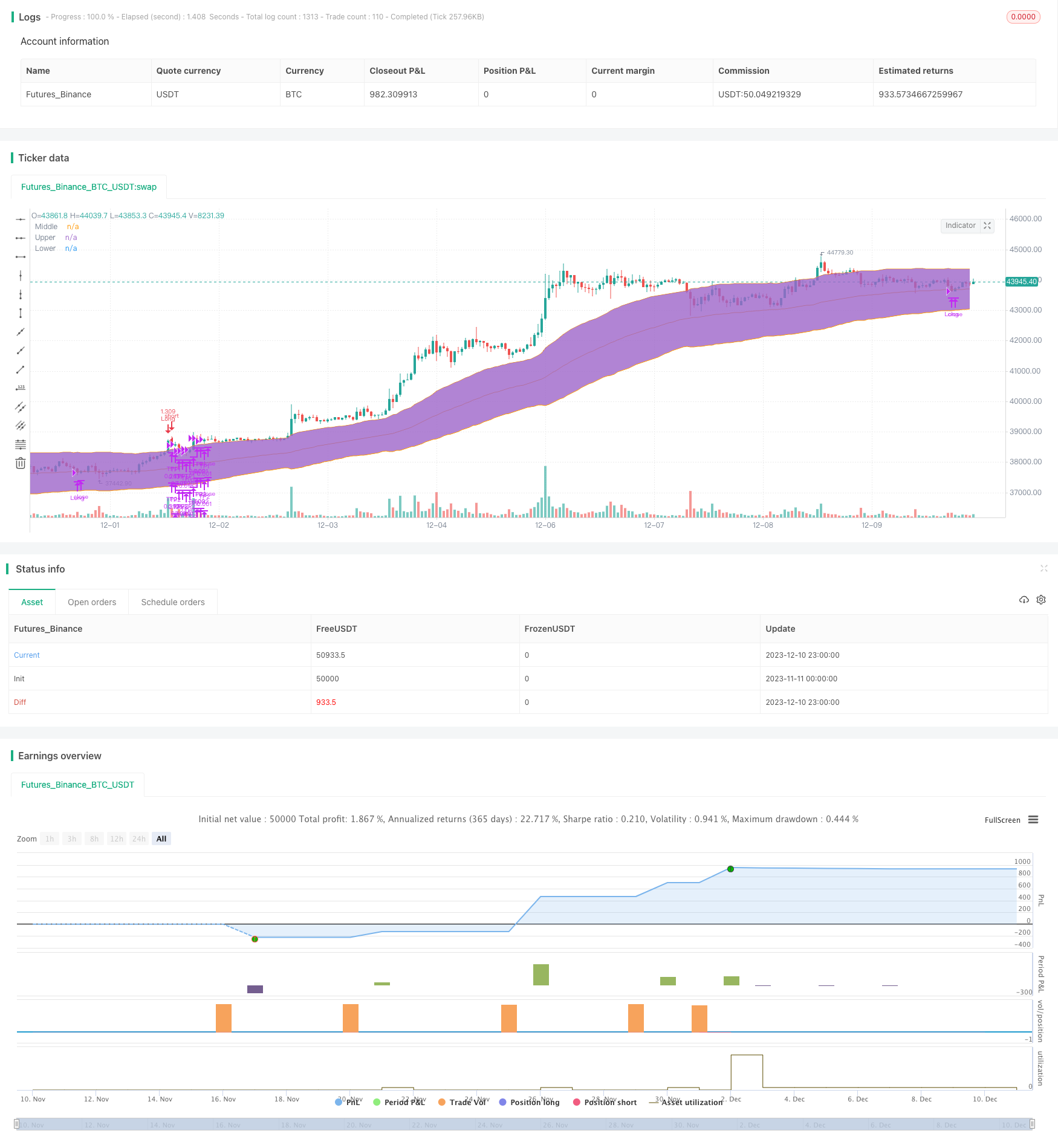
This strategy identifies trend formations by calculating channels and momentum indicators to achieve trend tracking trading. Specifically, it combines momentum indicators and equilibrium channel indicators, and takes…
Overview
This strategy identifies trend formations by calculating channels and momentum indicators to achieve trend tracking trading. Specifically, it combines momentum indicators and equilibrium channel indicators, and takes advantage of both to intervene in long-term trends while using equilibrium channels to lock in long profit areas.
Strategy Principle
The strategy mainly uses the following two indicators for judgment:
Momentum Indicator (DMI): Judge the long and short trend in the market and generate trading signals when the index is greater than the set threshold.
Equilibrium Channel (Keltner Channel): Determine the trend area. When the price breaks through the upper rail, it is time to buy, and when the price falls below the middle rail, it is a signal to close the position.
The specific trading logic is: When the +DI momentum indicator is greater than the set threshold (default 32), it is determined that a bullish trend has formed. At this time, if the price breaks through the upper rail of the equilibrium channel, a buy signal is generated; after that, the equilibrium channel is used. The middle rail is used as a stop loss line to track the stop loss and achieve profit protection.
This strategy combines the advantages of two indicators, uses momentum indicators to determine trend direction, and uses equilibrium channels to determine entry timing and stop loss areas. The double indicator combination allows the strategy to efficiently enter early in the discovery of a trend, while using channel indicators to lock in profits and stops.
Advantage Analysis
The strategy uses momentum indicators to determine the early stage of market trends, which is more efficient than lagging indicators such as simple moving averages.
Using the equilibrium channel to determine the specific trading range can effectively lock the profit zone.
The indicator parameters and trading rules are rigorous and reasonable, and the backtest data performs well and verifies the actual combat effect.
The strategy is relatively simple and clear, easy to understand and implement, and suitable for quantitative trading beginners to learn.
The risk of the strategy is controllable, and it adopts dynamic stop loss with the median line to effectively control single loss.
Risk analysis
The strategy is only suitable for trending markets and not suitable for consolidating and fluctuating markets. If the QtCore channel increases and the middle rail stop loss is too loose, it cannot control the loss.
The DMI indicator has a certain lag and cannot determine trend confirmation. It may cause losses by intervening in the trend earlier.
The fixed percentage stop loss method has risks. It is unable to re-intervene in trends after a sharp fluctuation, thus missing subsequent trends.
There are sufficient backtest data, but long-term running is still required to verify parameter stability in real trading.
Optimization
Different stop loss methods can be tested, such as ATR stop loss, moving stop loss and so on to replace fixed percentage stop loss.
Secondary confirmation indicators can be added, such as volume amplification, to ensure entry after trend confirmation.
Different parameter combinations can be tested to find the optimal parameter combination.
The robustness of parameters can be verified through stepwise optimization and walk forward testing.
Summary
This strategy achieves efficient capturing of trending markets by using double indicator judgments. The strategy is relatively simple and intuitive with clear logic and good backtest performance. It can serve as one of the entry strategies for quantitative trading. But sufficient verification of real trading data and parameter optimization is still required to reduce real trading losses. This will be the focus of future work.
Parameters
| Name | Default | What it controls |
|---|---|---|
| v_input_1 | true | Enable Ribbon Filter |
| v_input_2 | 30 | Ribbon Period |
| v_input_3 | true | useTrueRange |
| v_input_4 | 80 | KELTNER Period |
| v_input_5 | 3 | KELTNER Multiple |
| v_input_6 | 14 | ADX Smoothing |
| v_input_7 | 14 | DI Length |
| v_input_8 | 32 | +DI Trigger Level |
| v_input_9 | 2019 | Backtest Start Year |
| v_input_10 | true | Backtest Start Month |
| v_input_11 | true | Backtest Start Day |
| v_input_12 | 2030 | Backtest Stop Year |
| v_input_13 | 12 | Backtest Stop Month |
| v_input_14 | 31 | Backtest Stop Day |
| v_input_15 | 8 | Long Take Profit 1 Target % |
| v_input_16 | 20 | Long Take Profit 1 Qty % |
| v_input_17 | 16 | Long Take Profit 2 Target % |
| v_input_18 | 30 | Long Take Profit 2 Qty % |
Source Pine Script
/*backtest
start: 2023-11-11 00:00:00
end: 2023-12-11 00:00:00
period: 1h
basePeriod: 15m
exchanges: [{"eid":"Futures_Binance","currency":"BTC_USDT"}]
*/

//Original Idea by: @Wunderbit


//@version=4
strategy("Keltner Channel [LINKUSDT] 1H", overlay=true, initial_capital=3000,pyramiding = 0, currency="USD", default_qty_type=strategy.percent_of_equity, default_qty_value=100,  commission_type=strategy.commission.percent,commission_value=0.1)


/// TREND
trend_cond = input(true, title="Enable Ribbon Filter")
ribbon_period = input(30, "Ribbon Period", step=1)

leadLine1 = ema(close, ribbon_period)
leadLine2 = sma(close, ribbon_period)

// p3 = plot(leadLine1, color= #53b987, title="EMA", transp = 50, linewidth = 1)
// p4 = plot(leadLine2, color= #eb4d5c, title="SMA", transp = 50, linewidth = 1)
// fill(p3, p4, transp = 60, color = leadLine1 > leadLine2 ? #53b987 : #eb4d5c)

//Upward Trend
UT=leadLine2 < leadLine1
DT=leadLine2 > leadLine1

///////////////////////////////////////INDICATORS

// KELTNER //
source       = close
useTrueRange = input(true)
length       = input(80, "KELTNER Period", step=1, minval=1)
mult         = input(3.0,"KELTNER Multiple", step=0.1)

// Calculate Keltner Channel
ma      = ema(source, length)
range   = useTrueRange ? tr : high - low
rangema = ema(range, length)
upper = ma + rangema * mult
lower = ma - rangema * mult

plot(ma, title="Middle", color=color.orange)
p1=plot(upper, title="Upper", color=color.orange)
p2=plot(lower, title="Lower", color=color.orange)
fill(p1,p2)


// DMI INDICATOR //

lensig = input(14, title="ADX Smoothing", minval=1, maxval=50)
len = input(14, minval=1, title="DI Length")
up = change(high)
down = -change(low)
plusDM = na(up) ? na : (up > down and up > 0 ? up : 0)
minusDM = na(down) ? na : (down > up and down > 0 ? down : 0)
trur = rma(tr, len)
plus = fixnan(100 * rma(plusDM, len) / trur)
minus = fixnan(100 * rma(minusDM, len) / trur)
sum = plus + minus
adx = 100 * rma(abs(plus - minus) / (sum == 0 ? 1 : sum), lensig)

trig_level=input(title="+DI Trigger Level", defval=32, minval=1,step=1)
//trig_level_adx=input(title="ADX Trigger Level", defval=30, minval=1,step=1)

//plot(adx, color=#FF006E, title="ADX")
//plot(plus, color=#0094FF, title="+DI")
//plot(minus, color=#FF6A00, title="-DI")
// plot(trig_level, color=color.white, title="Key Level")

///////////////////////////////////////////////////////////


////////////////////////////////////////////////////Component Code Start

testStartYear = input(2019, "Backtest Start Year")
testStartMonth = input(1, "Backtest Start Month")
testStartDay = input(1, "Backtest Start Day")
testPeriodStart = timestamp(testStartYear,testStartMonth,testStartDay,0,0)

testStopYear = input(2030, "Backtest Stop Year")
testStopMonth = input(12, "Backtest Stop Month")
testStopDay = input(31, "Backtest Stop Day")
testPeriodStop = timestamp(testStopYear,testStopMonth,testStopDay,0,0)

testPeriod() =>
    time >= testPeriodStart and time <= testPeriodStop ? true : false

///// Component Code Stop //////////////////////////////////////////

//////////////// STRATEGY EXECUTION //////////////////////////

// STRATEGY CONDITION
// LONG

long = ((open > lower and open < upper) and close > upper) and plus > minus and plus > trig_level and volume[0] > volume[1]
entry_long = trend_cond ? long and UT : long
exit_long = (close < ma) //or low < SL_long

//LONG SET UP
// Take Profit / Stop Loss

entry_price_long=valuewhen(entry_long,close,0)
//SL_long = entry_price_long * (1 - long_sl_inp)

long_tp1_inp = input(8, title='Long Take Profit 1 Target %', step=0.1)/100
long_tp1_qty = input(20, title="Long Take Profit 1 Qty %", step=1)

long_tp2_inp = input(16, title='Long Take Profit 2 Target %', step=0.1)/100
long_tp2_qty = input(30, title="Long Take Profit 2 Qty %", step=1)

long_take_level_1 = strategy.position_avg_price * (1 + long_tp1_inp)
long_take_level_2 = strategy.position_avg_price * (1 + long_tp2_inp)

//long_sl_inp = input(4, title='Long Stop Loss %', step=0.1)/100
//long_stop_level = strategy.position_avg_price * (1 - long_sl_inp)


// STRATEGY EXECUTION
if testPeriod()

    // LONG

    strategy.entry(id="Long", long=true, when=entry_long, comment = "INSERT ENTRY LONG COMMAND")
    strategy.exit("TP1","Long", qty_percent=long_tp1_qty, limit=long_take_level_1) // PLACE TAKE PROFIT IN WBT BOT SETTINGS
    strategy.exit("TP2","Long", qty_percent=long_tp2_qty, limit=long_take_level_2) // PLACE TAKE PROFIT IN WBT BOT SETTINGS
    strategy.close(id="Long", when=exit_long, comment= "INSERT EXIT LONG COMMAND")


//PLOT FIXED SLTP LINE
// LONG POSITION
plot(strategy.position_size > 0 ? long_take_level_1 : na, style=plot.style_linebr, color=color.green, linewidth=1, title="1st Long Take Profit")
plot(strategy.position_size > 0 ? long_take_level_2 : na, style=plot.style_linebr, color=color.green, linewidth=1, title="2nd Long Take Profit")
//plot(strategy.position_size > 0 ? long_stop_level : na, style=plot.style_linebr, color=color.red, linewidth=1, title="Long Stop Loss")Published by ChaoZhang on the FMZ strategy square · last modified 2023-12-12. Collected in the Quant Trading Vault. Unvalidated research: re-test with your own data and costs before trusting it.
Build this with AgenKit
A spec is not a trading system. Paste this into your coding agent and AgenKit runs a specialist team — architecture, test-first build, risk gates, review — with paper trading on by default.
/agenkit build a production-grade trading bot with a backtest engine, risk controls and paper trading by default from strategies/Momentum-Equilibrium-Channel-Trend-Tracking-Strategy.md- npx agenkit install engineering-kit in your project
- Paste the command into your agent and approve each phase
- Get tests, backtest, risk controls and a paper-trading switch
Understand it first
Before you run this, read the lesson behind the idea and how to backtest it honestly. Specs like this one are the survivors of an unknown number of trials; deflate their results accordingly.
Related specs
- Multi Indicator Comprehensive Analysis Quantitative Trading Strategy Trend Momentum and Volatility Collaborative Prediction ModelPine Script · Momentum · 3m
- ADX Momentum Trend StrategyPine Script · Momentum · 10m
- Multi Timeframe Unified Strategy Based on Quantitative Momentum and Convergence DivergencePine Script · Momentum · 1d
- VWMA ADX Momentum and Trend Based Bitcoin Long StrategyPine Script · Momentum · 1h
- Adaptive Trading Strategy Based on Momentum IndicatorsPine Script · Momentum · 1d
- Advanced EMA Crossover Momentum Trend Capture StrategyPine Script · Momentum · 2h