Strategy vault / Trend following
Trend Following Strategy Based on Multi Period SMA
This strategy combines multiple SMA lines with different periods to identify and follow the trend. The core idea is: compare the rising/falling directions of SMAs with different periods to determine the trend; go…
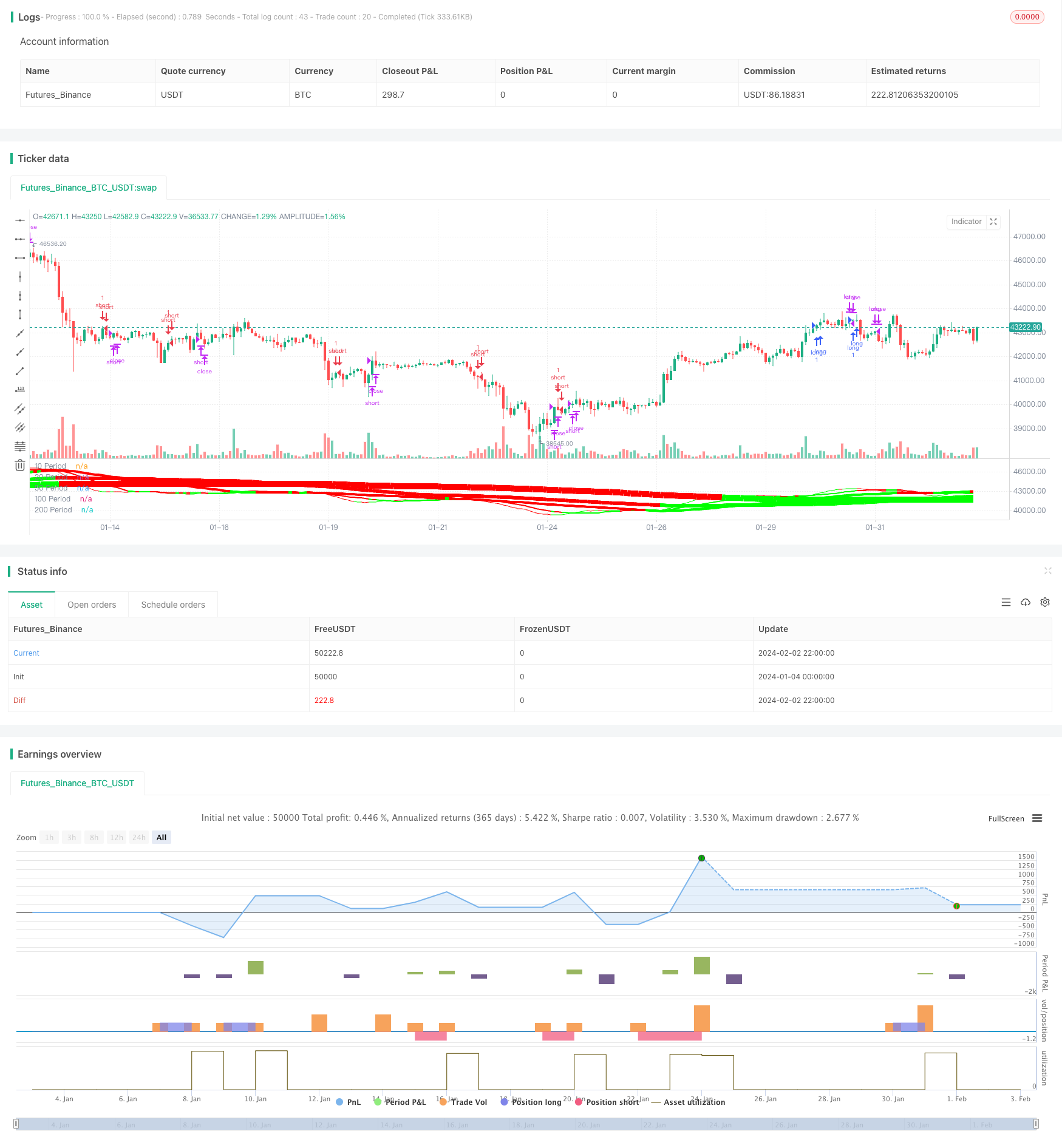
Overview
This strategy combines multiple SMA lines with different periods to identify and follow the trend. The core idea is: compare the rising/falling directions of SMAs with different periods to determine the trend; go long when short-period SMA crosses over long-period SMA, and go short when short SMA crosses below long SMA. ZeroLagEMA is also used to confirm entries and exits.
Strategy Logic
- Use 5 SMA lines with periods of 10, 20, 50, 100 and 200 respectively.
- Compare the directions of these 5 SMAs to determine the trend. For example, when 10-, 20-, 100- and 200-period SMAs are rising together, it indicates an upward trend; when they are all falling, it indicates a downward trend.
- Compare the values of SMAs with different periods to generate trading signals. For example, when 10-period SMA crosses over 20-period SMA, go long; when 10SMA crosses below 20SMA, go short.
- Use ZeroLagEMA for entry confirmation and exit signals. Go long when fast ZeroLagEMA crosses over slow ZeroLagEMA, exit long when it crosses below. Judgment logic for shorts is the opposite.
Advantages
- Combining multiple SMAs with different periods can effectively determine the market trend.
- Comparing SMA values generates quantitative entry and exit rules.
- ZeroLagEMA filter avoids unnecessary trades and improves stability.
- Combining trend judgment and trading signals achieves trend following trading.
Risks and Solutions
- When market enters consolidation, frequent SMA crossovers may cause redundant losses.
- Solution: Increase ZeroLagEMA filter to avoid invalid signal entries.
- Judging from multiple-period SMAs has some lagging, failing to respond swiftly to sharp short-term price changes.
- Solution: Add faster indicators like MACD to assist judgment.
Optimization Directions
- Optimize SMA period parameters to find best combination.
- Add stop loss strategies like trailing stop to further limit losses.
- Add position sizing mechanism to increase bets in strong trends and decrease bets in consolidations.
- Incorporate more assisting indicators like MACD and KDJ to improve overall stability.
Conclusion
This strategy effectively determines the market trend by combining multiple-period SMAs, and generates quantified trading signals. ZeroLagEMA improves win rate. In summary, the strategy achieved quantitative trend following trading, with remarkable results. Further optimizing periods, stop loss, position sizing etc. can strengthen the strategy for live trading.
Parameters
| Name | Default | What it controls |
|---|---|---|
| v_input_1 | true | === SERIES INPUTS === |
| v_input_2_close | 0 | SMA Source: close | high | low | open | hl2 | hlc3 | hlcc4 | ohlc4 |
| v_input_3 | 10 | SMA 1 Length |
| v_input_4 | 20 | SMA 2 Length |
| v_input_5 | 50 | SMA 3 Length |
| v_input_6 | 100 | SMA 4 Length |
| v_input_7 | 200 | SMA 5 Length |
| v_input_8 | 4 | SMA Direction Span |
| v_input_9_close | 0 | ZeroLag EMA Source: close | high | low | open | hl2 | hlc3 | hlcc4 | ohlc4 |
| v_input_10 | 9 | ZeroLag EMA Fast Length |
| v_input_11 | 21 | ZeroLag EMA Slow Length |
| v_input_12 | true | === PLOT TIME LIMITER === |
| v_input_13 | true | Use Start Time Limiter? |
| v_input_14 | 2018 | Start From Year |
| v_input_15 | 2 | Start From Month |
| v_input_16 | true | Start From Day |
| v_input_17 | false | Start From Hour |
| v_input_18 | false | Start From Minute |
| v_input_19 | true | === TRAILING STOP === |
| v_input_20 | false | Use Trailing Stop? |
| v_input_21 | 200 | Stop Loss Trail Points |
| v_input_22 | 400 | Stop Loss Trail Offset |
Source Pine Script
/*backtest
start: 2024-01-04 00:00:00
end: 2024-02-03 00:00:00
period: 2h
basePeriod: 15m
exchanges: [{"eid":"Futures_Binance","currency":"BTC_USDT"}]
*/

//@version=2
strategy("Forex MA Racer - SMA Performance /w ZeroLag EMA Trigger", shorttitle = "FX MA Racer (5x SMA, 2x zlEMA)", overlay=false )

// === INPUTS ===
hr0             = input(defval = true, title = "=== SERIES INPUTS ===")
smaSource       = input(defval = close, title = "SMA Source")
sma1Length      = input(defval = 10, title = "SMA 1 Length")
sma2Length      = input(defval = 20, title = "SMA 2 Length")
sma3Length      = input(defval = 50, title = "SMA 3 Length")
sma4Length      = input(defval = 100, title = "SMA 4 Length")
sma5Length      = input(defval = 200, title = "SMA 5 Length")
smaDirSpan      = input(defval = 4, title = "SMA Direction Span")
zlmaSource      = input(defval = close, title = "ZeroLag EMA Source")
zlmaFastLength  = input(defval = 9, title = "ZeroLag EMA Fast Length")
zlmaSlowLength  = input(defval = 21, title = "ZeroLag EMA Slow Length")
hr1             = input(defval = true, title = "=== PLOT TIME LIMITER ===")
useTimeLimit    = input(defval = true, title = "Use Start Time Limiter?")
// set up where we want to run from
startYear       = input(defval = 2018, title = "Start From Year", minval = 0, step = 1)
startMonth      = input(defval = 02, title = "Start From Month", minval = 0,step = 1)
startDay        = input(defval = 01, title = "Start From Day", minval = 0,step = 1)
startHour       = input(defval = 00, title = "Start From Hour", minval = 0,step = 1)
startMinute     = input(defval = 00, title = "Start From Minute", minval = 0,step = 1)
hr2             = input(defval = true, title = "=== TRAILING STOP ===")
useStop     = input(defval = false, title = "Use Trailing Stop?")
slPoints    = input(defval = 200, title = "Stop Loss Trail Points", minval = 1)
slOffset    = input(defval = 400, title = "Stop Loss Trail Offset", minval = 1)
// === /INPUTS ===

// === SERIES SETUP ===
// Fast ZeroLag EMA
zema1=ema(zlmaSource, zlmaFastLength)
zema2=ema(zema1, zlmaFastLength)
d1=zema1-zema2
zlemaFast=zema1+d1

// Slow ZeroLag EMA
zema3=ema(zlmaSource, zlmaSlowLength)
zema4=ema(zema3, zlmaSlowLength)
d2=zema3-zema4
zlemaSlow=zema3+d2

// Simple Moving Averages
period10 = sma(close, sma1Length)
period20 = sma(close, sma2Length)
period50 = sma(close, sma3Length)
period100 = sma(close, sma4Length)
period200 = sma(close, sma5Length)
// === /SERIES SETUP ===

// === PLOT ===
// colors of plotted MAs
p1 = (close < period10) ? #FF0000 : #00FF00
p2 = (close < period20) ? #FF0000 : #00FF00
p3 = (close < period50) ? #FF0000 : #00FF00
p4 = (close < period100) ? #FF0000 : #00FF00
p5 = (close < period200) ? #FF0000 : #00FF00

plot(period10, title='10 Period', color = p1, linewidth=1)
plot(period20, title='20 Period', color = p2, linewidth=2)
plot(period50, title='50 Period', color = p3, linewidth=4)
plot(period100, title='100 Period', color = p4, linewidth=6)
plot(period200, title='200 Period', color = p5, linewidth=10)
// === /PLOT ===

//BFR = BRFIB ? (maFast+maSlow)/2 : abs(maFast - maSlow)

// === STRATEGY ===
// calculate SMA directions
direction10 = rising(period10, smaDirSpan) ? +1 : falling(period10, smaDirSpan) ? -1 : 0
direction20 = rising(period20, smaDirSpan) ? +1 : falling(period20, smaDirSpan) ? -1 : 0
direction50 = rising(period50, smaDirSpan) ? +1 : falling(period50, smaDirSpan) ? -1 : 0
direction100 = rising(period100, smaDirSpan) ? +1 : falling(period100, smaDirSpan) ? -1 : 0
direction200 = rising(period200, smaDirSpan) ? +1 : falling(period200, smaDirSpan) ? -1 : 0

// conditions
// SMA Direction Trigger
dirUp = direction10 > 0 and direction20 > 0 and direction100 > 0 and direction200 > 0
dirDn = direction10 < 0 and direction20 < 0 and direction100 < 0 and direction200 < 0

longCond = (period10>period20) and (period20>period50) and (period50>period100) and  dirUp//and (close > period10) and (period50>period100) //and (period100>period200)
shortCond = (period10<period20) and (period20<period50) and dirDn//and (period50<period100) and (period100>period200)

longExit = crossunder(zlemaFast, zlemaSlow) or crossunder(period10, period20)
shortExit = crossover(zlemaFast, zlemaSlow) or crossover(period10, period20)


// entries and exits
startTimeOk() =>
    // get our input time together
    inputTime   = timestamp(syminfo.timezone, startYear, startMonth, startDay, startHour, startMinute)
    // check the current time is greater than the input time and assign true or false
    timeOk      = time > inputTime ? true : false
    // last line is the return value, we want the strategy to execute if..
    // ..we are using the limiter, and the time is ok -OR- we are not using the limiter
    r = (useTimeLimit and timeOk) or not useTimeLimit


if( true )
    // entries
    strategy.entry("long", strategy.long, when = longCond)
    strategy.entry("short", strategy.short, when = shortCond)


    // trailing stop
    if (useStop)
        strategy.exit("XL", from_entry = "long", trail_points = slPoints, trail_offset = slOffset)
        strategy.exit("XS", from_entry = "short", trail_points = slPoints, trail_offset = slOffset)

    // exits
    strategy.close("long", when = longExit)
    strategy.close("short", when = shortExit)
// === /STRATEGY ===Published by ChaoZhang on the FMZ strategy square · last modified 2024-02-04. Collected in the Quant Trading Vault. Unvalidated research: re-test with your own data and costs before trusting it.
Build this with AgenKit
A spec is not a trading system. Paste this into your coding agent and AgenKit runs a specialist team — architecture, test-first build, risk gates, review — with paper trading on by default.
/agenkit build a production-grade trading bot with a backtest engine, risk controls and paper trading by default from strategies/Trend-Following-Strategy-Based-on-Multi-Period-SMA.md- npx agenkit install engineering-kit in your project
- Paste the command into your agent and approve each phase
- Get tests, backtest, risk controls and a paper-trading switch
Understand it first
Before you run this, read the lesson behind the idea and how to backtest it honestly. Specs like this one are the survivors of an unknown number of trials; deflate their results accordingly.
Related specs
- Bollinger Bands and RSI Trend Following StrategyPine Script · Trend following · 1h
- Dual ATR Channel Trend Following StrategyPine Script · Trend following · 15m
- Dual MA Crossover Trend Tracking StrategyPine Script · Trend following · 1h
- Dynamic Dual EMA Crossover Strategy with Adaptive Profit Loss ControlPine Script · Trend following · 1d
- EMA SMA Multi Indicator Comprehensive Trend Following StrategyPine Script · Trend following · 1h
- EMA and RSI Trend Trading StrategyPine Script · Trend following · 1d